23
QUICK START GUIDE
Choosing a driving mode
WARNING: The motorcycle has a side stand safety cut-out
feature that prevents a driving mode from being selected
whilst the side stand is in the down position. The safety
cut-out prevents moving o accidentally with the side stand
in the down position, as it could result in an accident, causing
injury or death.
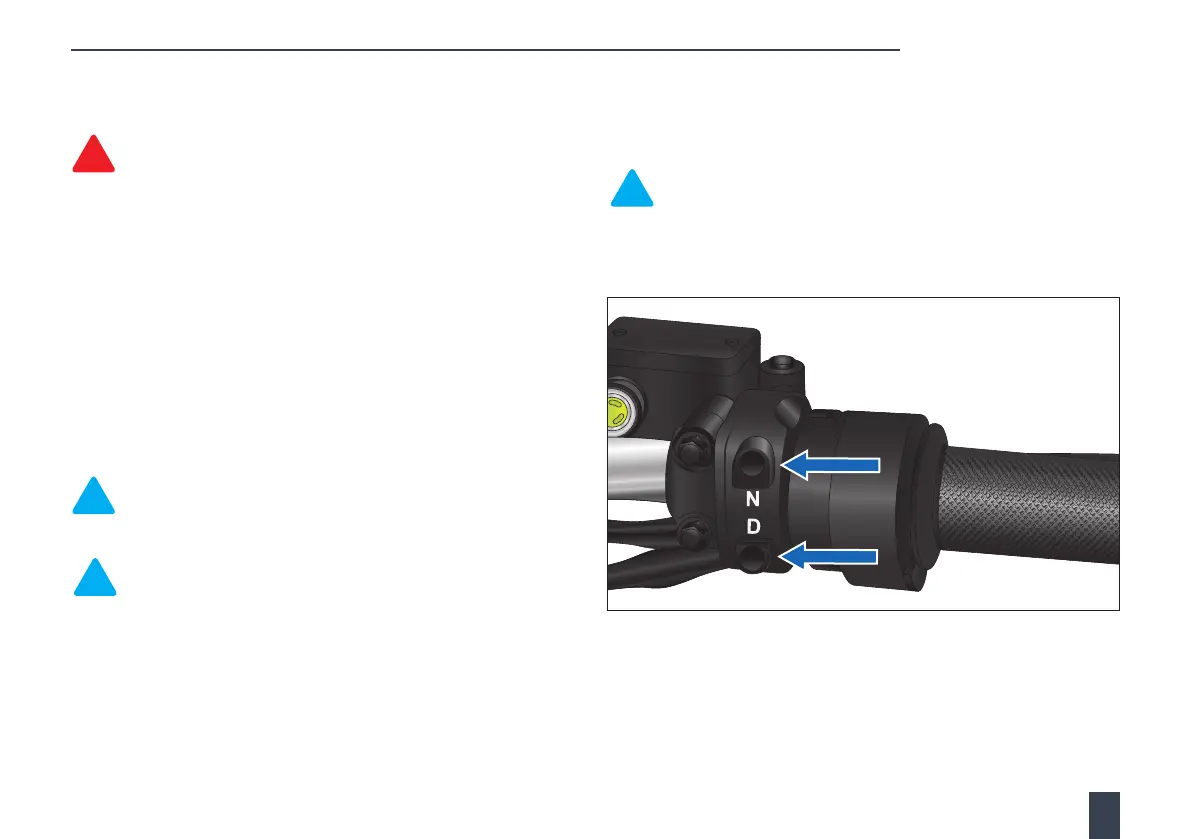
With the side stand in the up position, apply one of the brakes and press
the driving mode button (D) once to select driving mode 1 (default).
Repeated presses of the mode button will select driving S mode
(Sport) and then driving E mode (Economy).
If the battery charge levels are misaligned, S mode will not be
available, and the mode button will only cycle between
mode 1 > E mode.
The instrument panel displays the current driving mode selection.
Note: Driving modes may be altered, at any time, by pressing
the driving mode (D) button. However, the new driving mode
will not engage until the throttle has been fully closed.
Note: Three driving modes are available. The default driving
mode at start-up is 1. Driving mode S (Sport) gives the best
performance but consumes battery power more quickly, and
driving E mode (Economy) is the most economical.
After selecting a driving mode, release the brake and gradually
turn the throttle towards you to apply power and accelerate the
motorcycle forward. Twisting the throttle away from you reduces or
eliminates (fully closed throttle) power. There are no gears to worry
about; just open the throttle and ride.
After your trip, stop the motorcycle, and with the brake applied,
press the Neutral (N) button. This will select neutral and prevent the
motorcycle from moving forward if the throttle is turned.
Note: If the motorcycle is stationary for 5 minutes and the
throttle or brakes are not operated in this time, neutral will be
automatically selected.
For further information, see Driving mode button on page 55.



 To Next Page