39
MagCore® Plus II
3. Do "X axis JOG test", pressing "JOG +" and "JOG –"check X axis moving direction.
If JOG + is outward (toward the front door), JOG – is inward (toward home position),
the motor works normally. If the directions are incorrect, inspect the motor cables
(the motor is durable and the probability of malfunction is quite low).
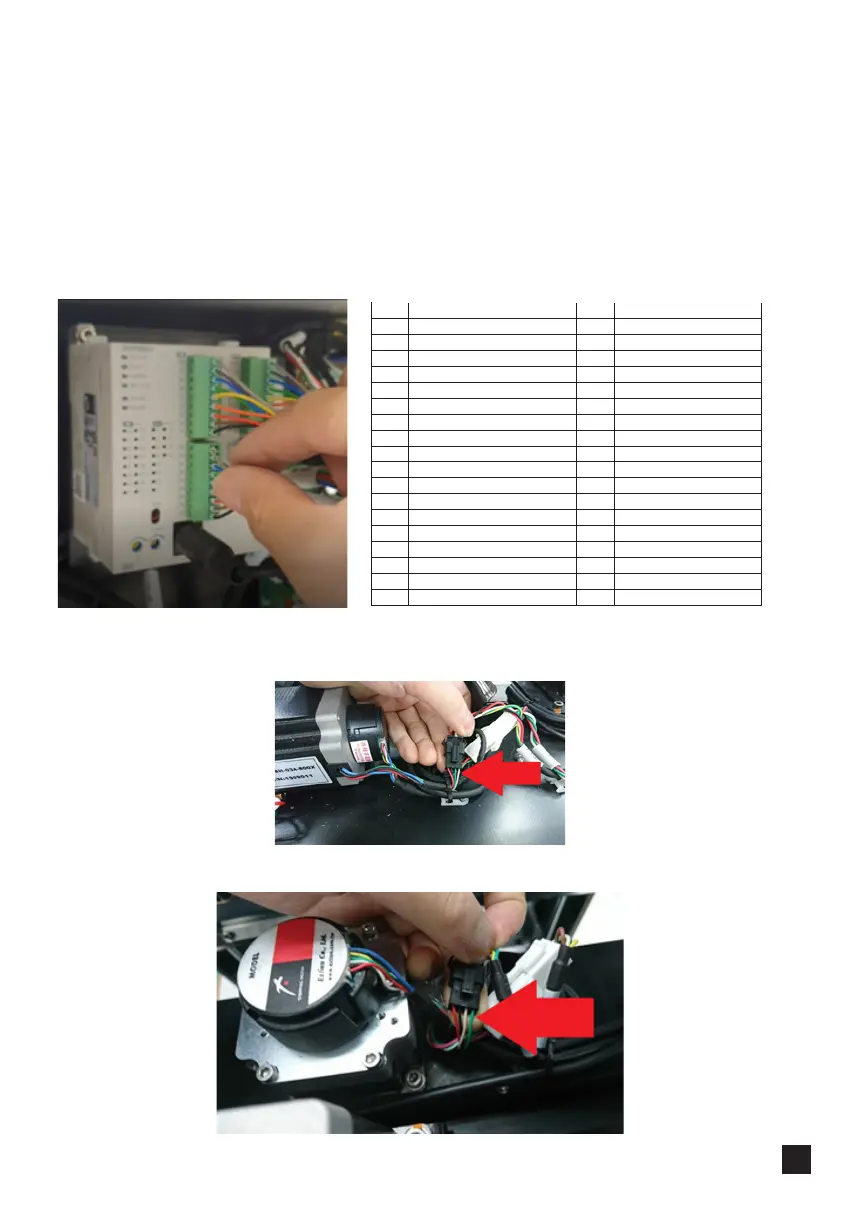
4. If X motor directions are correct, but the feedback from the encoder is reversed,
switch cable X10 and X11 on PLC and test.
See the picture below: the order of X encoder cap line is red, black, green yellow.
The order of V axis encoder is red, black, yellow, green.
Check if the order of the four cables is correct.
I/O IN I/O OUT
X0 Y Motor Encoder Signal(A) Y0 Y Motor Drive(A)
X1 Y Motor Encoder Signal(B) Yl Y Motor Drive(B)
X2 Y Home Sensor Signal Y2 V Motor Drive(A)
X3 Y3 V Motor Drive(B)
X4 V Motor Encoder Signal A Y4 X Motor Drive(A)
X5 V Motor Encoder Signal B Y5 X Motor Drive(B)
X6 V Home Sensor Signal Y6
X7 UP Sensor Signal Y7
X8 Y8
X9 Y9
X10 X Motor Encoder Signal(A) Y10 M DC Motor JOG
X11 X Motor Encoder Signal(B) Y11 UV Lamp Switch-Relay
X12 X Home Sensor Signal Y12 RS232 Switch
X13 Down Sensor Signal
X14
X15
X16
X17 Door Sensor



 To Next Page