56
www.rbcbioscience.com
━ Heating Test
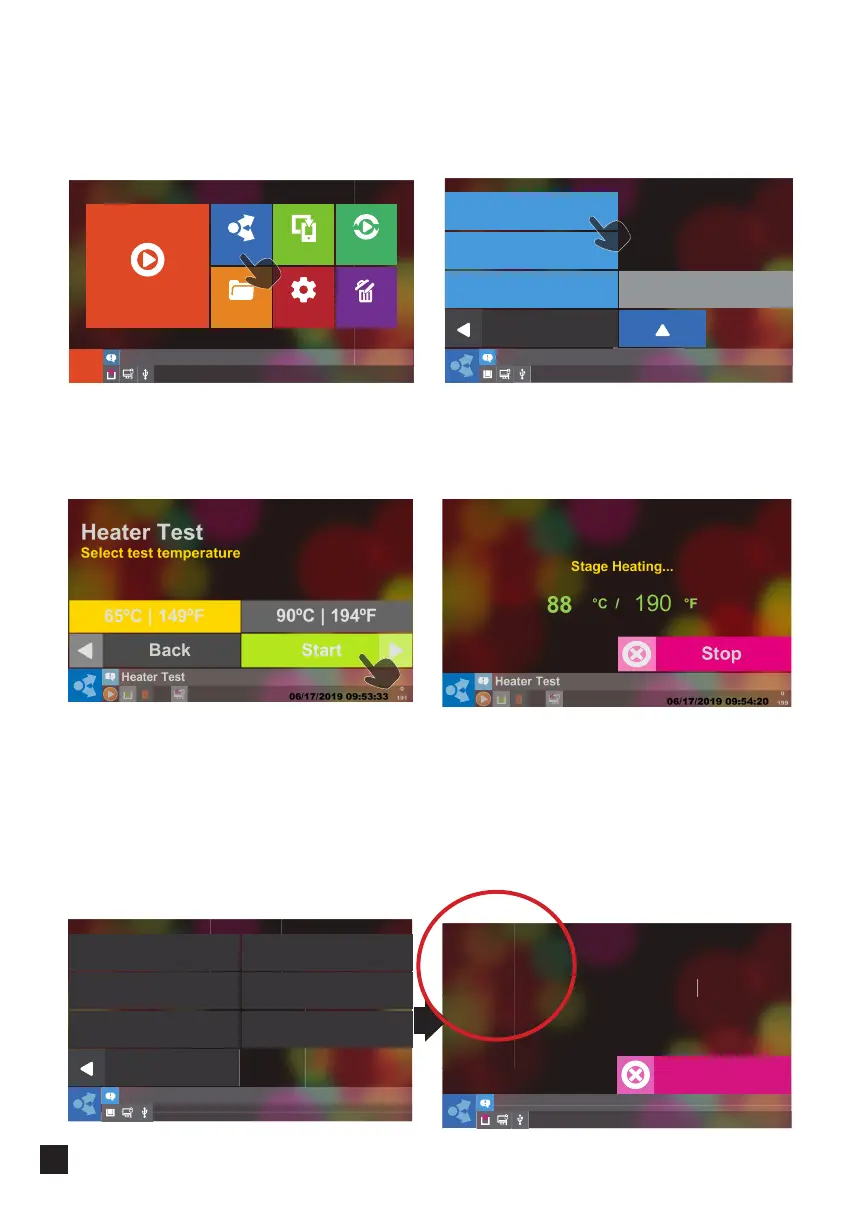
Select Heater Test button.
Use a digital thermometer to get more precise measurements. Put it into the separate
Heat Block Wells and press Next.
Select Test Temperature, press Start and wait.
Be aware that Screen response time for 90 degree test is slower!
Now the heater will heat up to 65° C or 90° C; check whether the temperature shown
on the thermometer is consistent with what is shown on the screen.
The acceptable temperature range is 65± 10° C or 90± 10° C.
To get accurate measurements go to RD mode and run the heater test. Highlighted
numbers are the precise temperature and should be very close to the temperature
shown by the thermometer.
Heater Test
65 ºC / 149 ºF
MM/DD/YYYY HH:MM:SS
6WDJH+HDWLQJ
7'▜䅾〉
7'▜㵩ⵤ
7'6HW㵩ⵤ
7'3:0巶₸
Stop
Report
Setup
Eject Tip
Maintenance
Pairing
Saved
Protocols
Start
Select
Program Update
Heater Test
Back
Advanced
Alarm History
Administrator
Back
Load Speed Default
CalibrationMotor JOG Test
IO Check
Resetting
RD Unuse



 To Next Page