LeadCare
®
II User's Guide 1-8
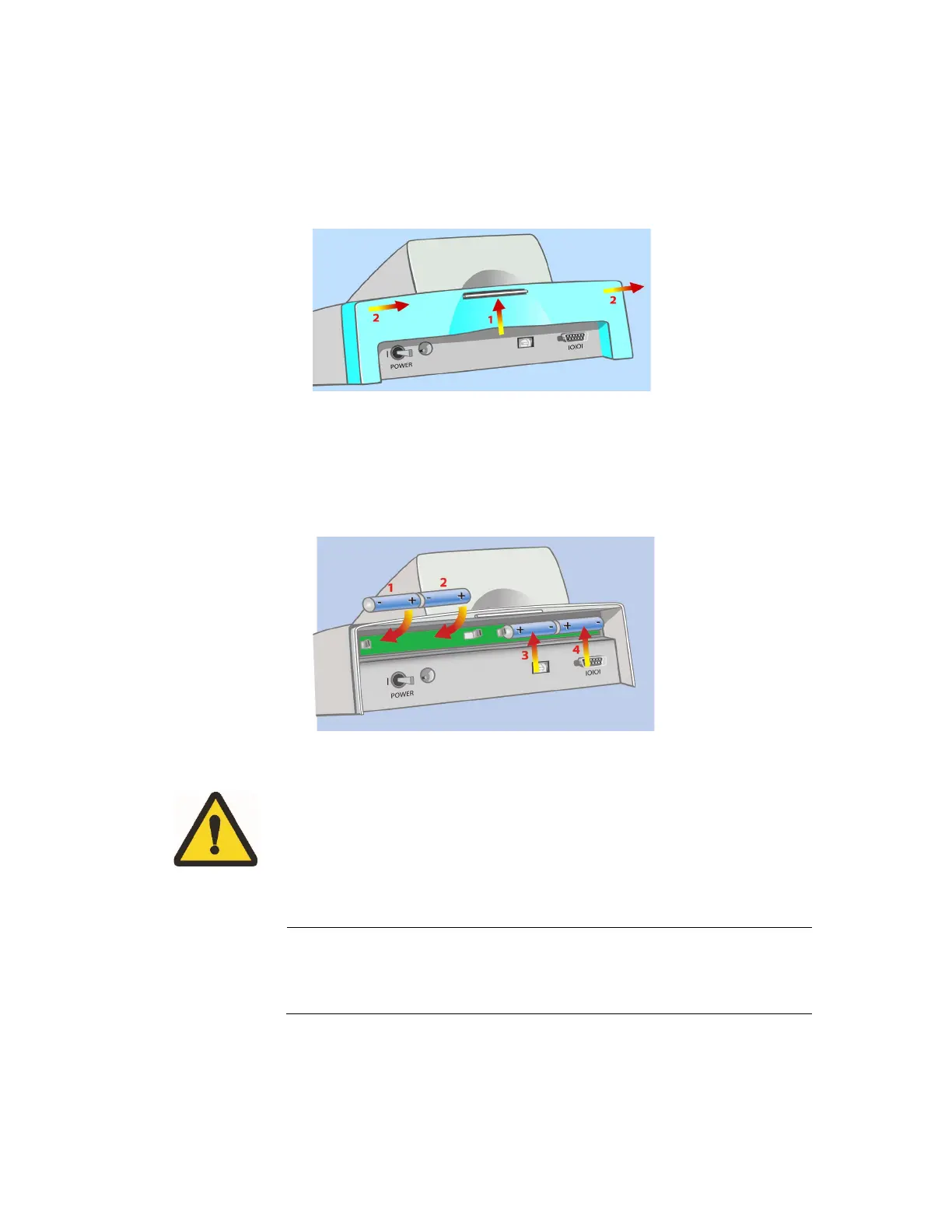
The battery holder is located at the rear of the analyzer. To install the batteries:
1. Turn the analyzer to access the battery area.
2. Remove the DC input connector.
3. Remove the battery cover as shown in Figure 1-4.
Figure 1-4 Remove Battery Holder Cover
4. Press on the locking tab with one or both thumbs and slide it away from the
analyzer.
5. Insert four 1.5 V AA size alkaline or lithium batteries as shown in Figure 1-5.
Figure 1-5 Insert Batteries
CAUTION: Observe the polarity of each battery. Inserting one
backwards could damage the analyzer.
6. Replace the cover by sliding it back on. Make sure it “clicks” into place.
When the analyzer is not in use it will automatically shut off:
Battery: 15 minutes AC Adapter: 60 minutes
Test results are lost when the analyzer becomes idle.


 To Next Page