LeadCare
®
II User's Guide A-3
Power Off Cycle
1. Turn off the LeadCare II.
2. Turn off the printer.
Note on Labels: The SmartLabels have a mark on the backing of each label
that the SLP 650SE and future models use for top of label alignment. Check to
be sure the labels have this mark before loading them into the printer.
Loading Labels
1. Power on the printer. The green status light will flash until labels are
loaded.
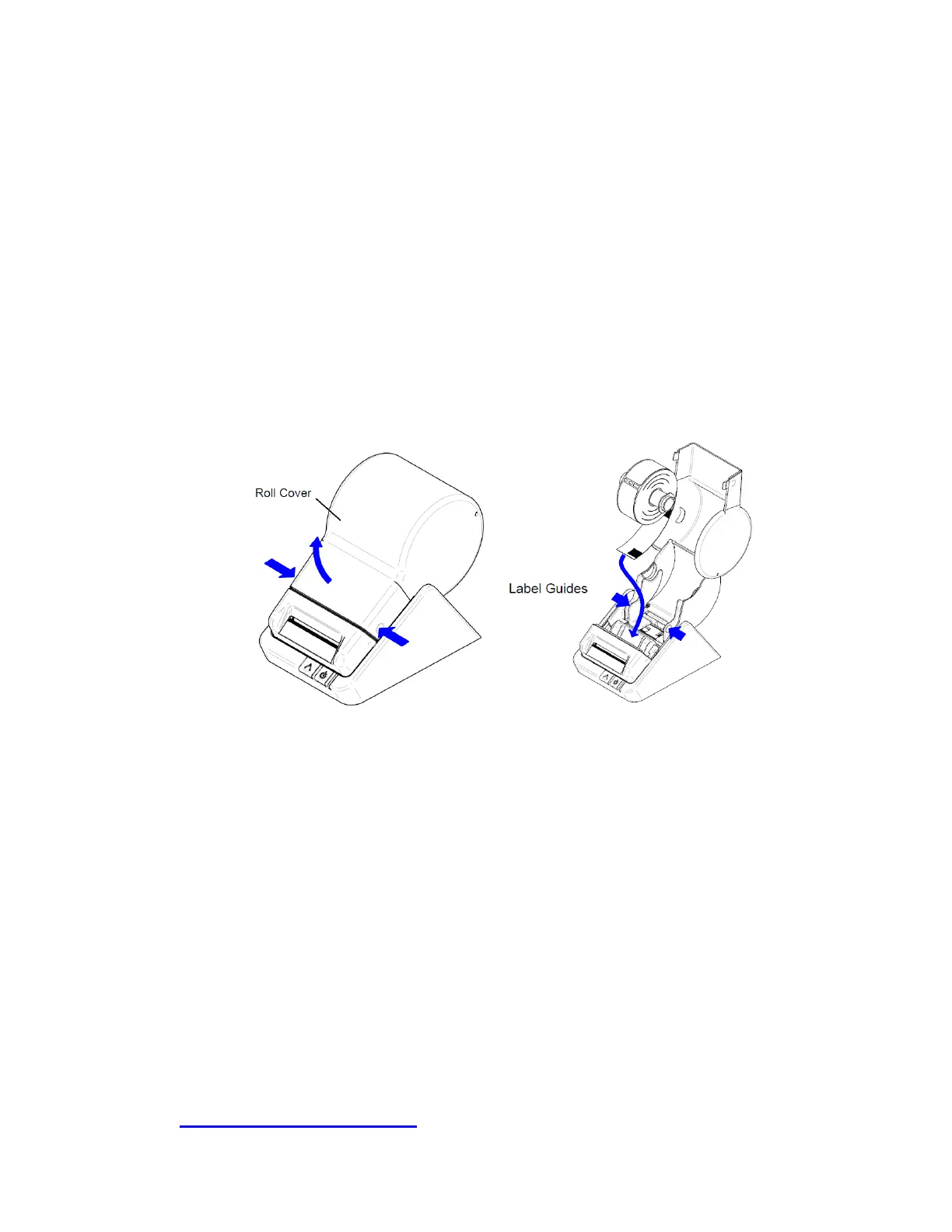
2. Lift the left side of the roll cover to open. Remove the spindle and place a
roll of labels on the spindle. (The LeadCare II utilizes shipping labels:
2 1/8” W X 4” L label stock.) Adjust the guides to fit the labels (see below).
Figure A-4 Label Placement
3. Feed the labels into the entrance slot, label side down. The labels will
automatically feed and align the end in the exit slot.
4. Close the roll cover.
Troubleshooting Information
• Steady green light indicates the printer is on-line.
• Blinking green light indicates the printer is awaiting labels.
• Blinking yellow indicates a label jam.
• Blinking red indicates a voltage error or print head error.
• Steady yellow light indicates the printer is off-line.
Call LeadCare Product Support for additional assistance: 1-800-275-0102.


 To Next Page