LeadCare
®
II User's Guide 4-8
7. The analyzer will beep when it
has enough sample. It will display
the message to the right. After 3
minutes (180 seconds) the
analyzer will beep again to
indicate that the test is done.
TESTING
XXX SECONDS TO GO
SENSOR LOT 0018A
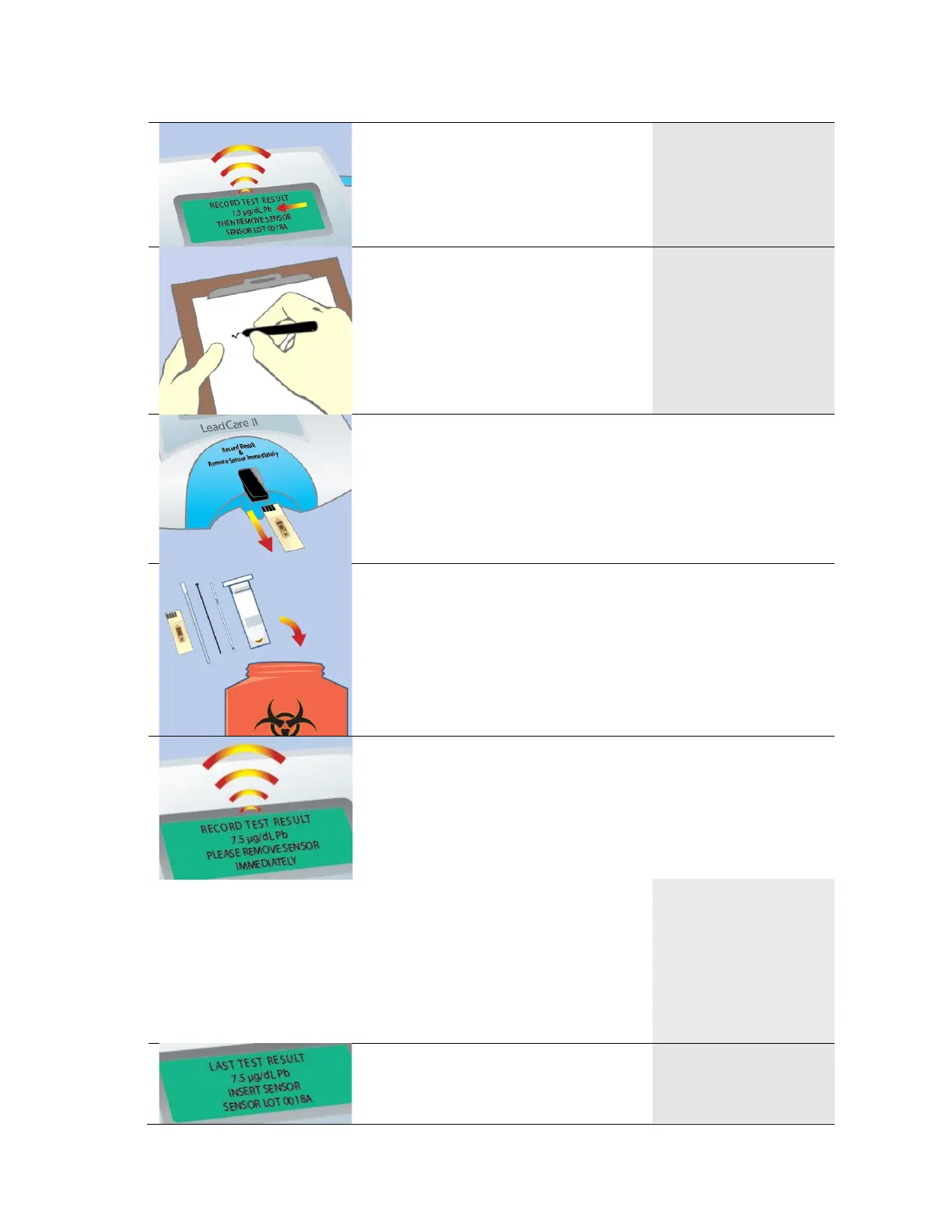
8. Record the test results.
RECORD TEST RESULT
7.5 µg/dL Pb
THEN REMOVE SENSOR
SENSOR LOT 0018A
9. Remove the used sensor immediately after recording the
result.
10. Discard the used materials in an appropriate biohazard
container.
11. If you do not remove the sensor after recording your last
result, within one minute the analyzer will sound two
short warning beeps every 15 seconds until the sensor
is removed or until the unit powers down.
Once the warning beep begins
the message on the screen
changes to “RECORD TEST
RESULT XXXX µg/dL Pb
PLEASE REMOVE SENSOR
IMMEDIATELY”. The beep
stops when the sensor is
removed.
RECORD TEST RESULT
XXXX µg/dL Pb
PLEASE REMOVE SENSOR
IMMEDIATELY
12. The analyzer is ready for the
next sample when the “LAST
TEST RESULT” message
LAST TEST RESULT
7.5 µg/dL Pb
INSERT SENSOR
SENSOR LOT 0018A


 To Next Page