DEFROST/HEAT
• DEFROST/HEAT for 59 minutes or less: Basic Instructions
UsesBOTHradiant heatandmicrowave energytode- 1. Press DEFROST/HEATpad.
frostthenheatfrozenconveniencefoodspackagedin
heat-proof paperor plasticcontainers. 2. Closeand lockovendoor.
3. Turn SET knobtoenter time.
• DEFROST/HEATfor over 60 minutes or more:
• 59 minutesor less tO defrostand heat frozen
Uses ONLY microwaveenergyto defrostroastsand foodsin heatproofpaperOrplasticContainer.
poultry over 4-1bs.
• 60 minutes or more to defrost roasts or pouffry
F;;qI- q t- q I- -1 over.-lbs
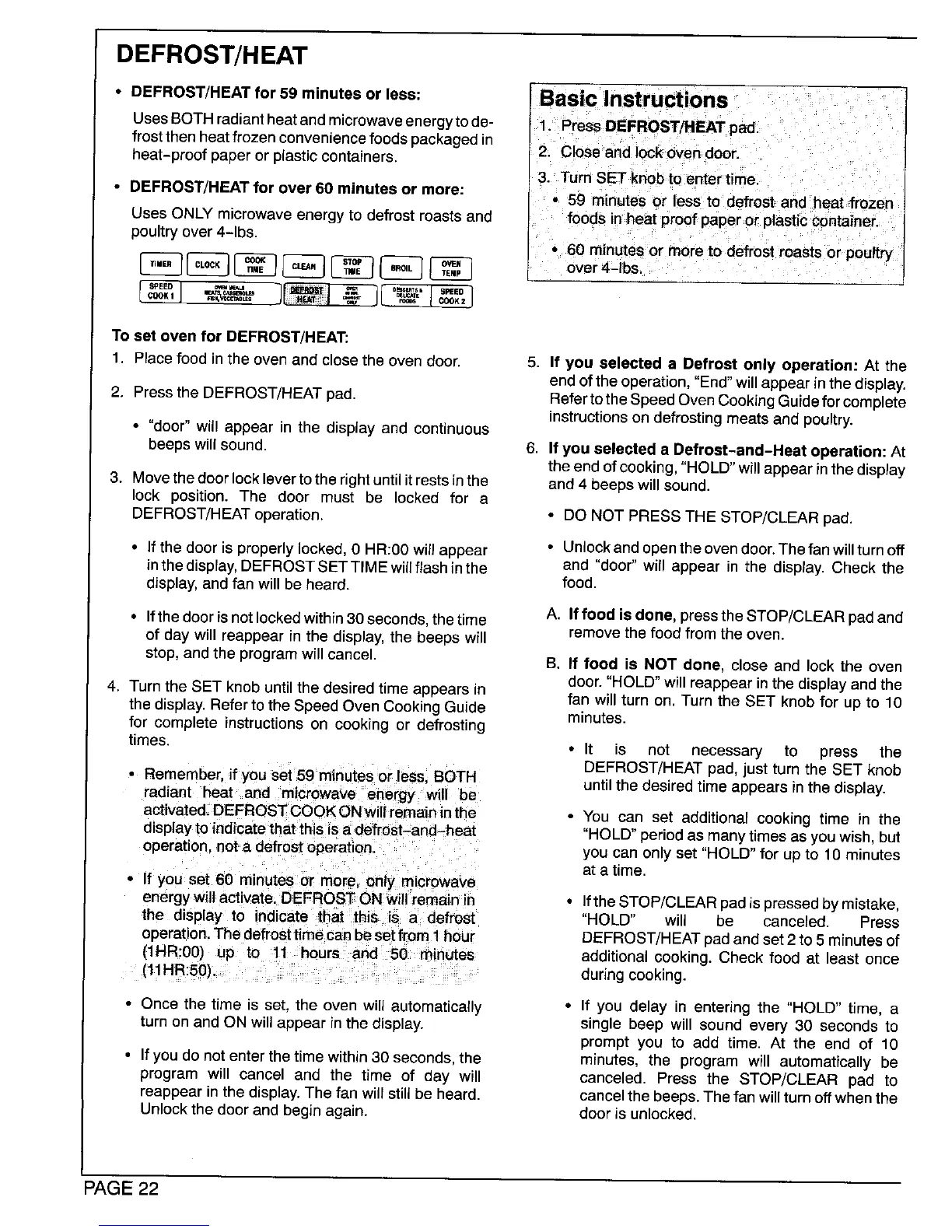
To set oven for DEFROST/HEAT;
1. Placefood inthe oven and closethe oven door. 5. If you selected a Defrost only operation: At the
endof theoperation,"End"willappearin thedisplay.
2. Pressthe DEFROST/HEATpad. RefertotheSpeedOvenCookingGuideforcomplete
instructionson defrostingmeatsand poultry.
• "door"will appear in the displayand continuous
beepswillsound. 6. If you selected a Defrost-and-Heat operation: At
the end of cooking, "HOLD"will appearinthe display
3. Move thedoor locklever to the rightuntil it restsin the and 4 beeps will sound.
lock position. The door must be locked for a
DEFROST/HEAToperation. • DO NOT PRESS THE STOP/CLEAR pad.
• If the door is properly locked, 0 HR:00will appear • Unlockand open the ovendoor.Thefan will turn off
inthe display,DEFROSTSET TIME willflash inthe and "door" will appear in the display. Check the
display, and fan will be heard, food.
• Ifthedoorisnctlockedwithin30seconds, thetime A. Iffoodisdone, pressthe STOP/CLEAR padand
of day will reappear in the display, the beeps will remove the food from the oven.
stop, and the program will cancel. B. If food is NOT done, close and lock the oven
door. "HOLD"will reappear in the display andthe
4. Turn the SET knob until the desired time appears in fan will turn on. Turn the SET knob for up to 10
the display. Refer to the Speed Oven Cooking Guide minutes.
for complete instructions on cooking or defrosting
times. • It is not necessary to press the
• Remember, if you set 59 minutes or lees BOTH DEFROST/HEAT pad, just turn the SET knob
radiant heat and microwave energy will be until the desired time appears in the display.
activated. DEFROSTCOOKONwillremaininthe • You can set additional cooking time in the
display to indicate that this is a defrost-and-heat "HOLD"period as manytimes as youwish, but
operation, not a defrost operation, you can only set "HOLD" for up to 10 minutes
at a time.
• If you set 60 minutes or more, only miorowave
energywill activate. DEFROST ON will remain in • Ifthe STOP/CLEARpad ispressed bymistake,
the clisplay to indicate that this is a defrost "HOLD" will be canceled. Press
operation.The defroettimecan be set from 1hour DEFROST/HEATpad and set2 to 5 minutes of
(1HR:00) up to 11 hours and 50 minutes additional cooking. Check food at least once
(11HR:50). during cooking.
• Once the time is set, the oven will automatically • If you delay in entering the "HOLD" time, a
turn on and ON will appear in the display, single beep will sound every 30 seconds to
prompt you to add time. At the end of 10
• Ifyou do not enter the time within 30 seconds, the minutes, the program will automatically be
program will cancel and the time of day will canceled. Press the STOP/CLEAR pad to
reappear in the display. The fan will still be heard, cancelthe beeps. The fan will turn offwhen the
Unlockthe door and begin again, door is unlocked.
PAGE 22




 To Next Page