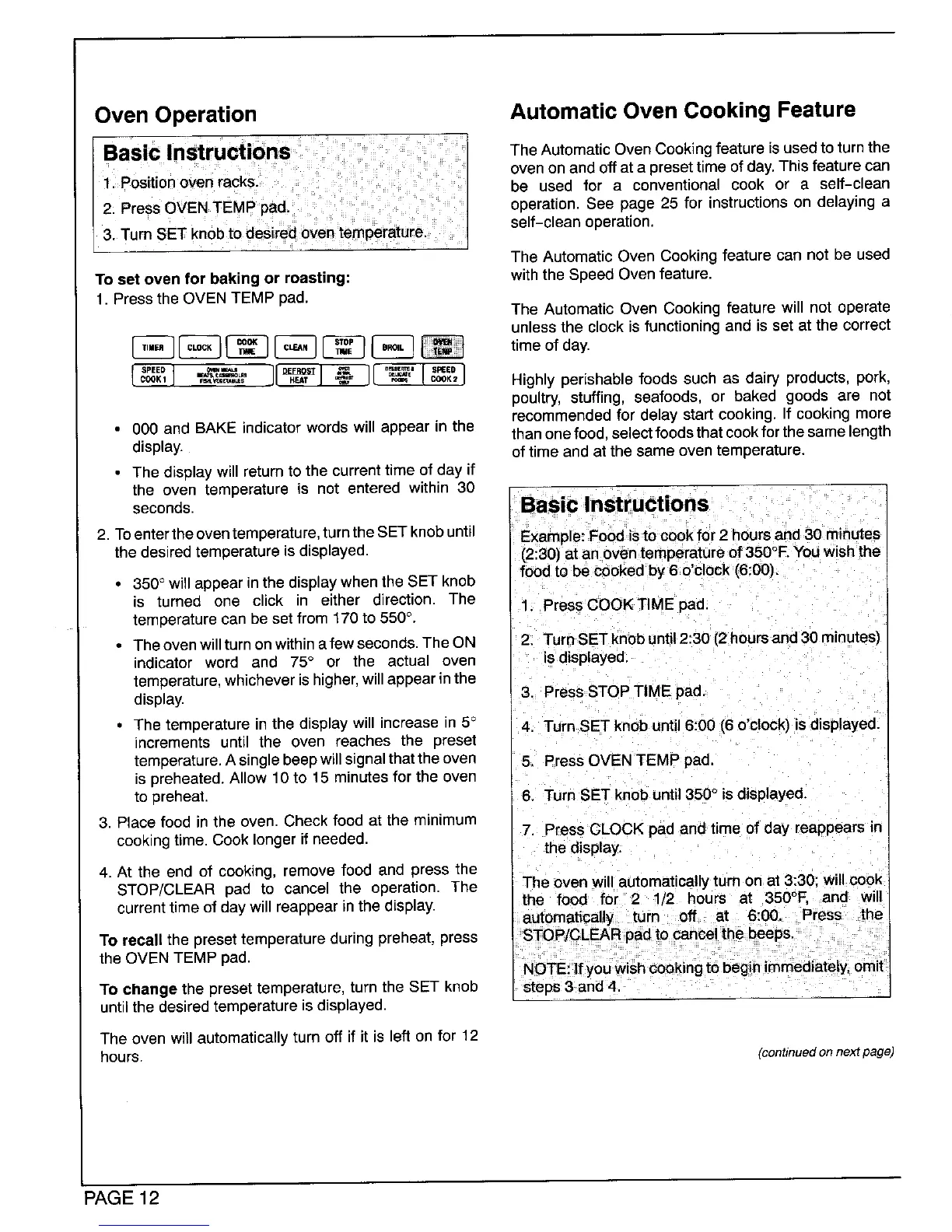
Oven Operation Automatic Oven Cooking Feature
The Automatic Oven Cookingfeature is used to turn the
oven on and off at a preset time of day.This feature can
be used for a conventional cook or a self-clean
operation. See page 25 for instructions on delaying a
self-clean operation.
The Automatic Oven Cooking feature can not be used
To set oven for baking or roasting: with the Speed Oven feature.
1, Pressthe OVENTEMP pad.
The AutomaticOven Cookingfeature will not operate
unlessthe clockisfunctioningand isset at the correct
J__ Highly perishable foods such as dairy products, pork,
poultry, stuffing, seafoods, or baked goods are not
recommended for delay start cooking, If cooking more
• 000 and BAKE indicator words will appear in the than onefood,select foods that cook forthe same length
display, of time and at the same oven temperature.
• The display will returnto the current time of day if
the oven temperature is not entered within 30
seconds. Basic Instructions
2. Toenterthe oventemperature,turnthe SETknob until Example: Food is to cook for 2 hours and 30 minutes
the desired temperature is displayed. (2:30) at an oven temperature of 350°F,You wish the
• 350° will appear in the displaywhen the SET knob foodto be cooked by 6 o'clock (6:00).
is turned one click in either direction. The 1. Press COOK TIME pad.
temperature can be set from 170 to 550°.
• Theovenwillturnonwithinafewseconds. TheON 2. TurnSET knobuntil 2:30 (2hours and 30minutes)
indicator word and 75° or the actual oven is displayed,
temperature,whichever is higher,will appear inthe
display. 3. Press STOP TIME pad.
• The temperature in the display will increase in 5° 4, Turn SET knob until 6:00 (6 o'clock) is displayed.
increments until the oven reaches the preset
temperature,A singlebeep willsJgnalthat the oven 5, Press OVEN TEMP pad,
is preheated. Allow 10 to 15 minutes for the oven
to preheat. 6. Turn SET knob until350° is displayed.
3. Place food in the oven. Check food at the minimum
cookingtime. Cook longer if needed. 7. Press CLOCK pae and time of day reappears in
the display.
4, At the end of cooking, remove food and press the
STOP/CLEAR pad to cancel the operation. The The oven will automatically turn on at 3:30: will cook
current timeofdaywill reappear inthedisplay, the food for 2 1/2 hours at 350°F. and will
automatically turn off at 6:00. Press the
To recall the presettemperature during preheat, press STOP/CLEAR pad to cancel the beeps.
the OVEN TEMP pad. NOTE: If youwish cooking to beginimmediately, omit
To change the preset temperature, turn the SET knob steps 3 and 4.
until the desired temperature is displayed.
The oven will automatically turn off if it is left on for 12
hours. (continued on next page)
PAGE12




 To Next Page