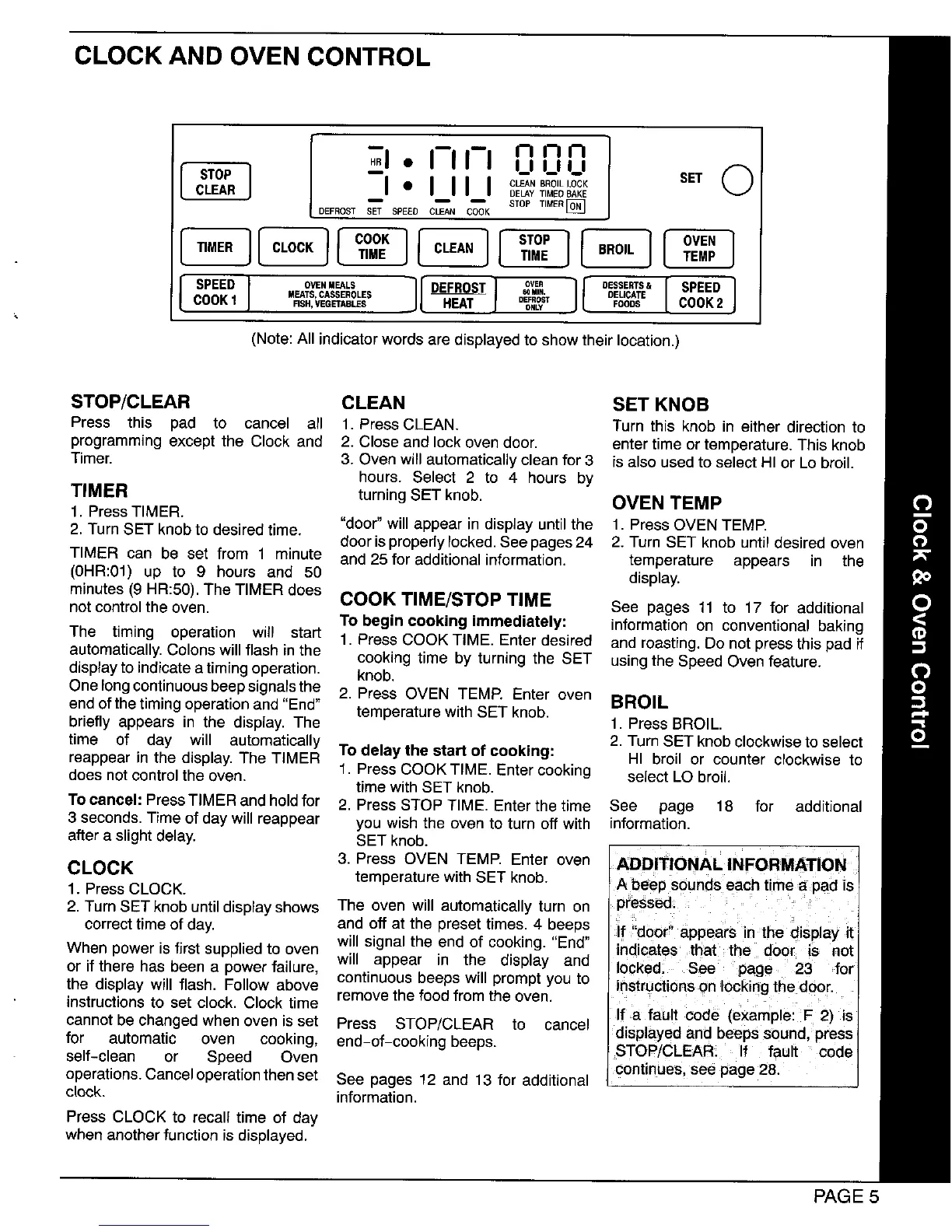
CLOCK AND OVEN CONTROL
• I-I I-I n n n ]
!d s=o
DEFROST SET SPEED
c.oc,l[coo:I[c.,= I ]
o.31...s.[s,,=j
MEATS, CASSEROLES _ ira. DEICATE
DEFROST
FISH, VEGETAB ONLY FOODS COOK 2
(Note: Allindicator words are displayed to show their location.)
STOP/CLEAR CLEAN SET KNOB
Press this pad to cancel all t, PressCLEAN. Turn this knob in either directionto
programmingexcept the Clock and 2, Closeand lockovendoor, entertimeortemperature.Thisknob
Timer, 3. Ovenwillautomaticallycleanfor 3 isalso usedto selectHI or Lo broil,
hours. Select 2 to 4 hours by
TIMER turningSET knob, OVEN TEMP
1. PressTIMER.
2. TurnSET knobto desiredtime. "door"willappear in displayuntilthe t, PressOVENTEMP,
door isproperlylocked.See pages24 2. Turn SET knob until desired oven
TIMER can be set from 1 minute and 25 for additional information, temperature appears in the
(0HR:01) up to 9 hours and 50 display.
minutes (9 HR:50).The TIMER does COOK TIME/STOP TIME
not control the oven. See pages 11 to 17 for additional
To begin cooking immediately: informationon conventional baking
The timing operation will start 1. PressCOOK TIME. Enterdesired and roasting.Do notpressthispad if
automatically.Colonswillflash inthe cookingtime by turningthe SET usingthe SpeedOvenfeature.
displaytoindicateatimingoperation, knob.
OnelongcontinuousDeepsignalsthe 2. Press OVEN TEMP. Enter oven BROIL
endofthetimingoperationand "End" temperaturewithSET knob.
briefly appears in the display.The 1. PressBROIL.
time of day will automatically 2. TurnSET knobclockwisetoselect
reappear inthe display.The TIMER To delay the start of cooking: HI broil or counter clockwise to
doesnotcontrolthe oven. t. PressCOOK TIME. Entercooking selectLObroil.
time withSET knob.
To cancel: PressTIMERandholdfor 2. PressSTOP TIME. Enterthetime See page 18 for additional
3 seconds.Time of daywillreappear you wish the ovento turnoff with information.
after a slightdelay. SET knob.
CLOCK 3. Press OVEN TEMP. Enter oven ADDITIONAL INFORMATION
1. PressCLOCK. temperaturewithSET knob. A beep soundseach timea pad is
2. TurnSETknob untildisplayshows The oven will automaticallyturn on pressed.
correcttimeofday. and offat the presettimes. 4 beeps If "door"appears in the displayit
When poweris firstsuppliedto oven willsignalthe end of cooking."End" indicates that the door is not
or if there has been a powerfailure, will appear in the display and locked. See page 23 for
the displaywill flash. Followabove continuousbeeps will promptyouto instructionson lockingthe door.
instructionsto set clock.Clock time removethe foodfromthe oven.
cannotbe changedwhenovenis set Press STOP/CLEAR to cancel If a fault code (example: F 2) is
displayedand beepssound,press
for automatic oven cooking, end-of-cooking beeps.
self-clean or Speed Oven STOP/CLEAR. If fault code
operations.Canceloperationthenset See pages 12 and 13 for additional continues,see page28.
clock, information.
Press CLOCK to recalltime of day
whenanotherfunctionisdisplayed.
PAGE 5




 To Next Page