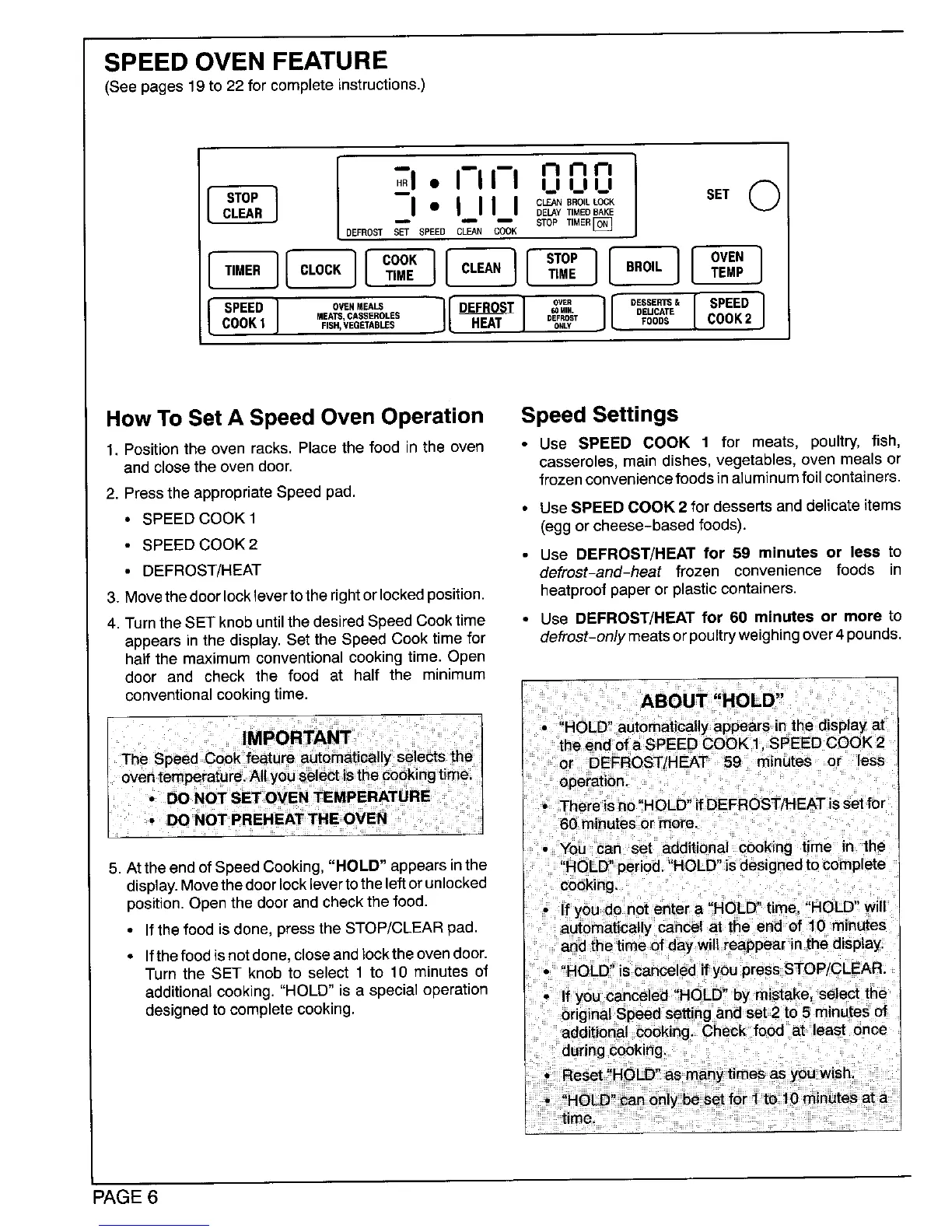
SPEED OVEN FEATURE
(See pages 19 to 22 for complete instructions.)
stop o
I 1 ,-,,-,,-, s_.
C,EA, I" I_11 I O_..o,LLocK
DELAY TIMED BAKE
DEFROST _'_ SPEED CLEAN C_OK STOP TIMEB[_
[ ...,,1[c.oc.1[co:_l[c._.I[s;o:1[.o,.l[ov;.I
[s,.oI ..oo---oo......,.lio,,.os.1.o...j[o.ss.o,is..o]o.o,,COOK1 RSH,VEGETABLESJ L HEAT 0er.OsTONLVFOODS COOK2
HowToSet A SpeedOven Operation SpeedSettings
1, Positionthe oven racks, Placethe food in the even • Use SPEED COOK 1 for meats, poultry, fish,
and closethe oven door. casseroles, main dishes, vegetables, oven meals or
frozen convenience foods inaluminum foil containers.
2. Pressthe appropriate Speed pad.
• SPEED COOK 1 • Use SPEED COOK 2 for dessertsand delicateitems
(eggor cheese-basedfoods).
• SPEED COOK2
• Use DEFROST/HEAT for 59 minutes or less to
• DEFROST/HEAT defrost-and-heat frozen convenience foods in
3. Movethedoorlocklevertotherightorlockedposition, heatproofpaper orplasticcontainers.
4. Turnthe SET knobuntilthedesiredSpeedCooktime • Use DEFROST/HEAT for 60 minutes or more to
appearsinthe display.Set the Speed Cook time for defrost-on/y meatsorpoultryweighingover4pounds.
half the maximumconventionalcookingtime. Open
door and check the food at half the minimum
conventionalcookingtime. ABOUT "HOLD"
! u * • ,
HOLD automaticallyappears*nthe displayat
theend ofa SPEED COOK 1. SPEED COOK 2
or DEFROST/HEAT 59 minutes or Jess
operation. ,,
• Thereisno HOLD"ifDEFROST/HEATisset for
60 minutes or more.
• You can set additional cooking time in the
5. Attheendof SpeedCooking,"HOLD" appearsinthe "HOLD"period.'HOLD' isdesignedtocomplete
display.Movethedoorlocklevertotheleftorunlocked cooking.
position.Openthedoorand checkthe food.
If you do not entera HQLD hme HOLD will
• Ifthe foodisdone,pressthe STOP/CLEAR pad. automaticallycancel at the end of 10 minutes
• ifthe foodisnotdone,closeand lookthe ovendoor. and the time ofday wiltreappearinthe display.
Turn the SET knob to select 1 to 10 minutesof iscanceledif
additionalcooking."HOLD" is a specialoperation
designedto completecooking.
PAGE 6




 To Next Page