19
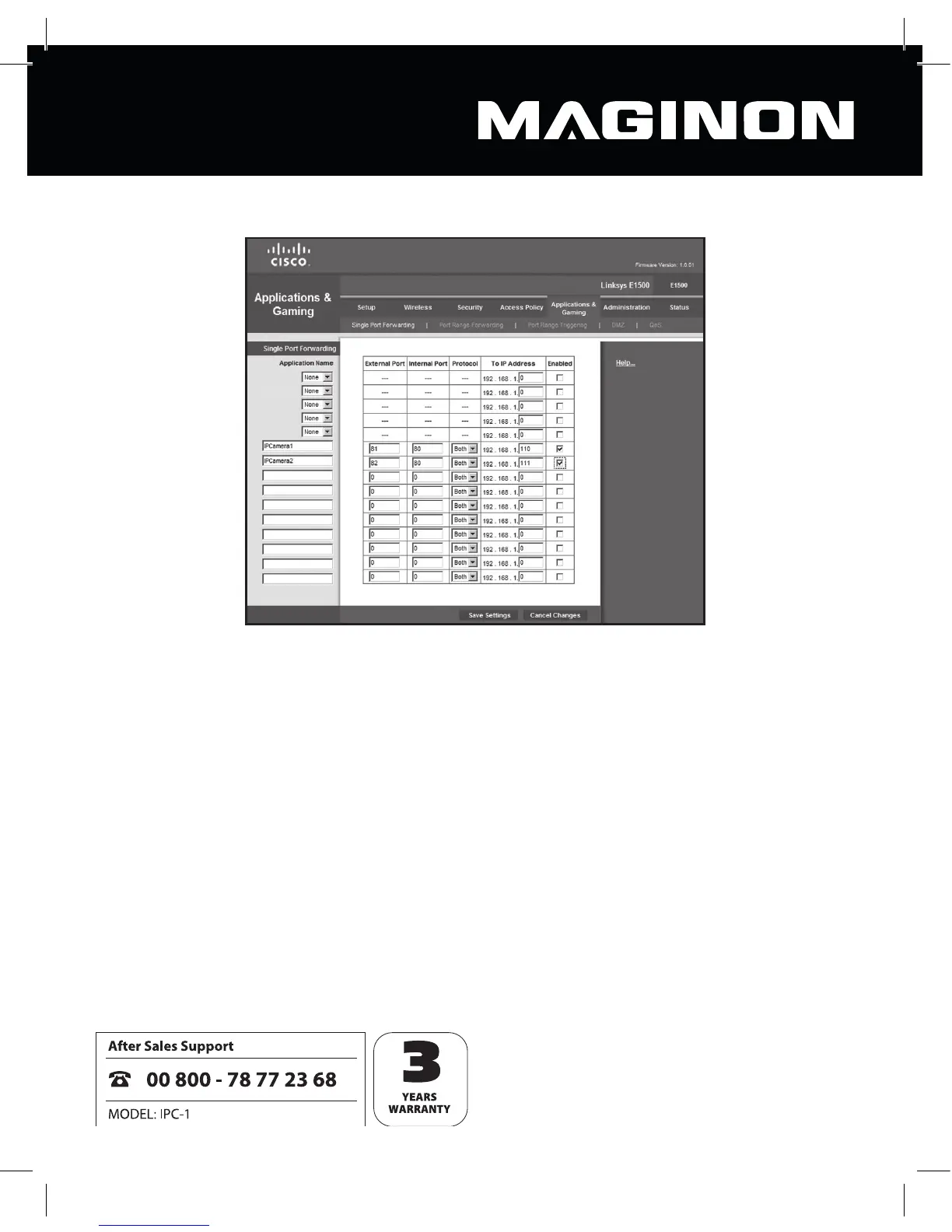
Start by opening your router’s port forwarding menu.
In the example shown, two security cameras are connected to the router, one called
IPCamera1 under local network address 192.168.1.110 and one called IPCamera2 under local
network address 192.168.1.111.
External port 81 is now speci ed as the access point for IPCamera1. TCP and UDP are both
permitted protocols, however the only one required is TCP. This camera is then accessed
from the Internet under the address http://xxx.xxx.xxx.xxx:81 (where xxx.xxx.xxx.xxx is the
Internet address of the router).
External port 82 is speci ed as the access point for IPCamera2. This allows the camera to be
accessed from the Internet using the address http://xxx.xxx.xxx.xxx:82.
Please note that this example assumes internal port 80 for both cameras. If the internal port
for a camera is changed, this needs to be taken into account here.
Do also take care to ensure that no external port is allocated twice over.


 To Next Page