MP7500 Router Installation Manual Version 1.0
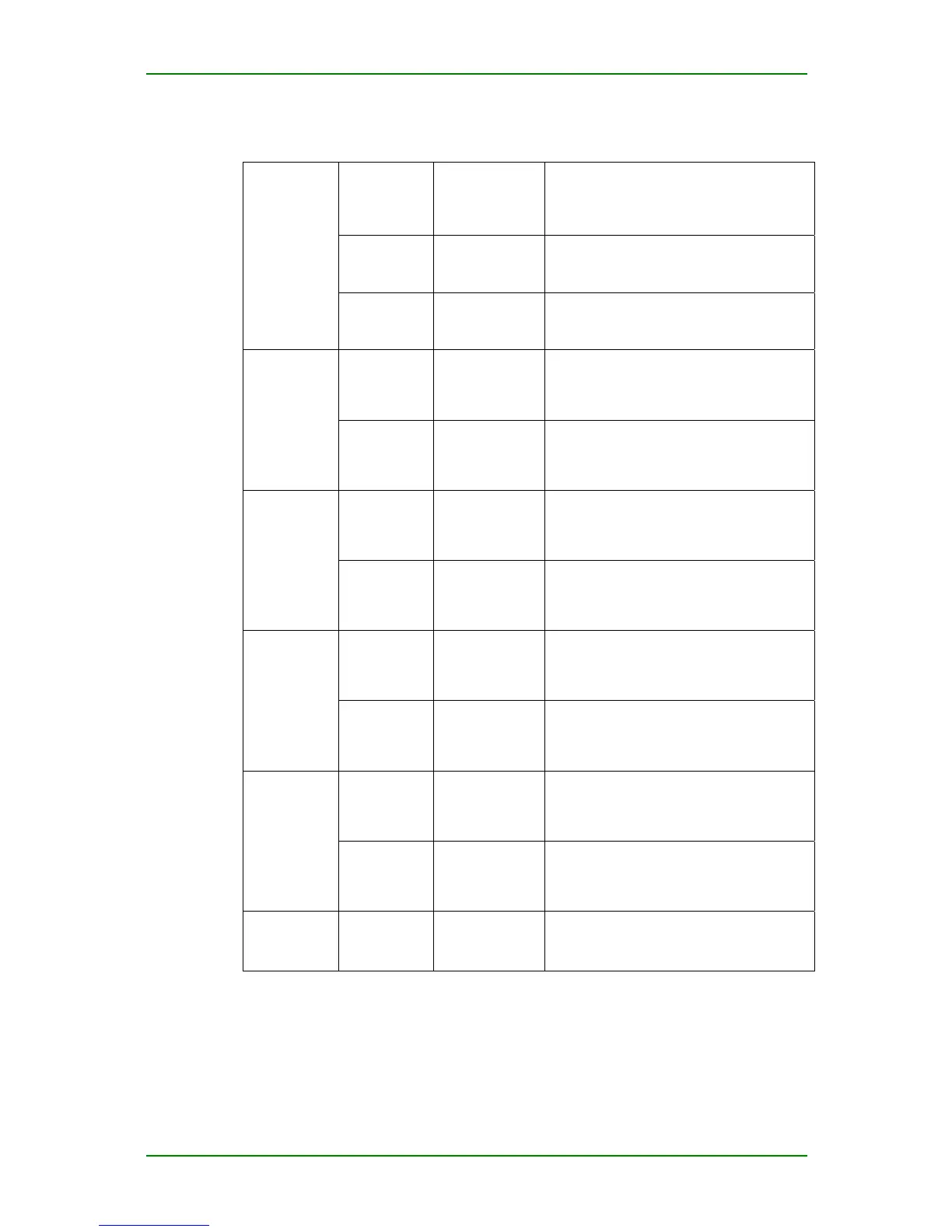
Indicators:
SYSTEM Green light
(CPU control)
Slow flash: works normally (flash
frequency: 0.5Hz)
Off/on: The control card does not work
normally
MASTER Green light
(hardware
control)
On: works in master mode
Off: works in slave mode
Control card
system
indicator
POWER Green light
(hardware
control)
On: power on
Off: power off
TXD Yellow light
carried by RJ45
(hardware
control)
Off: no data sending
Flash: with data sending
CONSOLE
RXD Green light
carried by RJ45
(hardware
control)
Off: no data receiving
Flash: with data receiving
TXD Yellow light
carried by RJ45
(hardware
control)
Off: no data sending
Flash: with data sending
AUX
RXD Green light
carried by RJ45
(hardware
control)
Off: no data receiving
Flash: with data receiving
LINK Yellow light
carried by RJ45
(hardware
control)
Off: Link not connected
On: Link connected
FE
ACT Green light
carried by RJ45
(hardware
control)
Off: no data receiving and sending
Flash: with data receiving and sending
LINK Yellow light
carried by RJ45
(hardware
control)
Off: Link not connected
On: Link connected
GIGABIT
ETHERNET
(0, 1, 2, 3)
ACT Green light
carried by RJ45
(hardware
control)
Off: no data receiving and sending
Flash: with data receiving and sending
CF card CF STATE Green light
(hardware
control)
Off: no CF card
On: with CF card
Flash: CF card has data reading and writing
The indicator of GIGABIT ETHERNET port cooperates with the indicators of
the corresponding electricity interface. When the port works on optical
interface, LINK AND ACT indicator on RJ45 has the same meaning as on
the electricity interface.
Maipu Confidential & Proprietary Information Page 15 of 62



 To Next Page