MP7500 Router Installation Manual Version 1.0
Cables
Ethernet Interface Cable
Ethernet interface cable of MP7500 router adopts 8-pin non-screen
twisted pair. In 10BASE-T and 100BASE-TX mode, silver plate 1 and 2
are the sending ends; silver plate 3 and 6 are the sending ends. In
1000BASE-T mode, silver plate 1, 2, 3, 4, 5, 6, 7, and 8 are all used
for receiving and sending signals.
The connection relation of RJ45 straight-through cable (type-5 twisted-
pair):
RJ45 Signal Direction RJ45 Description Length
1 TX0+ —> 1
2 TX0- —> 2
Twisted-pair 1
3 RX0+ <— 3
6 RX0- <— 6
Twisted-pair 2
4 ---- ---- 4
5 ---- ---- 5
Twisted-pair 3
7 ---- ---- 7
8 ---- ---- 8
Twisted-pair 4
2m
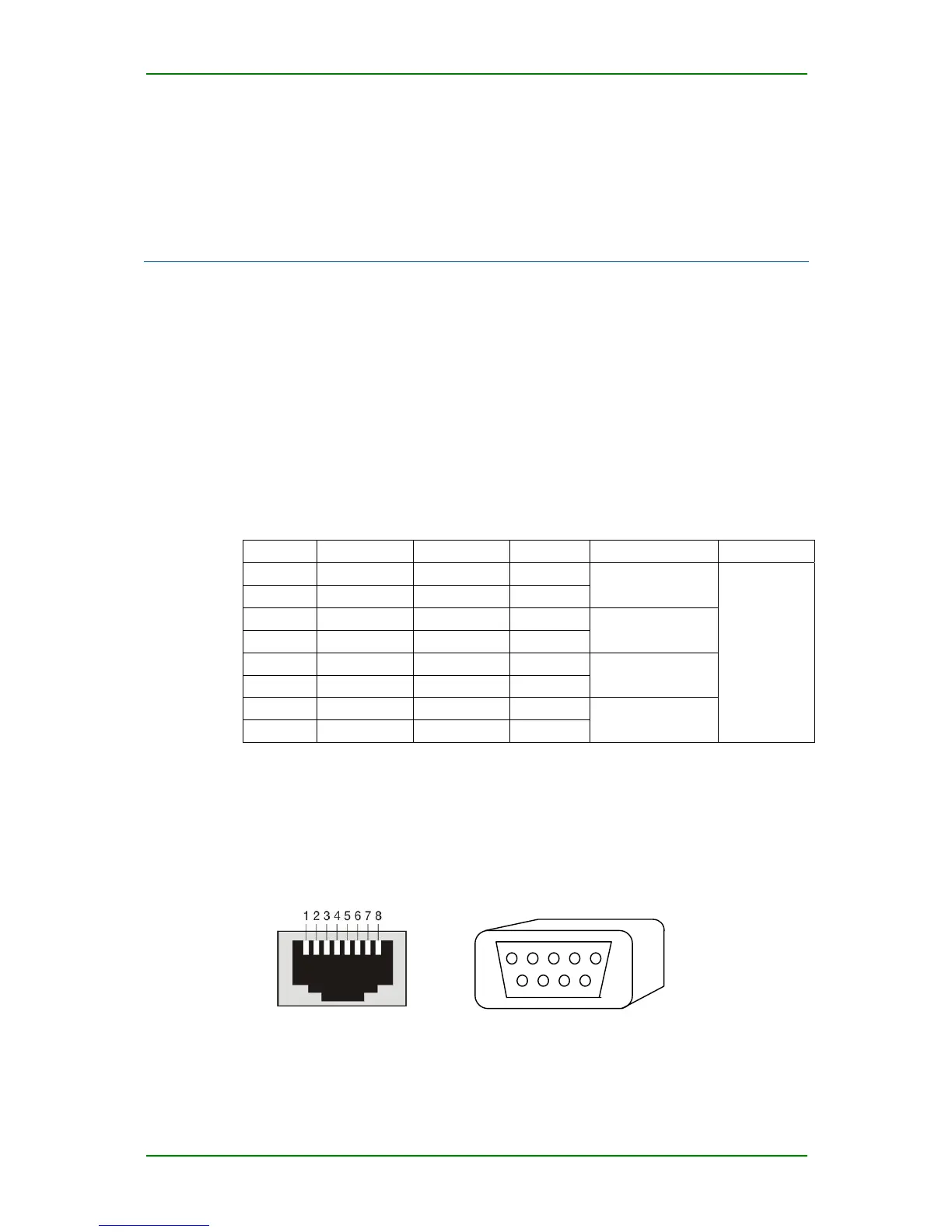
Console Port Cable
MP7500 console port cable is connected with PC 9-pin serial jack, and it is
8-pin non-screen cable. One side is RJ45 plug and another is DB9 (hole).
5 4 3 2 1
9 8 7 6
RJ45 jack
Standard DB9 interface
Maipu Confidential & Proprietary Information Page 60 of 62



 To Next Page