MP7500 Router Installation Manual Version 1.0
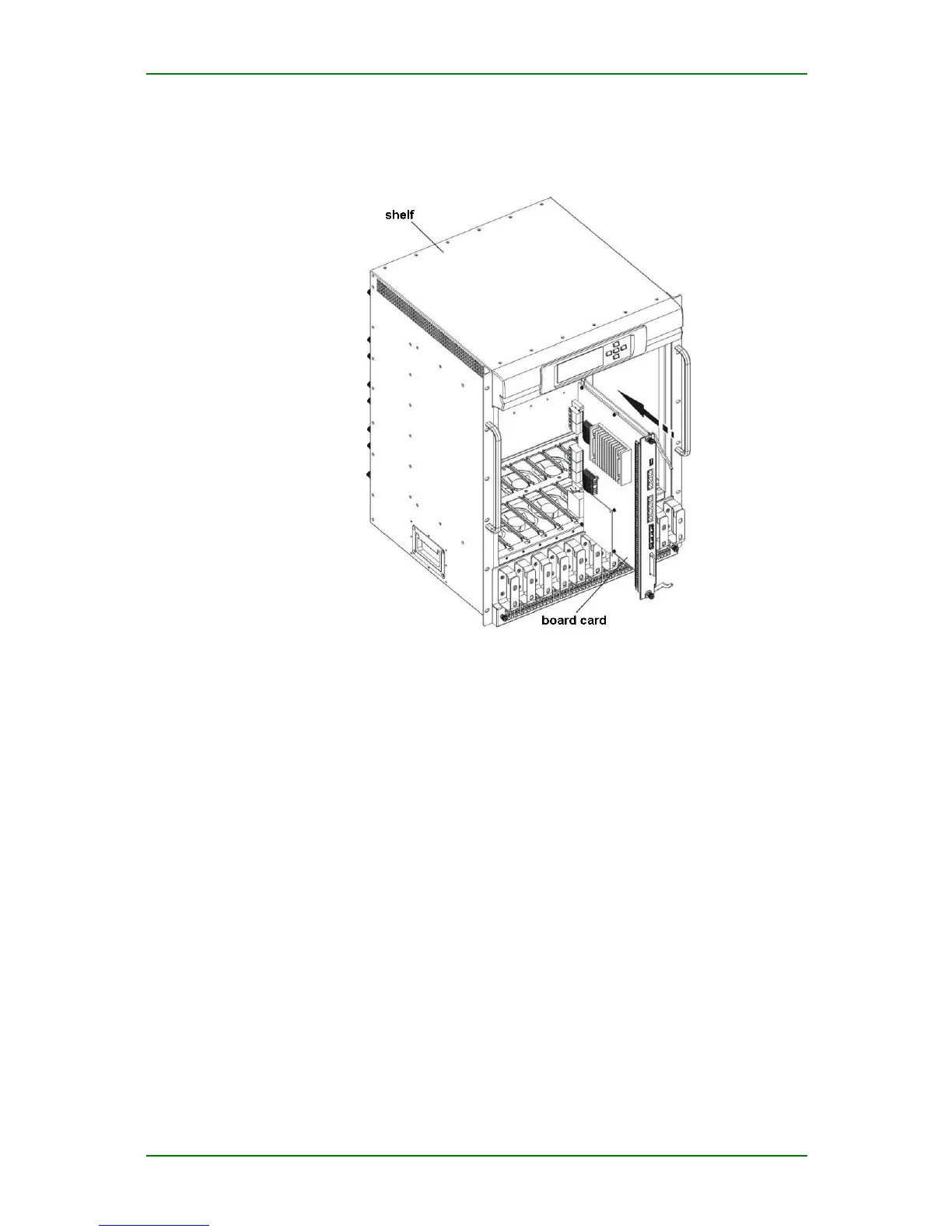
Install the board cards as follows:
• Step 1: Before installing board cards, ensure that the shelf is
installed in the cabinet, and fan shelf and power supply module are
installed in the shelf. During the installation, the hands cannot
touch the components on the board card.
• Step 2: Wear gloves and anti-static wrist and make the anti-static
reliable grounding.
• Step 3: Circumrotate ejector handle on the board card outwards
and use two hands to hold the board card stably to keep the board
card upright. Insert the board card into the corresponding slot from
the shelf front.
• Step 4: Push the board card into the shelf stably and circumrotate
ejector handle on the board card inwards to make the board card
be inserted into the slot.
• Step 5: Circumrotate the screw on the power supply module
clockwise to fix the board card in the shelf.
• Step 6: Repeat step 3-5 to install the other board cards in the
shelf.
Maipu Confidential & Proprietary Information Page 53 of 62



 To Next Page