10
4.4. AC+DC Voltage Measurements
CAUTION: Do not measure DC voltages if a motor on the circuit is being
switched ON or OFF. Large voltage surges may occur that can damage the
meter.
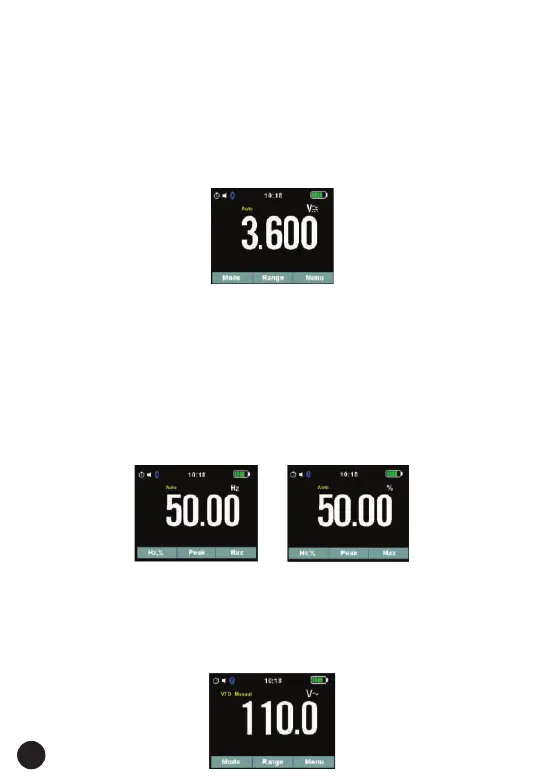
1. Set the function switch to the V AC/DC position.
2. Insert the black test lead banana plug into the negative COM jack.
Insert the red test lead banana plug into the positive V jack.
3. Press the MODE key to switch the V AC+DC Voltage functions.
4. Read the AC+DC voltage in the display.
4.5. Frequency Measurements
1. Set the function switch to the V AC/DC position.
2. Insert the black test lead banana plug into the negative COM jack. Insert
the red test lead banana plug into the positive V jack.
3. Press the menu key for 2 seconds refer soft key function for more
measurement options.
4. Press the soft key Hz key to switch the Hz functions.
5. Read the Frequency in the display.
6. Press the soft key Hz to switch the Duty functions.
7. Read the Duty in the display.
4.6. VFD Mode (Variable Frequency Drive)
1. Set the function switch to the V AC/DC to AC Voltage measurements.
2. Press the VFD button (MODE key for 2 seconds) to indicate “VFD” on
the display for variable frequency driver measurements.
3. Read Measurement in the display



 To Next Page