10:18
°C
1000
Mode Max Menu
Auto
OFF
V
Hz%
CAP
Ω
Temp
°C°F
600A
AC/DC TRMS
CLAMP METER
WITH DATALOGGER
1000A
CAT III 1000V
CAT IV 600V
CAP
V Hz%
Ω
Temp
COM
AUTO POWER OFF
V
LoZ
ESC
Bluetooth
INRUSH
REL
RANGE
MENU
MODE
2sec.
10:18
mF
100.0
Mode Max Menu
Auto
OFF
V
Hz%
CAP
Ω
Temp
°C°F
600A
AC/DC TRMS
CLAMP METER
WITH DATALOGGER
1000A
CAT III 1000V
CAT IV 600V
CAP
V Hz%
Ω
Temp
COM
AUTO POWER OFF
V
LoZ
ESC
Bluetooth
INRUSH
REL
RANGE
MENU
MODE
2sec.
13
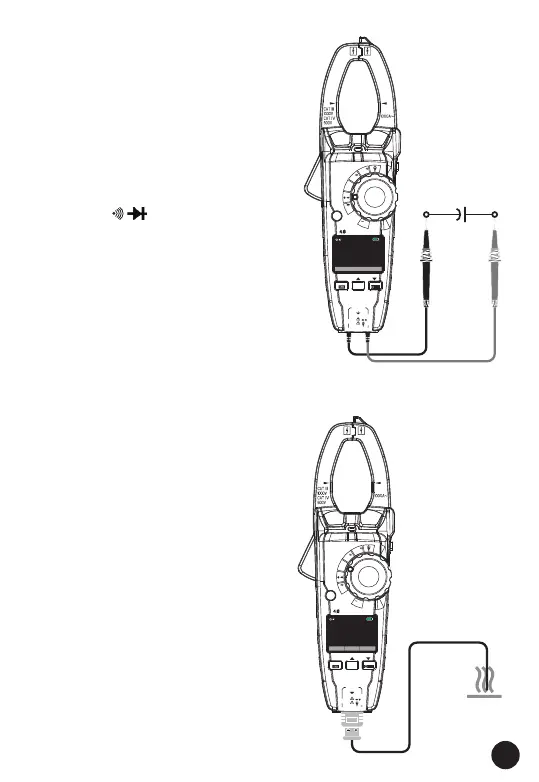
4.11. Capacitance
Measurements
WARNING: To avoid electric
shock, disconnect power to the
unit under test and discharge all
capacitors before taking any
capacitance measurements.
Remove the batteries and unplug
the line cords.
1. Set the rotary function switch
to the Ω CAP position.
2. Insert the black test lead
banana plug into the negative
COM jack. Insert the red test
lead banana plug into the
positive V jack.
3. Press the MODE button to
switch the Capacitance
functions.
4. Read the capacitance value in
the Display.
4.12. Temperature
Measurements
1. Set the function switch to the
TEMP position.
2. Insert the Temperature Probe
into the input jacks, making
sure to observe the correct
polarity.
3. Read the temperature in the
display
4. Press the MODE key to switch
the Unit (°C or °F).



 To Next Page