20
6. Maintenance
WARNING: To avoid electrical shock, disconnect the meter from any
circuit, remove the test leads from the input terminals, and turn OFF the
meter before opening the case. Do not operate the meter with an open
case.
6.1. Cleaning and Storage
• Periodically wipe the case with a damp cloth and mild detergent; do not
use abrasives or solvents.
• If the meter is not to be used for 60 days or more, remove the battery
and store it separately.
6.2. Battery Replacement
1. Remove the Phillips head screw that secures the rear battery door.
2. Open the battery compartment.
3. Replace the AAA battery.
4. Secure the battery compartment.
6.3. Temperature Probe Replacement
Note: To use a Type K thermocouple probe that is terminated by a
subminiature (flat blade) connector, a subminiature-to-banana plug adaptor
is required.
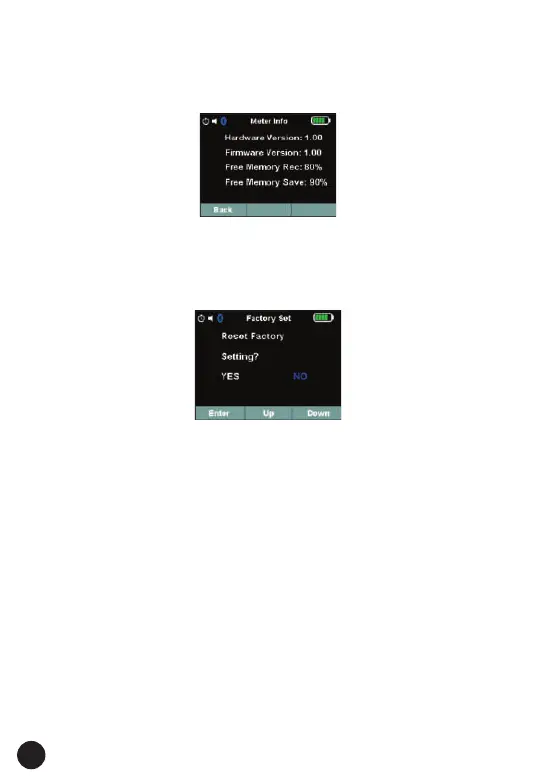
5.6. Factory Set Details
• Press soft key Up/Down to select Factory set item at main menu, and
Press soft key Enter to enter Factory set interface.
• Select “YES” button, System setting will be reset. Fig is below:
5.5. Meter Info Details
• Press soft key Up/Down to select Meter Info item at main menu, and
Press soft key Enter to enter Meter info interface.
• This menu contains software’s version, hardware’s version and Free
Memory.



 To Next Page