OFF
V
Hz%
CAP
Ω
Temp
°C°F
600A
AC/DC TRMS
CLAMP METER
WITH DATALOGGER
1000A
CAT III 1000V
CAT IV 600V
CAP
V Hz%
Ω
Temp
COM
AUTO POWER OFF
V
LoZ
ESC
Bluetooth
INRUSH
REL
RANGE
MENU
MODE
2sec.
10:18
A
3000
Mode Max Menu
0 3 6
3000A
14
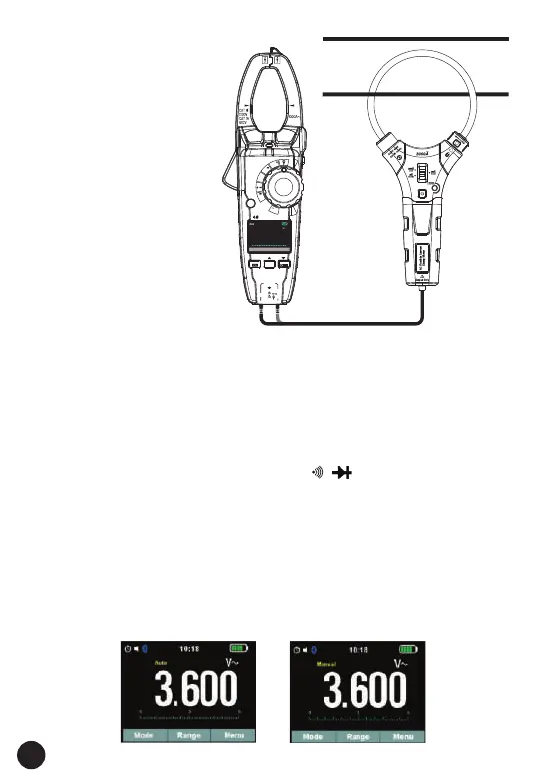
4.13. Fexible Coil
Current Measurements
(use the MT740)
1. Set the function switch
to the Flexible coil
position.
2. Insert the black test lead
banana plug into the
negative COM jack.
Insert the red test lead
banana plug into the
positive V jack.
3. Read the Current in the
display.
4. Press the RANGE key to
switch range. 30A,
300A, 3000A.
4.14. Using RANGE
• Press the RANGE key to activate the manual mode and to disable the
Auto range function.
• The message “Manual” appears on the upper left part of the display
instead of “Auto”.
• In manual mode, press the RANGE key to change measuring range: the
relevant decimal point will change its position.
• The RANGE key is not active in positions , , ,%, Temp °C°F, 600A
ACDC, 1000A ACDC.
• In Auto range mode, the instrument selects the most appropriate ratio for
carrying out measurement.
• If a reading is higher than the maximum measurable value, the indication
“O.L” appears on the display.
• Press and hold the RANGE key for more than 1 second to exit the
manual mode and restore the Auto range mode.
Auto (or manual) mode fig below:



 To Next Page