7
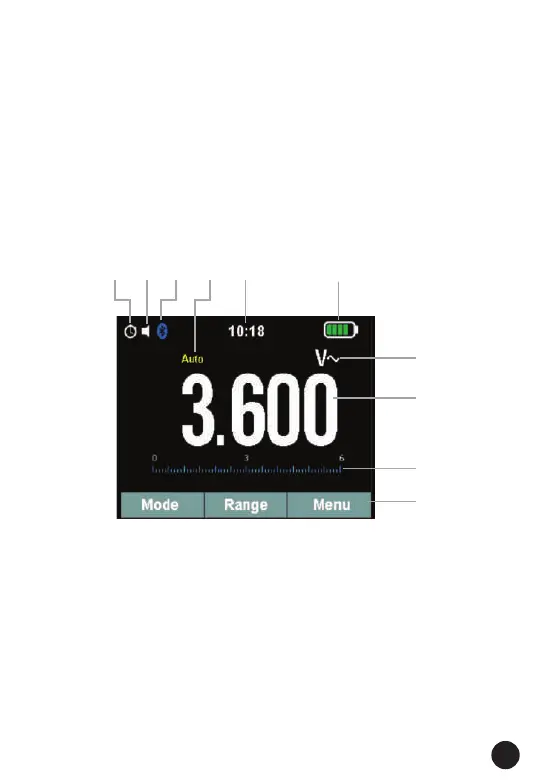
1. Power Off Function
2. Key Beeper Function
3. Bluetooth Function
4. Automatic/Manual Mode
5. System’s Time
6. Battery Capacity
7. Measuring Unit
8. Measuring Result
9. Analogue Bar Graph
10. Function Keys
3.2. Symbols Used on LCD Display
1. MODE: Press the Mode key to switch the functions, and press for 2
seconds to switch to VFD AC Voltage when AC Voltage measurement.
2. RANGE: Press the Range key to manual range, and press for 2 seconds
to switch to auto range measurement.
3. MENU: Press the menu key to open the menu functions, and press the
range and menu soft key function for more measurement options.
4. REL: Press the Rel key for 2 seconds to switch to inrush function when
measuring 600 or 1000 A AC.
5. HOLD: Freezes the present reading in the display and allows the display
to be saved. Press for 2 seconds to turn the Flashlight on or off.
3.3. Key Description
1
3
2
5
6
4
7
8
9
10



 To Next Page