$
To remove a cell window from the Mastersizer Micro or Microplus:
.
Open the cell drawer.
.
Ensure that the cell has fully drained.
.
Remove the small volume cell top by lifting and rotating the locking lever.
.
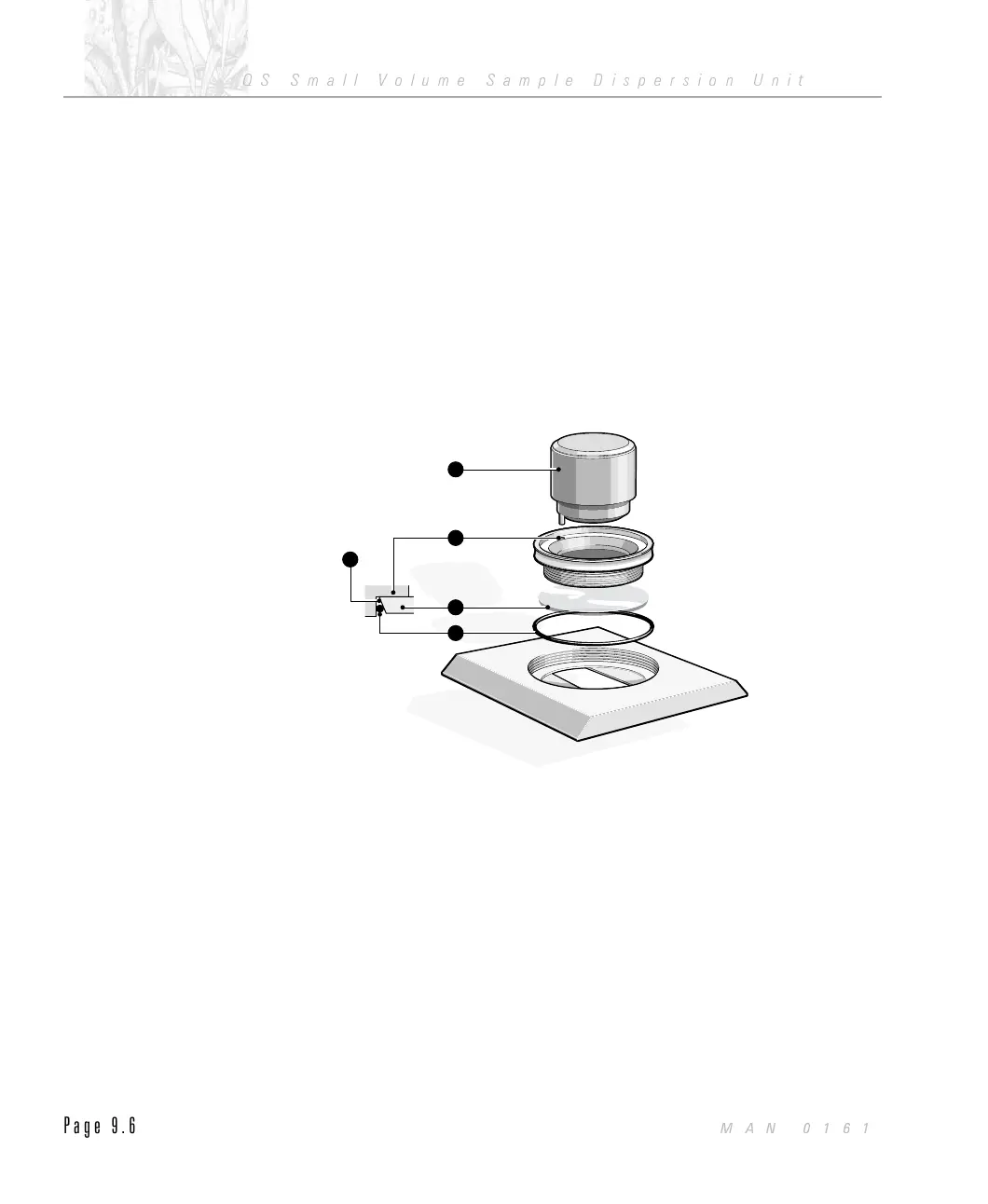
Locate the two pegs on the window tool À into the two holes on the retain-
ing ring.
.
Rotate the window tool anti-clockwise and remove the ring Á .
.
Tip the window à out of the cell onto a clean paper towel.
.
If the “O” ring  did not come out with the ring then carefully remove it
with a pair of tweezers.
The window assembly is shown in the diagram below.
Inspect both sides of the cell window. If there are any signs of scratches the
windows should be replaced. Spare windows may be obtained through your
Malvern Representative.
At this point any dirt on the surfaces of the window can be removed using a
compressed gas duster can. Keep the can upright while in use to prevent liquid
emerging.
1
2
4
3
5
ILL2218
CHAPTER 9
QS Small Volume Sample Dispersion Unit
Page 9.6
MAN 0161



 To Next Page