62
Menu Screen Operations
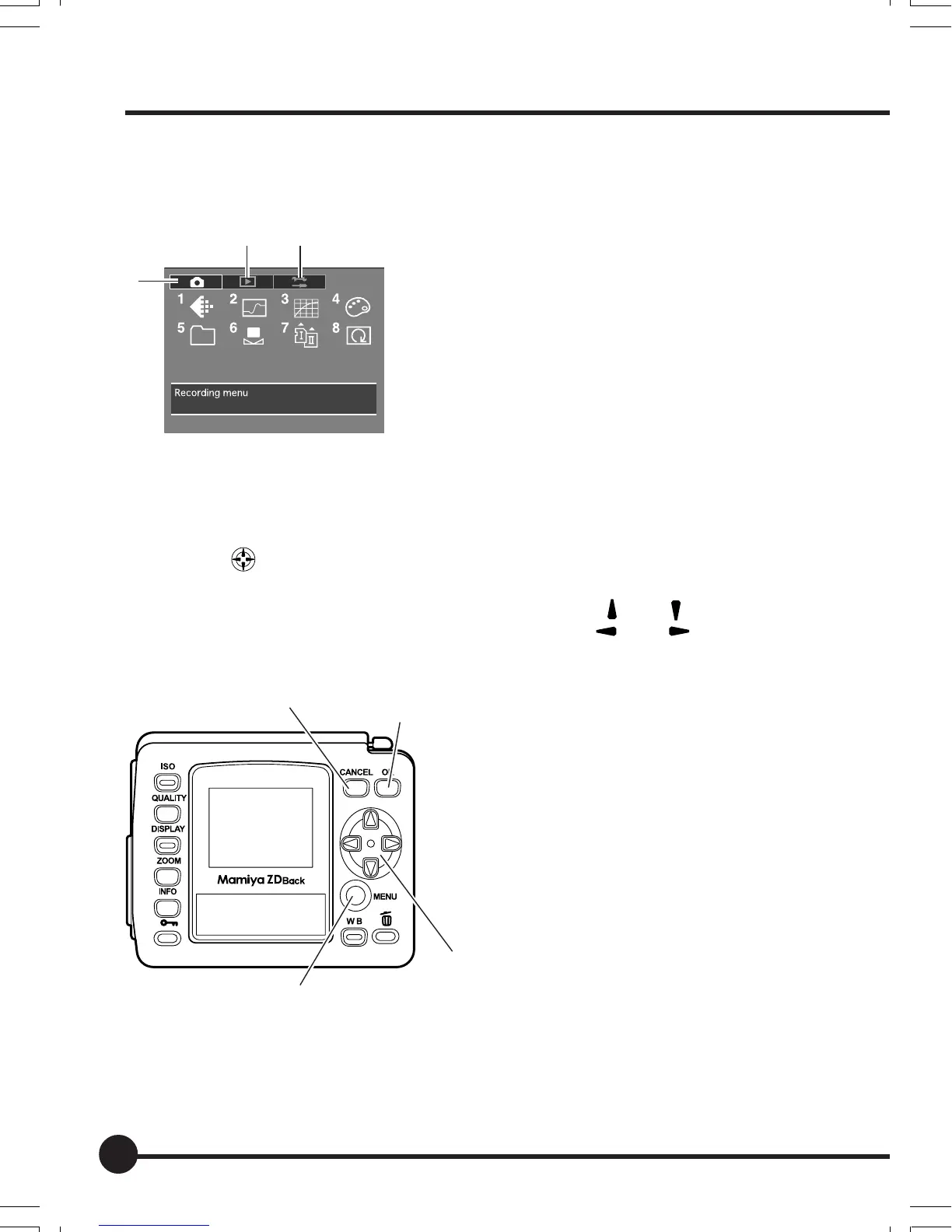
The following screen will be displayed on the LCD monitor when the MENU
button is pressed. This screen enables all of the various this unit settings to be
modified.
1 Recording Menu
The Recording Menu includes the settings for
color mode, sharpness, tone, saturation and
other elements related to taking photographs.
2 Playback Menu
The Playback Menu includes the settings for
erasing images, enlarging images and other
parameters related to playing back images.
3 Setup Menu
The Setup Menu includes all of the basis settings relating to this unit, such as
memory card formatting, date setup, and other settings.
•To set up each parameter, select the required parameter symbol with the use of the
toggle key , and then press the OK button.
• Press the Cancel button to return by one step.
• The front control dial performs the same functions as the [ ] and [ ] toggle keys, and
the rear control dial performs the same functions as the [ ] and [ ] toggles keys.
The toggle key operations are shown below.
1 Cancel button
Returns to the previous screen.
2 OK button
Confirms the selection.
3Toggle key
Selects the required parameter.
4 MENU button
Displays the menu screen.
1
23
1
2
3
4
05_ZD back_E_p061-066 07/3/9, 20:4162



 To Next Page