A:: Console Access
Rev 10/21/19 29
Note: You can exit minicom at any time—the purpose of showing it here is to demonstrate how to display
console messages for debugging purposes. To exit minicom, press Ctrl+A, then press X. When prompted, select
Yes to leave minicom.
· Windows
i. If you do not have a terminal emulator program (e.g. PuTTY, Tera Term, etc.), download and install
one now. The examples in this document use PuTTY.
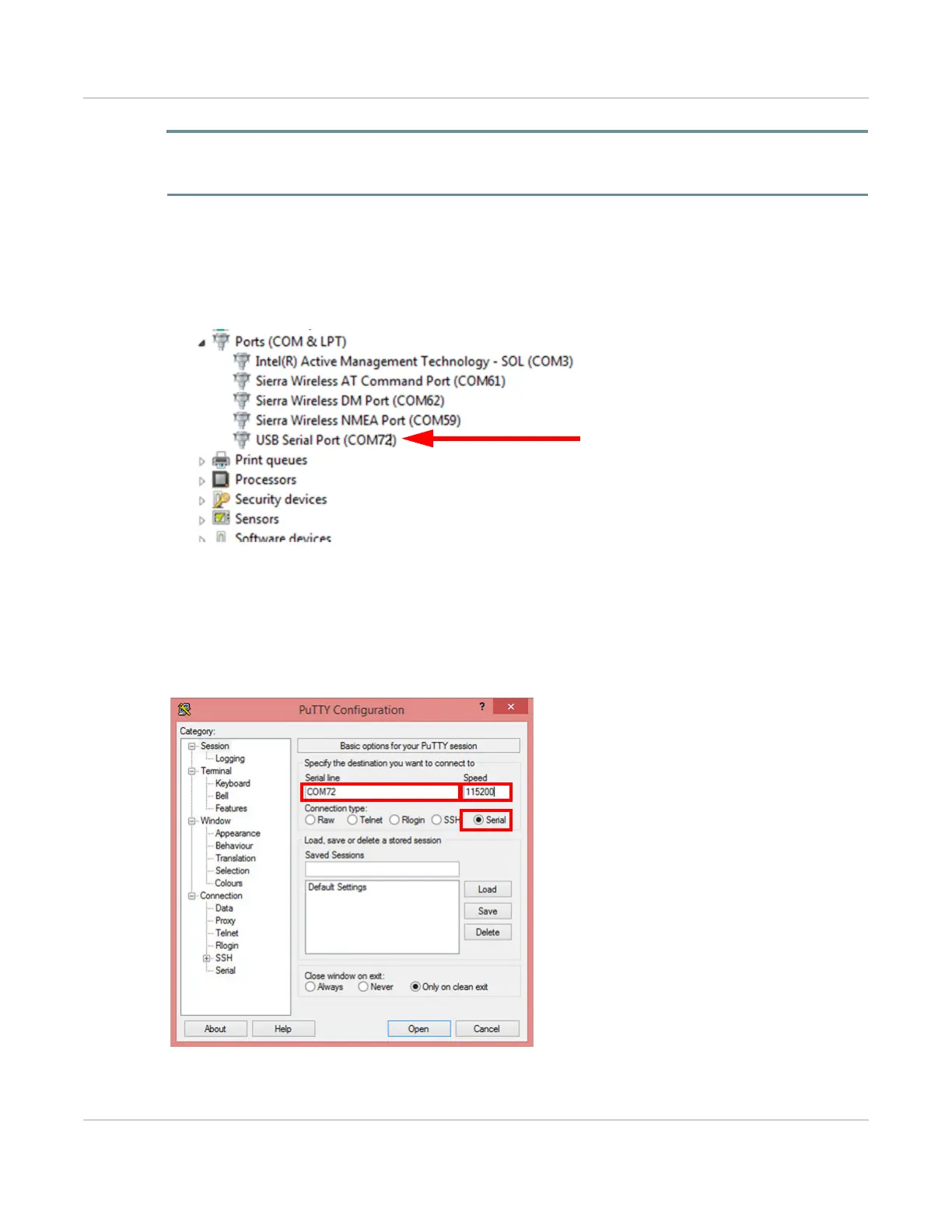
ii. Open Windows Device Manager, then expand Ports (COM &LPT). The mangOH Yellow’s CON port
enumerates as USB Serial Port (COMxx). (In the example below, it enumerates as COM72.)
iii. Open a terminal window (e.g. PuTTY) connected to the mangOH Yellow’s console using the following
settings:
· Connection type = Serial
· Serial line = [USB Serial port COM port]
· Speed = 115200
iv. Click Open. The window will remain empty until you power up the mangOH Yellow in the next step.


 To Next Page