ENGLISH
6
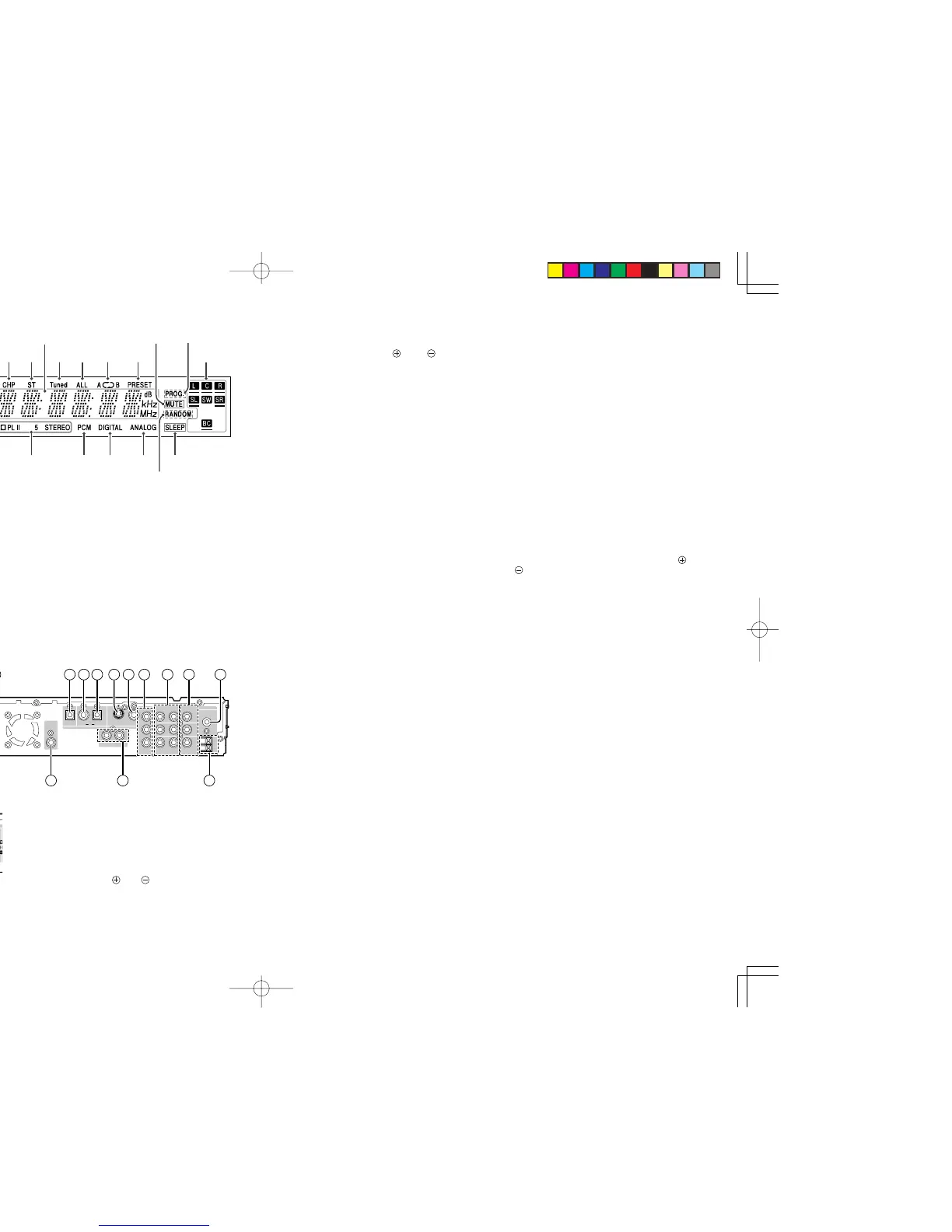
DISPLAY
a Indicates current disc format.
s P.SCAN indicates progressive scan mode.
d Indicates current title number.
f Indicates current track number.
g Indicates current chapter number.
h ST indicates in the tuner mode.
j Displays current status or time.
k Illuminates when a station is tuned.
l Illuminates during all track repeat playback.
¡0 Illuminates during repeat playback.
¡1 Illuminates when PRESET mode is selected.
¡2 Illuminates during mute.
¡3
PROG. indicates programmed playback is active.
¡4 Speaker icons.
¡5 Illuminates when SLEEP TIMER is set.
¡6 Illuminates during shuffle playback.
¡7
Illuminates when an analog source is selected.
¡8 Illuminates when a digital source is selected.
¡9 Type of audio signal.
™0 Surround mode.
™1 Indicates encoding audio format.
™2 Operating status indicator.
REAR PANEL
A CENTER, SURROUND L/R
and SUBWOOFER speaker
terminals
• Connect the center, surround left and right,
passive subwoofer speaker cord of center,
surround L/R and subwoofer channels,
observing the and polarity of the cord and
terminals.
B
FRONT L/R speaker terminals
• Connect the front left and right speaker cord of
front channel, observing the and polarity
of the cord and terminals.
C
Digital output jack (Optical)
• The DVD, CD signals during playback are output
digitally from this optical jack.
D VCR digital audio input jack
(Coaxial)
•
Connect to the digital audio output jack of a VCR.
E DSS digital audio input jack
(Optical)
•
Connect to the digital audio output jack of a DSS.
F
S-Video output jack
(DVD mode only)
• Connect to the s-video input jack of a monitor or
TV input.
G
Video output jack
• Connect to the composite video input jack of a
monitor or TV input.
H
Component video output jacks
(DVD mode only)
• Connect to the component video input jacks of
TV.
I
VCR IN/OUT jacks
• Connect the IN jacks to the output jacks of VCR
and the OUT jacks to VCR input jacks.
J
DSS IN jacks
• Connect the IN jacks to the output jacks of DSS.
K
FM antenna terminal (75 ohms)
• Connect an external FM antenna with a coaxial
cable, or a cable network FM source.
L AM antenna and ground
terminals
• Connect the supplied AM loop antenna. Use the
terminals marked “AM” and “GND”. The supplied
AM loop antenna will provide good AM reception
in most areas. Position the loop antenna until
you hear the best reception.
M
TV AUDIO IN jack
•
Connect the IN jack to the audio output jack of TV.
N
SUB WOOFER PRE OUT jack
• Connect to a component speaker input of an
active subwoofer.
O
SURROUND BACK CENTER
speaker terminals
•
Connect the separation cord supplied (Brown)
for Surround Back (Phantom) observing the
and polarity of the cord and terminals.
• If you use other 6.1ch speaker system than
SS2500, connect the surround back center
speaker cord of surround back center channel.
P
AC power cable (ER2500U)
• Connect to an AC power outlet.
This unit has to be powered by 120V AC only.
Q
AC IN (ER2500S)
• Connect to supplied an AC cable, and connect
to an AC power outlet.
ER2500S unit has to be powered by 230V AC
only.



 To Next Page