17
ENGLISH
SURROUND BACK
BS-YES (Default) :
Select this when the surround back speakers are
connected.
BS-NONE :
Select this when no surround back speakers are
connected.
SUBWOOFER
SW-YES (Default) :
Select this when a subwoofer is connected and
the front speakers are rather small.
When "SW - YES" is selected, Front speakers are
set to "F-SMALL" automatically, Bass frequencies
are output from the subwoofer.
SW-NO :
Select this when no subwoofer is connected and
the front speakers are large.
When "SW - NO" is selected, Front speakers are
set to "F-LARGE" automatically, and bass
frequencies of the all channels are output from
front speakers.
SPEAKER DISTANCE
This mode is used to set the speaker distance from
your listening position.
NIGHT
RETURN
DISPLAY
MUTE
VOLUME
DIMMERSURROUND
0
987
654
321
TV-CH
TV-VOL
TV-INPUTA/DDSSVCR
TV POWERTVTUNERDVD
SLEEPSTANDBY/ON
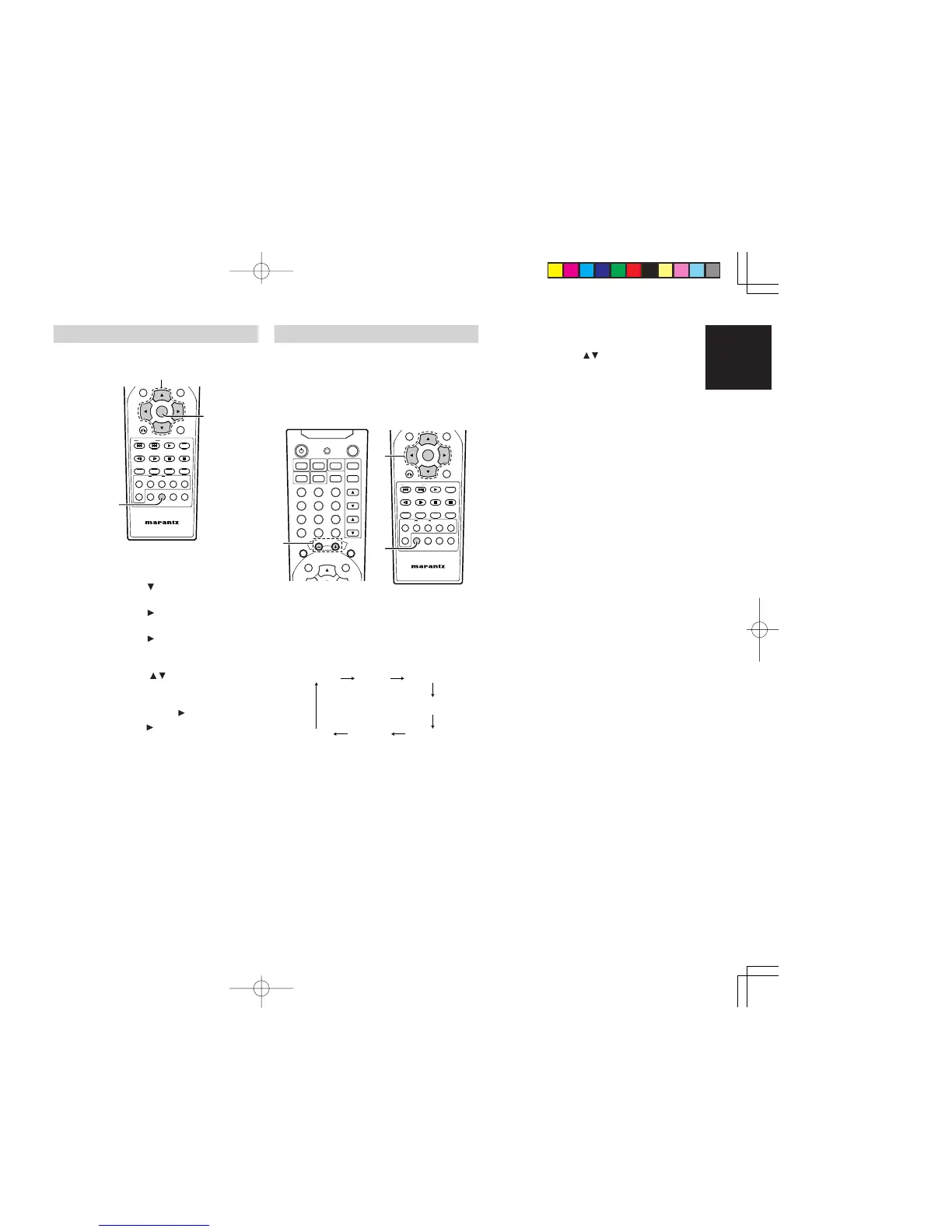
1. Press the SPK SET button.
• "SP SIZE" appears on the front display.
2. Press the cursor button.
• "SP DIST" appears on the front display.
3. Press the cursor button.
• "FRONT" appears on the front display.
4. Press the cursor button to adjust.
• "F 2.1M" (front default) appears on the front
display.
5. Press the cursor / buttons to change the
front speaker distance setting.
6. If you want to decide the speaker distance
setting, press the cursor button.
7. Press the cursor button to set next speaker
size setting (CNT).
• Repeat step 4. to 7. to set other speaker
distance settings.
• When all the settings have been finished,
press the SPK SET button or the ENTER
button (or leave the unit for 10 seconds) to
exit the speaker setup mode.
SPEAKER BALANCE (TEST TONE)
The test tone function is useful to adjust the relative
volume level between speakers.
Once the balance is set, you don't have to change
the balance as long as the speakers aren't moved.
• It is also possible to adjust the relative volume
level during playback DVD.
•
Use the remote control from your listening position.
NIGHT
RETURN
DISPLAY
MUTE
VOLUME
DIMMERSURROUND
0
987
654
321
TV-CH
TV-VOL
TV-INPUTA/DDSSVCR
TV POWERTVTUNERDVD
SLEEPSTANDBY/ON
NIGHTTONE
T.TONE SPK SETNTSC/PAL
1/ALL A-B RANDOM CLRPRG
ZOOMANGLEAUDIOS.TITLE
T.CLR RDS FM MODE MEMORY
TUNE PRESET BAND TUNE MODE
REPEAT
RC2500ER
ENTER
MENU
1. Press the T.TONE button.
• The test tone is emitted from each speaker
in the following order at 4-second intervals.
• If certain speakers are not used, (for
example, no center speaker) the test tone
will automatically skip over that channel.
C (Center)
FL (Front Left) FR (Front Right)
SL
(Surround Left)
SW
(Subwoofer)
SR
(Surround Right)
BS
(Back Surround)
Note:
• "Back Surr" will be displayed in DTS Neo:6,
DOLBY PRO LOGIC
II x, Dolby Digital EX, DTS
ES, Hall, Theater and Live mode.
2.
Adjust the master volume to the normal listening
level by VOLUME buttons.
3.
Using the cursor / buttons, adjust the volume
level of each speakers so that the test tone from
each speakers sounds the same.
• The volume level can be adjusted in 1 dB
steps from -10 dB to +10 dB.
• Adjust the volume level
of each speakers
,
while
the blinking display of each speakers
appears on the front display.
4. Repeat step 3. for other speakers until all
speakers are adjusted to the same volume
level.
5. When the setting has been finished, press the
T.TONE button to stop the test tone.
ER2500UDFU01eng2/4 04.8.26, 4:31 PMPage 17 AdobePageMaker6.5J/PPC



 To Next Page