38
ENGLISH
Other setting
You can set the timers, Audio delay, Speaker Optimize, and Auto
standby functions.
These settings are not displayed on the TV.
They are only displayed on the unit's display.
Timer setup (vpage38)
Audio delay (vpage39)
Auto standby (vpage40)
Other functions (vpage40)
Registering preset codes (vpage40)
Timer setup
You can set the timers (Everyday timer / Once timer) for playback
input sources from “DISC”, “TUNER”, and “iPod/USB1”.
Timer order of priority
The order of priority when the times set for the different timers
overlap is as follows:
1. Sleep timer
2. Once timer
3. Everyday timer
If the current time is not set, enter timer setting mode to get time
setting mode.
Setting the timer
• Everyday timer (“EVERY DAY”)
Playback starts and stops (the power turns off) at the set times each
day.
• Once timer (“ONCE”)
Playback starts and stops (the power turns off) once only at the set
times.
NOTE
• When the input source is set to “DISC/USB2”, use CD-DA. Many
BD-Video/DVD-Video cannot be played back using this function.
Also, fi les from a CD-R/-RW disc and USB memory device (USB2
port) cannot be played back.
• If you playback with the timer by using CD-DA, do not connect USB
memory devices to the USB2 port on the rear panel.
• If the input source is “DISC/USB2”, and fi les are being played
back from the USB memory device (USB2 port) with the power on,
playback does not switch to disc playback even when the timer start
time is reached.
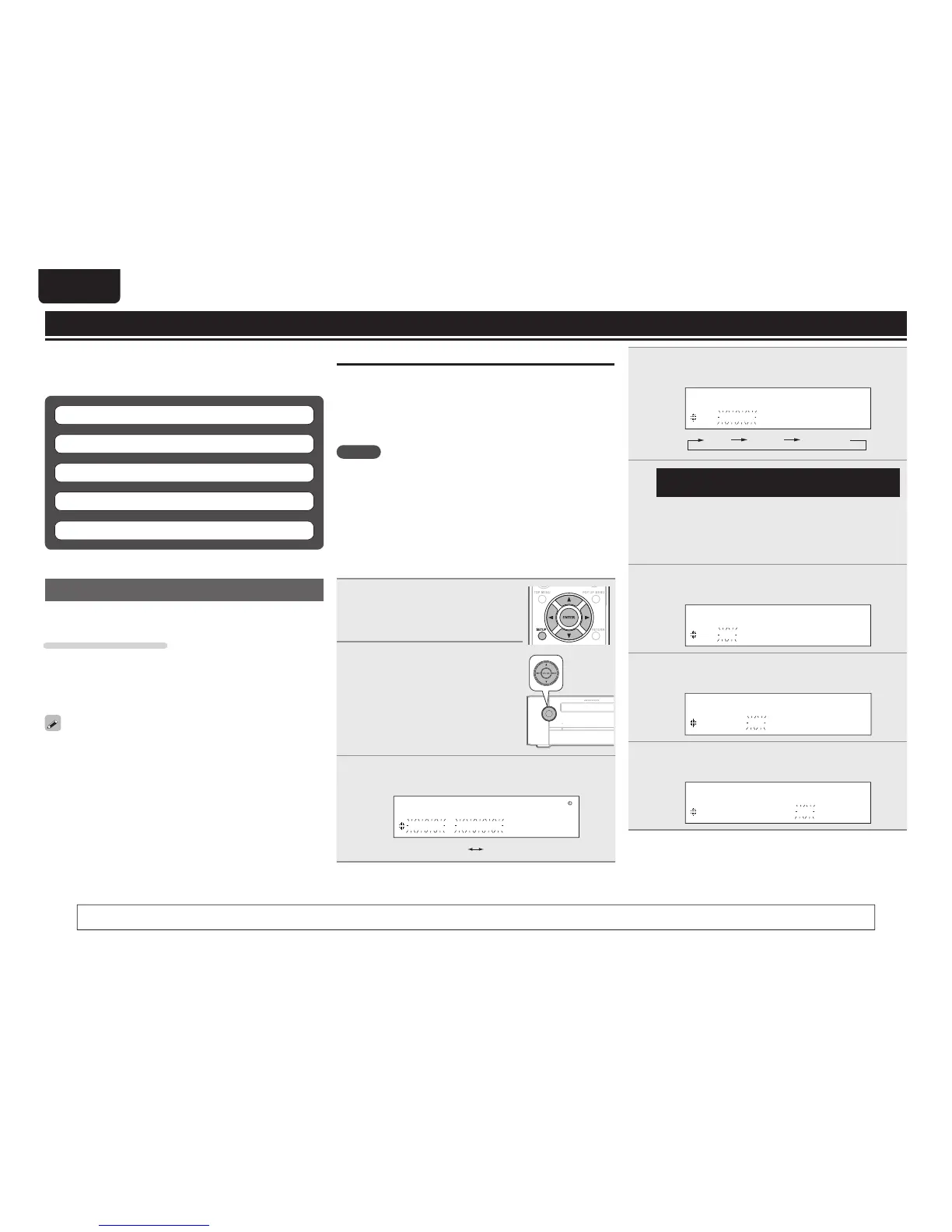
1
Press SETUP.
• If you perform operations on this unit, press
and hold MODE for 3 seconds and longer.
2
Use ui to select “TIMER
SETUP”, then press ENTER or
p.
3
Use ui to select the timer mode, then press ENTER
or p.
M O D E S E L E C T
O N C E T I M E R
ONCE
EVERYDAY
4
Use ui to select the input source, then press
ENTER or p.
I N P U T S E L E C T
D I S C
DISC TUNER iPod/USB1
5
Only when the input source “TUNER” function
is selected
Use
ui to select the preset number, then press
ENTER or p.
• When no name has been registered for the selected preset
number, the frequency appears after the preset number is
displayed.
6
Use ui to select “hours” for the timer start time,
then press ENTER or p.
O N T I M E
1 0 : 0 0 > 0 0 : 0 0
7
Use ui to select “minutes” for the timer start time,
then press ENTER or p.
O N T I M E
1 0 : 3 0 > 0 0 : 0 0
8
Use ui to select “hours” for the timer stop time,
then press ENTER or p.
O F F T I M E
1 0 : 3 0 > 1 1 : 0 0
You can also perform the same operations as o and p on the remote control unit with the MODE button and the INPUT button on this unit, respectively.



 To Next Page