Getting
Started
Basic
Connections
Advanced
Connections
Basic
Operations
Advanced
Operations
Other
setting
Settings
Other
information
Explanation
terms
Troubleshooting Specifi cations Index
39
Other
setting
ENGLISH
9
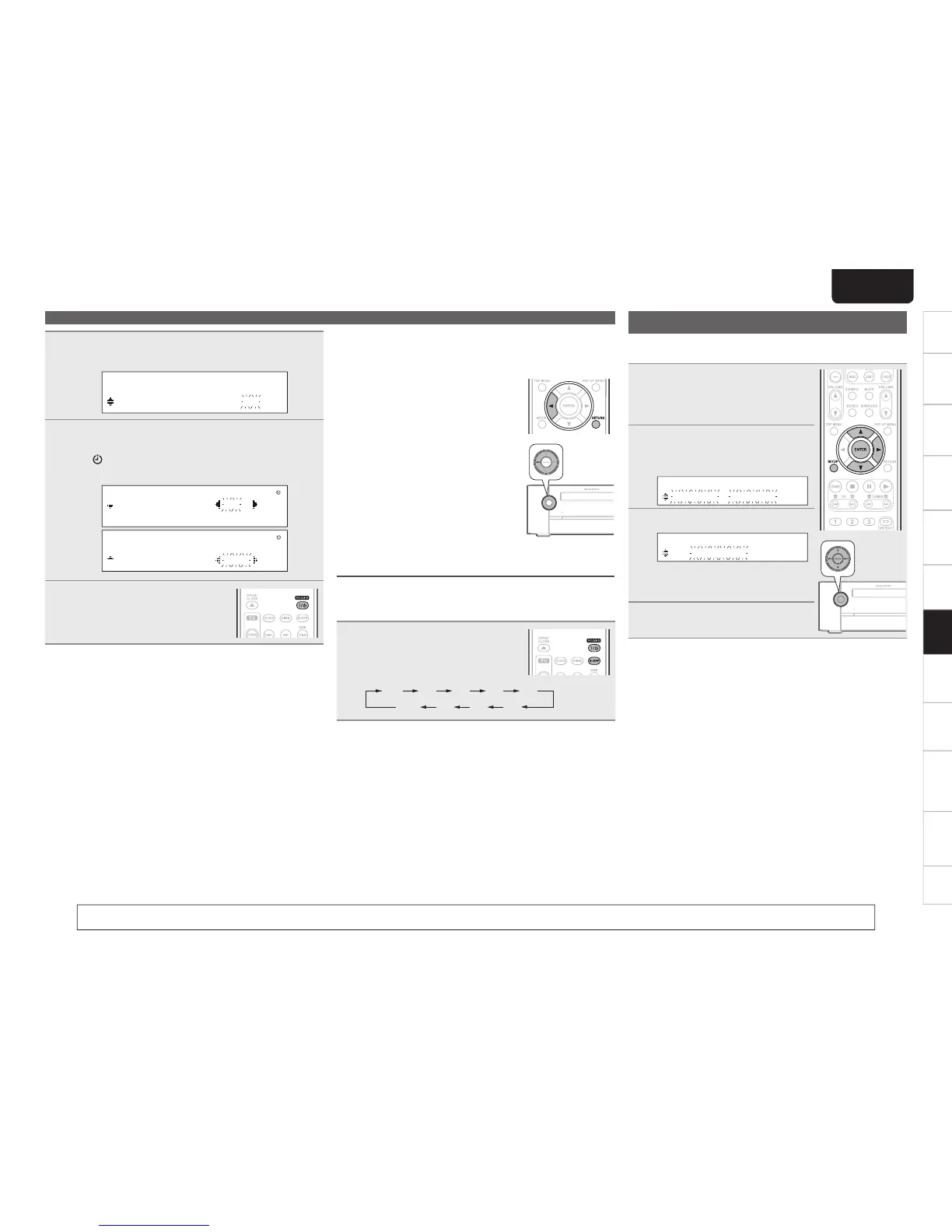
Use ui to select “minutes” for the timer stop time,
then press ENTER or p.
O F F T I M E
1 0 : 3 0 > 1 1 : 3 0
10
Use o p to select “ON” or “OFF” for the timer,
then press ENTER.
• The indicator lights and the timer setting is entered.
• The timer settings are displayed for 3 seconds.
O N C E T I M E R O N
E V E R Y D A Y O F F
O N C E T I M E R O N
E V E R Y D A Y O F F
11
Press POWER to set the power to
standby.
Timer standby mode is set, and the
timer indicator lights red.
n Setting the timer to on or off
q Press SETUP.
• If you perform operations on this unit, press and hold MODE for
3 seconds and longer.
w Use ui to select “TIMER ON/OFF” , then press ENTER.
e Use ui to select “ONCE” or “EVERYDAY”.
r Use op to select “ON” or “OFF” for the timer, then press
ENTER.
The timer settings are displayed after this.
• When set to “OFF”, time operation is disabled, but the timer
settings remain unchanged.
n To check the timer settings
q Press SETUP.
• If you perform operations on this unit, press and hold MODE for
3 seconds and longer.
w Use ui to select “TIMER ON/OFF” , then press ENTER.
e When “ON” is displayed for the timer setting, press ENTER.
The timer settings are displayed for 3 seconds..
n To change the timer settings
Perform the operations at “Setting the timer” (vpage38).
n To change the setting while setting the timer
Press o or RETURN.
• If you perform operations on this unit,
press MODE.
The setting returns to the previous step.
• Display the setting you want to change,
then make the desired setting.
Setting the sleep timer
Use this function to automatically switch the power to the standby
mode after a specifi c amount of time (minutes).
The sleep timer can be set to up to 120 minutes.
During playback, press SLEEP and
display the time you want to set.
• After about 5 seconds, the setting is entered
and the display returns to as it was before.
120 90 60 50 40
20 3010OFF
n Canceling the sleep timer
Either press SLEEP to select “SLEEP OFF” or press POWER.
n To check the time remaining until the sleep
timer is activated
Press SLEEP.
Timer setup
Audio delay
When the input source is “DISC/USB2”, timing delays between the
audio and images can be corrected while images are viewed.
1
Press SETUP.
• If you perform operations on this unit, press
and hold MODE for 3 seconds and longer.
2
Use ui to select “AUDIO
DELAY”, then press ENTER or
p.
S E T U P M E N U
A U D I O D E L A Y
3
Use ui to adjust a delay time.
A U D I O D E L A Y
8 0 m s e c
• Range : 0 to 160 msec
• Step : 10 msec
• Default : 0 msec
4
Press ENTER or p.
You can also perform the same operations as o and p on the remote control unit with the MODE button and the INPUT button on this unit, respectively.



 To Next Page