EasyManua.ls Logo

Marantz PMD620MKII - Installing a Memory Card; Removing a Memory Card

Marantz PMD620MKII
96 pages
Print Icon
To Next Page IconTo Next Page
To Previous Page IconTo Previous Page
Loading...
18
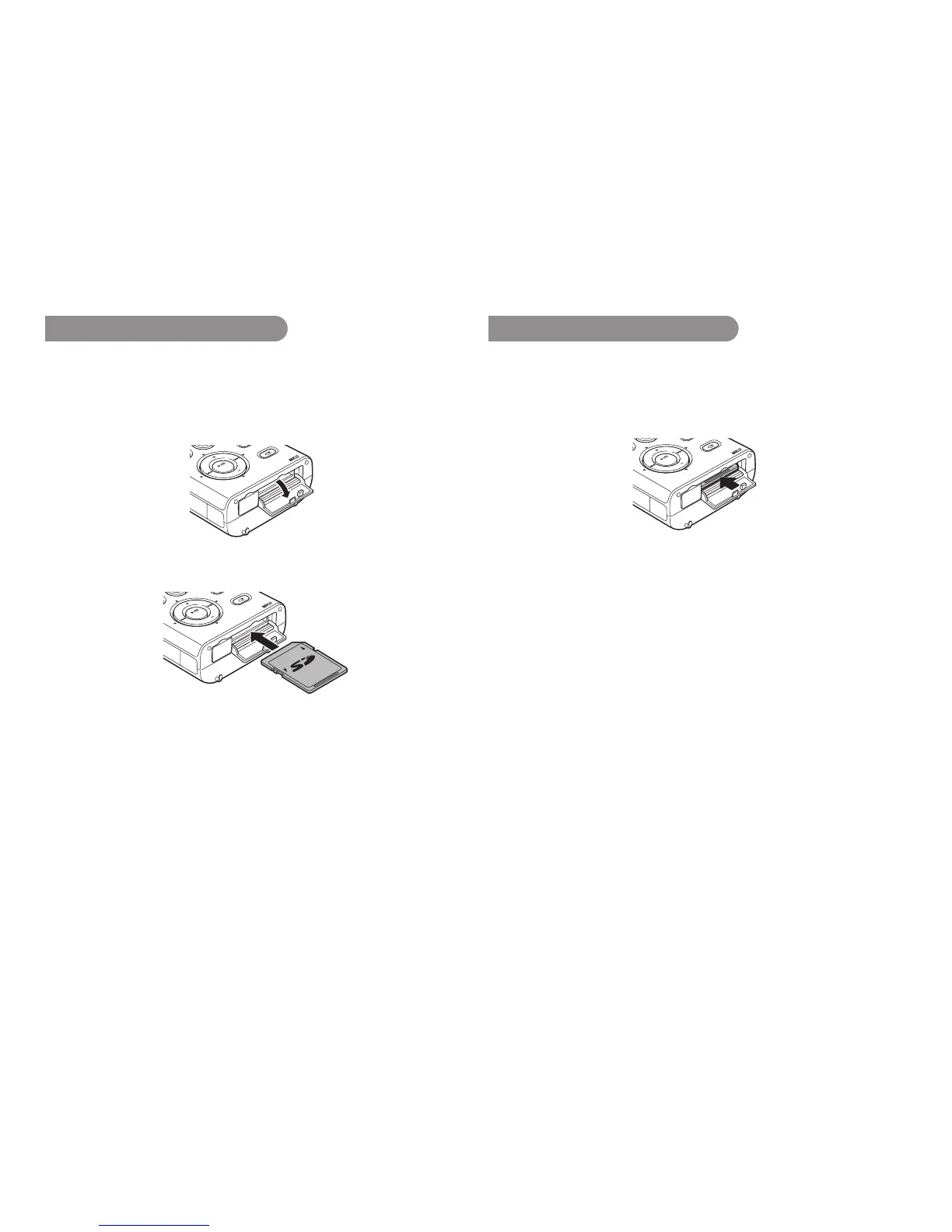
Installing a memory card
The PMD620MK
II
records onto various types of SD cards.
1.
Check that the power is turned off.
2.
Pull the SD card lid.
DC IN
MENU/
ST
SKIP BA
CK
VOL
ENTER
VOL
RETAKE
SOLID STATE RECORDER
PMD620
3.
Fully insert the SD card.
DC IN
MENU/ST
SKIP BACK
VOL
ENTER
VOL
SOLID S
TATE RECORDER
PMD620
RETAKE
4.
Close the SD card lid.
Removing a memory card
1.
Check that the power is turned off.
2.
Pull the SD card lid.
3.
Push the card, then pull it to remove it.
DC IN
MENU/ST
SKIP BACK
VOL
ENTER
VOL
SOLID STATE RECORDER
PMD620
RETAKE
4.
Close the SD card lid.
Notes:
• IftheSDcardlidopenswhilepowerison,“DoorOpen”isdisplayed.
• Ifrecordingisin progress, opening theSDcard lid automatically stops
recordingandwritescriticalfileinformationtoproperlyclosethefile.

Table of Contents

Related product manuals