43
USB mode
The PMD620MK
II
records directly onto SD cards.
Recordings can then be transferred to your desktop or laptop
computer by removing the SD card from the PMD620MK
II
, or by
connecting the PMD620MK
II
to your computer via the USB port.
Audio recorded in the popular MP3 compression format is
directly available for intranet or internet file sharing.
Computer compatible
On your computer you can then:
• logandarchiveaudiofiles
• playaudiofiles
• saveaudiofilestoyourdrive
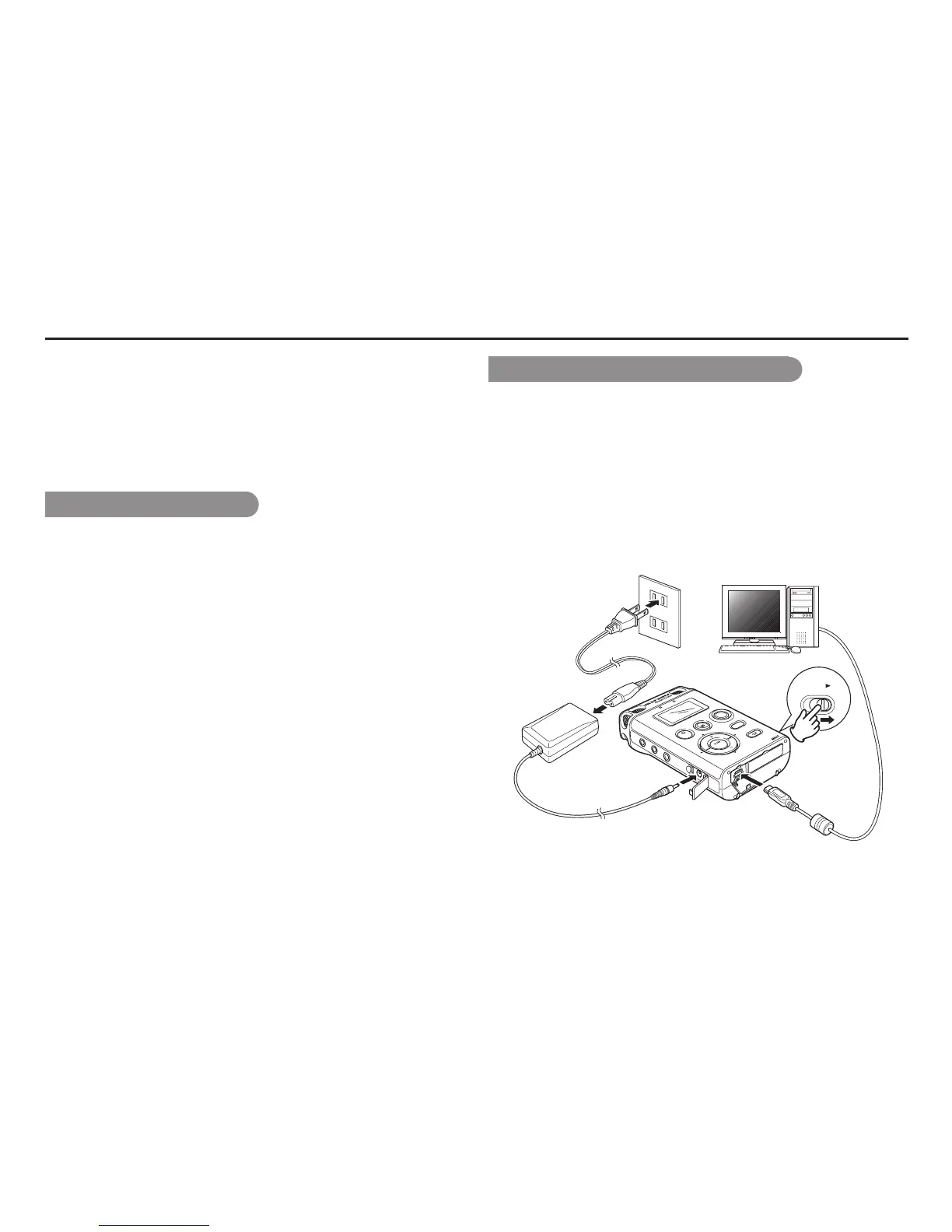
How to connect via the USB port
The SD card in the PMD620MK
II
appears as an external drive on
a connected computer.
1.
Power up the computer.
2.
Insert an SD card.
3.
Power up the PMD620MK
II
.
4.
During Stop mode, connect the cable to the PMD620MK
II
and
your computer.
LEVEL
O
VER
REC
REM
OTE
DC IN
DISPLAY
MENU/S
T
ORE
SKIP
B
ACK
REC PAUSE
S
TOP/CANCEL
VOL
ENTER
VOL
POWER
SOLID STA
TE RECORDER
PMD620
PHONES
LINE OUT
RETAKE



 To Next Page