34
Display
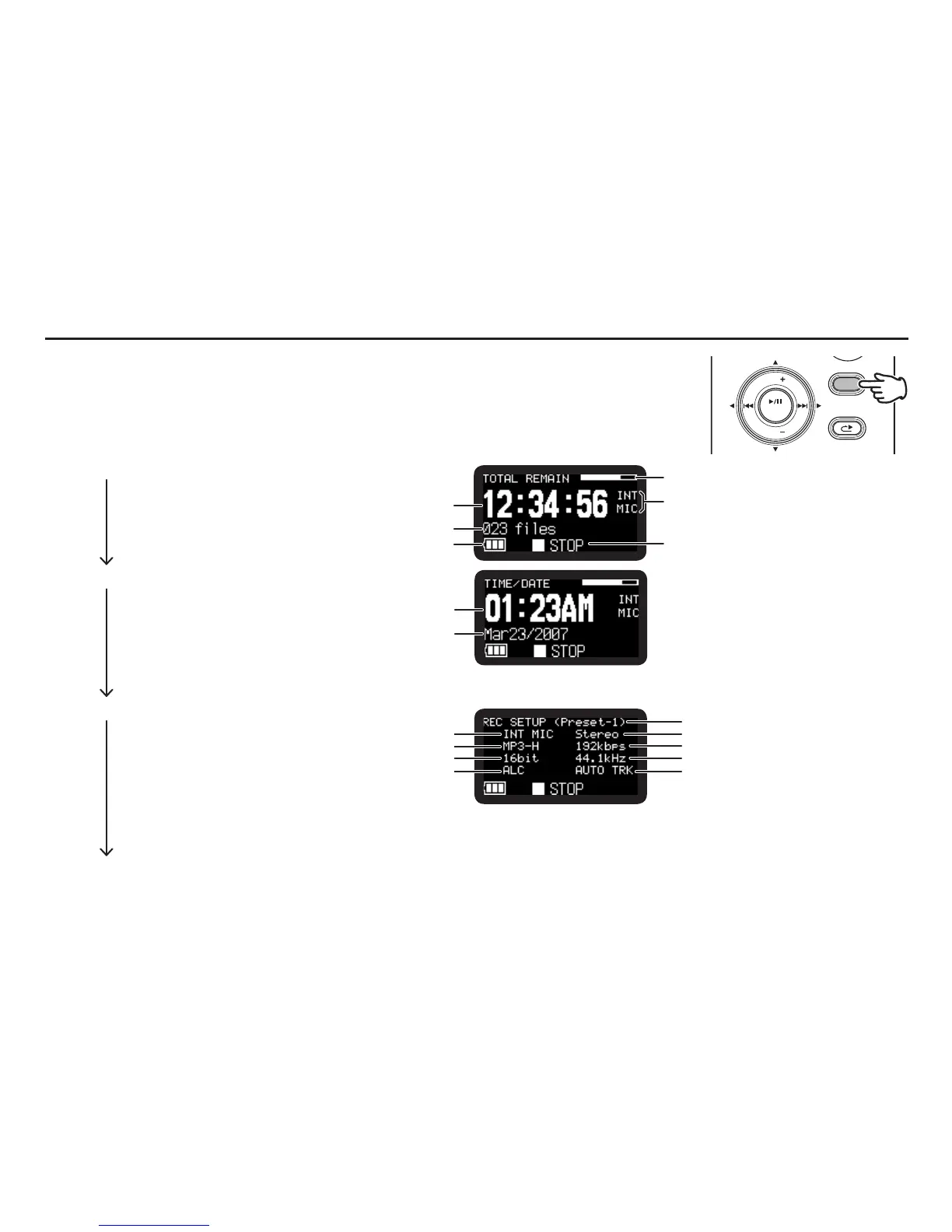
Press the DISPLAY button to alternate information displays. Displays are slightly different in
Stop, Record and Playback mode.
DISPLAY
MENU/STORE
SKIP
RETAKE
BACK
VOL
ENTER
VOL
During Stop mode:
q Total Remain
Remaining space of the card.
Input source
(INT MIC/MIC/LINE)
Total remain time
Number of files
Battery icon
Status
w Current Time/Date
Current time
Current date
• If“Date Form”setting inpresetmenuis M/D/Y,the datefieldshows MMMDD/YYYY.
If“DateForm”settingisD/M/Y,thedatefieldshowsDDMMM/YYYY.(
v
P.74)
e Record Setup
Input source
(INT MIC/MIC/LINE)
Quantization
ALC icon AUTO TRK icon
Sample rate
MP3 bitrate
Chennel
Record Format
Preset
• TheMP3bitrateisdisappearedifthe“RecFormat”settingisPCM.
• TheALCiconisdisappearedifthe“LevelCont.”settingisManual.
• TheAUTOTRKiconisdisappearedifthe“AutoTrack”settingisOff.
q Total Remain (Default display)



 To Next Page