ENGLISH
20
1.
When you select “MANUAL” in T-MODE menu
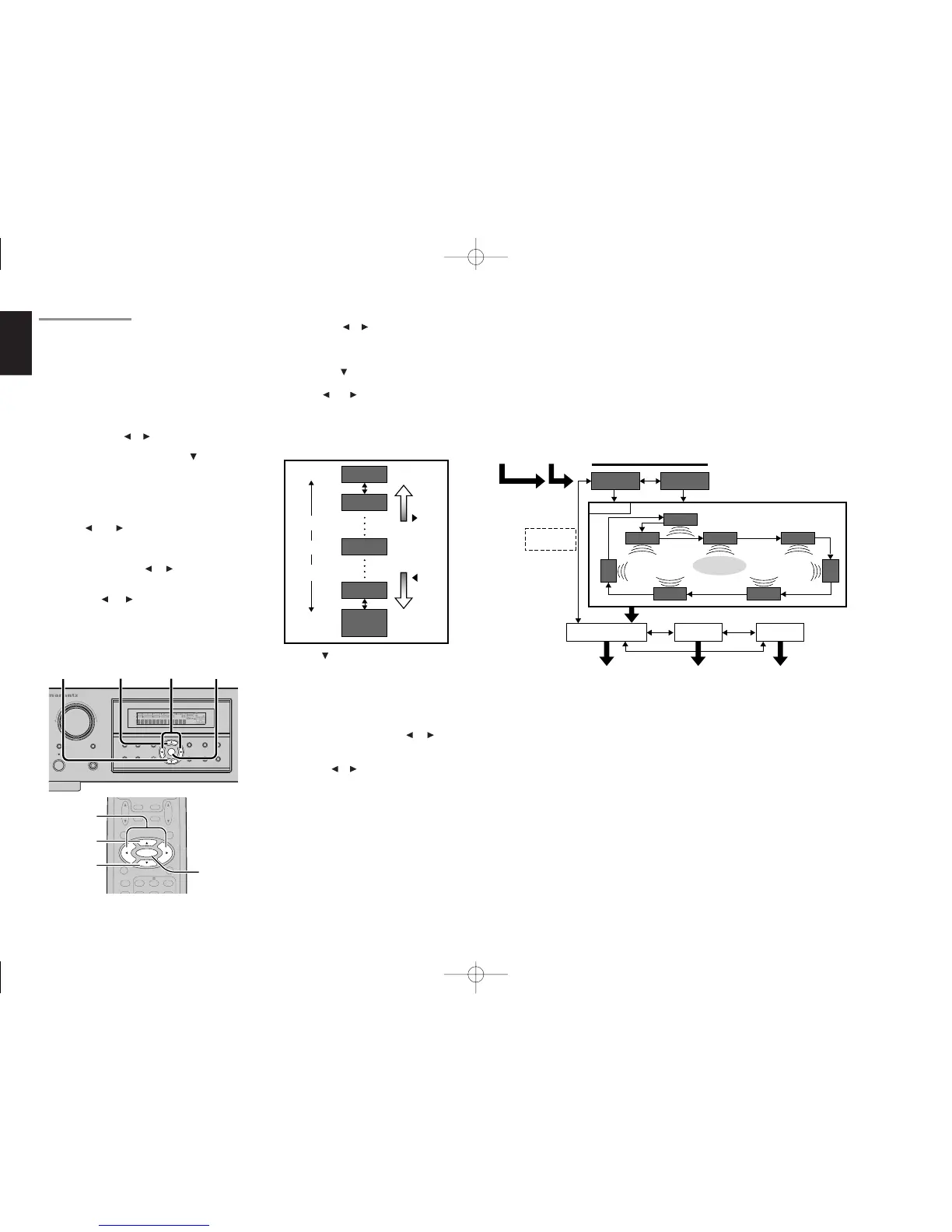
by pressing the or button, this unit will emit
a pink noise from the front left speaker. At this
time, adjust the desired level of the master
volume. Remember the level of this noise and
then press the button. This unit will emit the
pink noise from the center speaker.
2.
Using the and cursor buttons, adjust the
volume level of the noise from the center
speaker so that it is the same level as the front
left speaker (Note that this can be adjusted to
any level between –10 and +10 dB in 1dB
intervals).
3.
Press the cursor button again. This unit will
now emit the pink noise from the front right
speaker.
4.
Repeat steps 2 and 3 above for the front right
and other speakers until all speakers are
adjusted to the same volume level.
5.
Press the ENTER button, you can stop the
test tone mode.
Or press the or cursor
button to select “EXIT” then press the ENTER
button to exit the SETUP MENU.
Or press the or button to select “RETURN”
then press the ENTER button to return the
previous “2-2.
Speakers Distance
” setup.
2-3. SPEAKERS LEVEL
Here you will set the volume for each speaker so
that they are all heard by the listener at the same
level. Moreover, if the T.TONE button is pressed,
unit can enter into this menu directly.
Note:
• The speaker level settings is not available in 7.1
channel input mode and Pure Direct mode.
T(TEST) MODE :
Selects “MANUAL” or “AUTO” for generating
mode of test tone or cursor button.
If you select “AUTO” by pressing the button, the
test tone will be cycled through in a circular pattern
which is L (Left) → C (Center) → R (Right) → SR
(Surround Right) → SBR (Surround Back Right) →
SBL (Surround Back Left) → SL (Surround Left) →
SW (Subwoofer) → L →.. increments of 2 seconds
for each channel.
Using the and cursor buttons, adjust the
volume level of the noise from the speaker so that
it is the same level for all speaker.
Press the ENTER button, you can stop the test
tone mode. Or press the or cursor button to
select “EXIT” then press the ENTER button to exit
the SETUP MENU.
Or press the or cursor button to select
“RETURN” then press the ENTER button to return
the previous “2-2. Speakers Distance” setup.
If you select “MANUAL”, adjust the output level of
each speaker as follow.
Notes:
• Speakers that you selected “None” for in the
Speaker Size Setup menu will not appear.
• The setup level for each channel is memorized for
reproduction in all surround mode.
• To adjust the speaker levels for 7.1-channel input
sources, you will need to use the 7.1CH Level
Input setup menu.



 To Next Page