EasyManua.ls Logo

Markes International Unity 2 - Page 57

Markes International Unity 2
67 pages
Print Icon
To Next Page IconTo Next Page
To Previous Page IconTo Previous Page
Loading...
Markes International Ltd
T: +44 (0)1443 230935 F: +44 (0)1443 231531 E:
enquiries@markes.com
www.markes.com
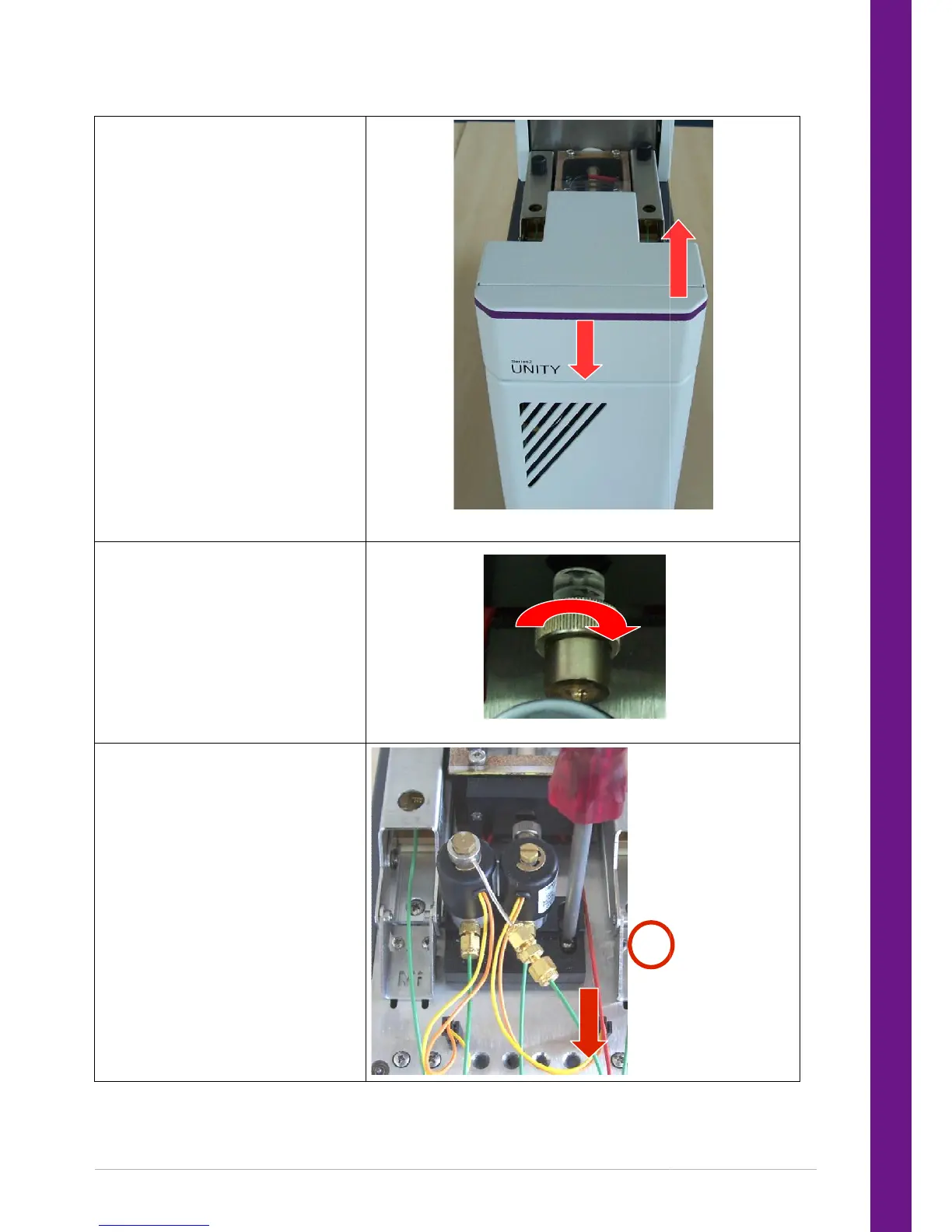
Remove the front top cover from
UNITY 2
1. Pull the cover back
2. Lift up
Loosen the steel fitting attached to the
cold trap
Keep a firm hold of the trap
pneumatics assembly during these
steps – if it is allowed to twist it can
snap the cold trap.
1. Loosen screw by ~4 turns. Do not
remove the screw completely.
2. Gently pull the desorb pneumatic
assembly towards the front of the
instrument being careful to keep it in
the horizontal plane.
Move the assembly clear of the cold
trap.

enquiries@markes.com
Loosen the steel fitting attached to the
1.
2.
Page 57

Table of Contents

Other manuals for Markes International Unity 2

Related product manuals