MR 150M–1050M SINGLE – MXIII CONTROLLER
OPERATION
17
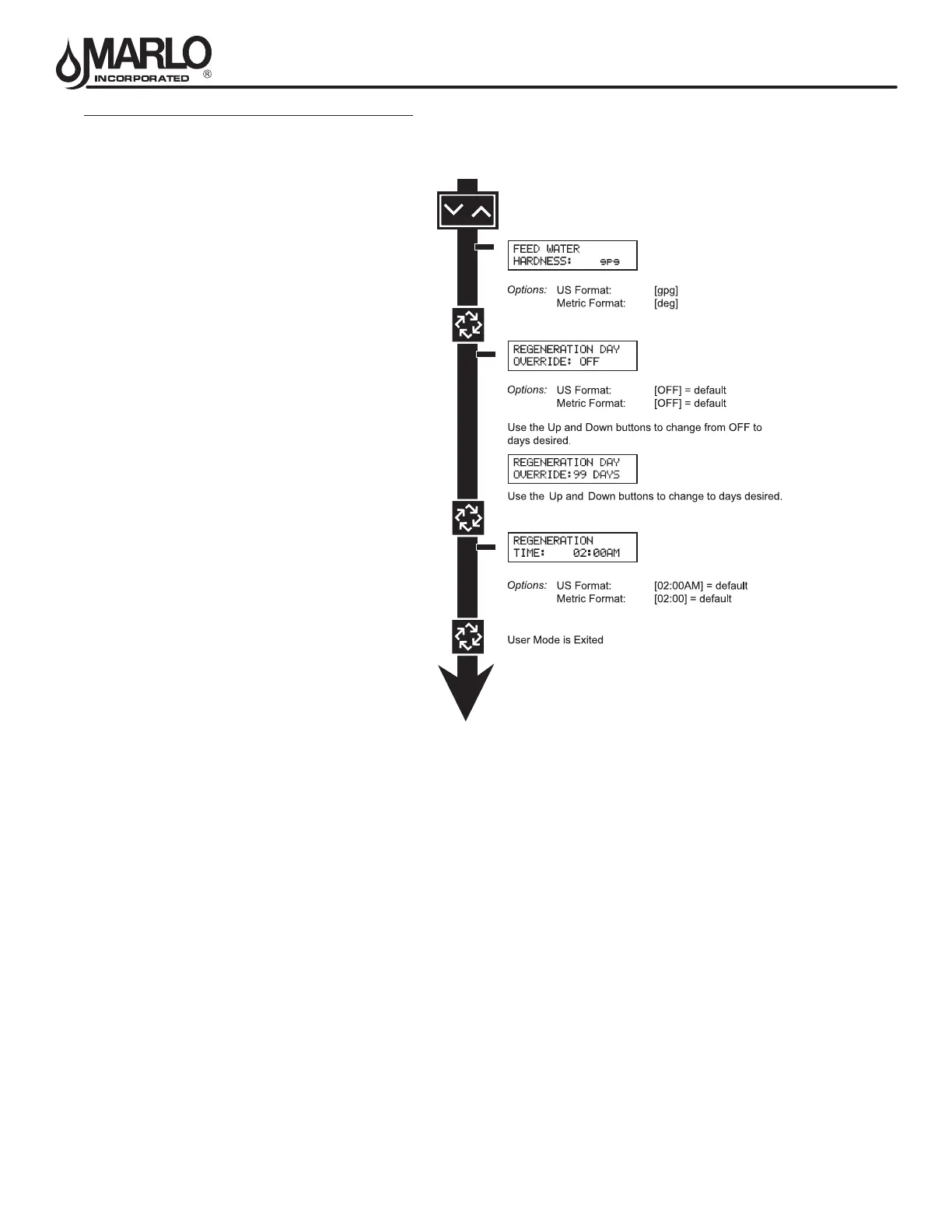
USER MODE PROGRAMMING FLOW CHART
NOTE: User Mode is only displayed when a metered option is chosen under System Type.
Depending on current option settings, some displays cannot be viewed or set.
Entering User Mode:
Hold the Up and Down buttons for 5 seconds.
NOTE: User Mode cannot be entered on the Lag unit for System 6.
1. Enter User Mode
Press and hold the Up and Down buttons for 5 seconds.
2. Set Language Option
Press up or down to select language.
Press the Extra Cycle button to proceed to the next step.
3. Set Feed Water Hardness
Press the Shift, Up, and Down buttons to move the cursor and change the value of the numbers.
Press the Extra Cycle button to proceed to the next step.
NOTE: Only displayed when a metered option is chosen under System Type.
4. Set Regeneration Day Override
To turn on and set the days, press the Down button.
Press the Shift, Up, and Down buttons to move the cursor and change the value of the numbers.
Press the Extra Cycle button to proceed to the next step.
5. Regeneration Time
Press the Shift, Up, and Down buttons to move the cursor and change the value of the numbers.
Press the Extra Cycle button
6. End of User Programming Mode



 To Next Page