Trawl Explorer | V2 | Sensor Configuration
Testing Measures
You can test the measures taken by the sensor (e.g. battery level, temperature, depth) to check that
there are no faults.
Before you begin
The sensor is connected to Mosa.
Procedure
1.
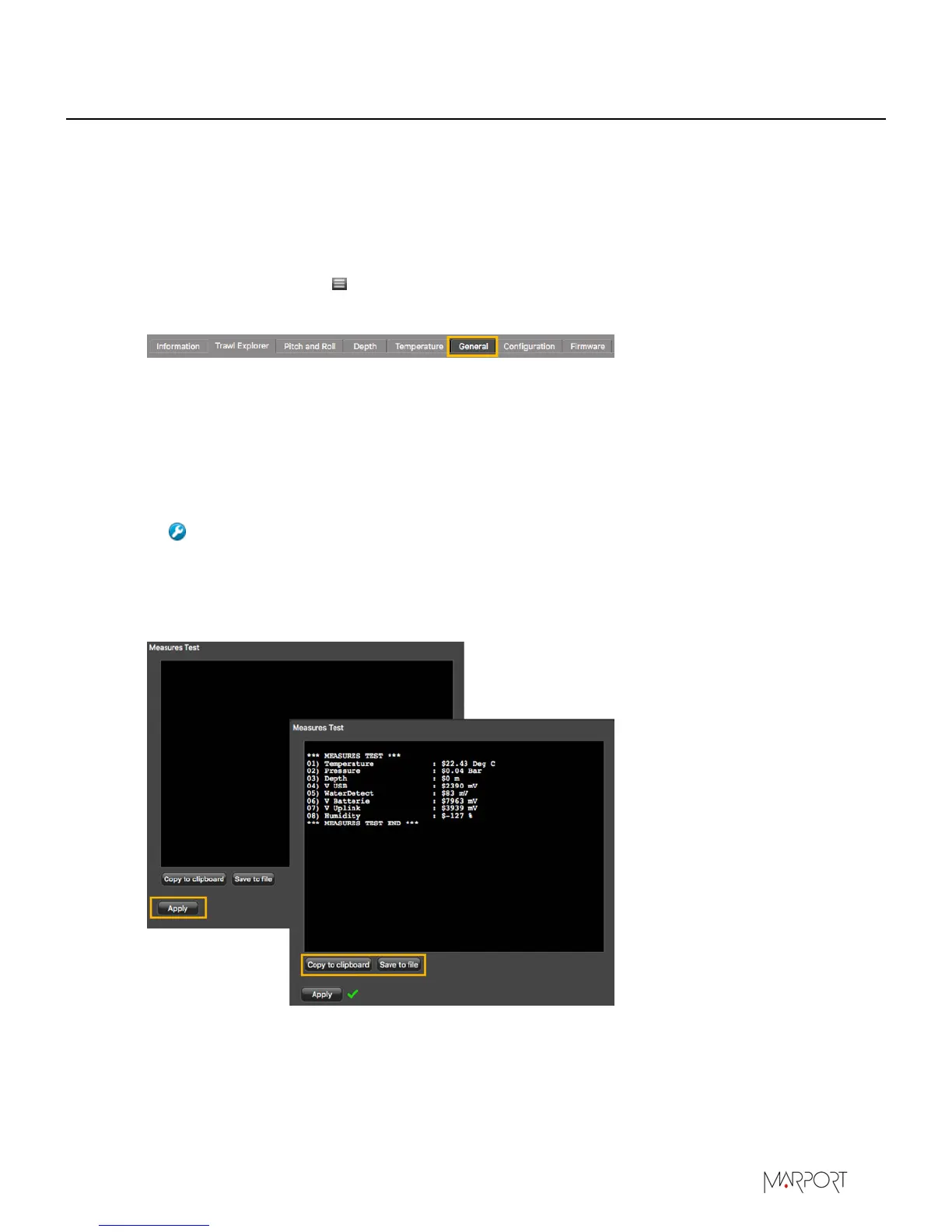
From Mosa, click Menu > Expert Mode and enter the password copernic.
2.
Click the tab General.
3.
From Measures Test, click Apply.
The measures taken by the sensor are displayed.
4.
Check the following measures:
• The temperature is consistent with the sensor environment.
• The depth is between 0 and 2m.
• The battery is between 6.9V and 8.1V.
Troubleshooting: If depth is incorrect, you can put an offset from Depth> Depth
Offset.
The other measures are only useful for the support service.
5.
To save the test on your computer:
•
Click Save to file to download the file.
•
Or, click Copy to clipboard then press Cmd + V on a word processor like Pages to paste the
contents.
| 25


 To Next Page