Trawl Explorer | V2 | Servicing and Maintenance
Servicing and Maintenance
Read this section for troubleshooting and maintenance information.
Interference Check
You can check if there is noise interfering with the reception of signals.
Spectrum Analyzer Display
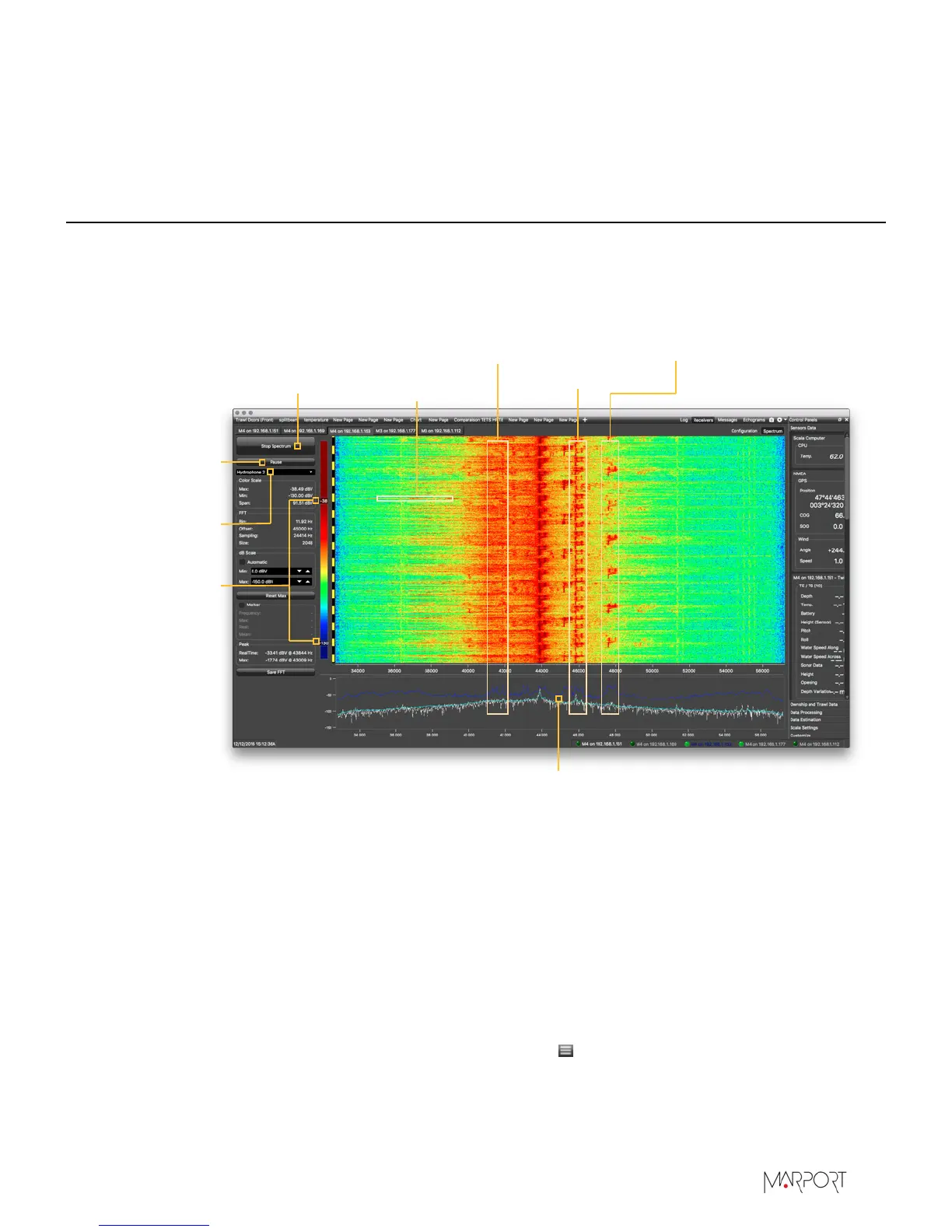
The following picture explains the main parts of the spectrum analyzer on Scala.
Start/Stop
spectrum analyzer
Pause
spectrum
analyzer
Select
hydrophone
Drag to adjust
colour scale
Dark blue line: maximum signal level
Light blue line: average signal level
White line: last received signal level
NBTE/HDTE signals
Noise
interference
Sensors pulses
Door sounder signals
Checking Noise Interference
You can use the spectrum analyzer to check the noise level of the hydrophones and check for
interference.
About this task
See Spectrum Analyzer Display above for details about the spectrum analyzer display.
Procedure
1.
From the top left corner of Scala window, click Menu > Expert Mode and enter the password
copernic.
2.
Again in the menu, click Receivers.
| 39


 To Next Page