Trawl Explorer | V2 | System Configuration and Display
Configuring the Sensor Settings
Important: Make sure the settings you enter here are the same as in Mosa.
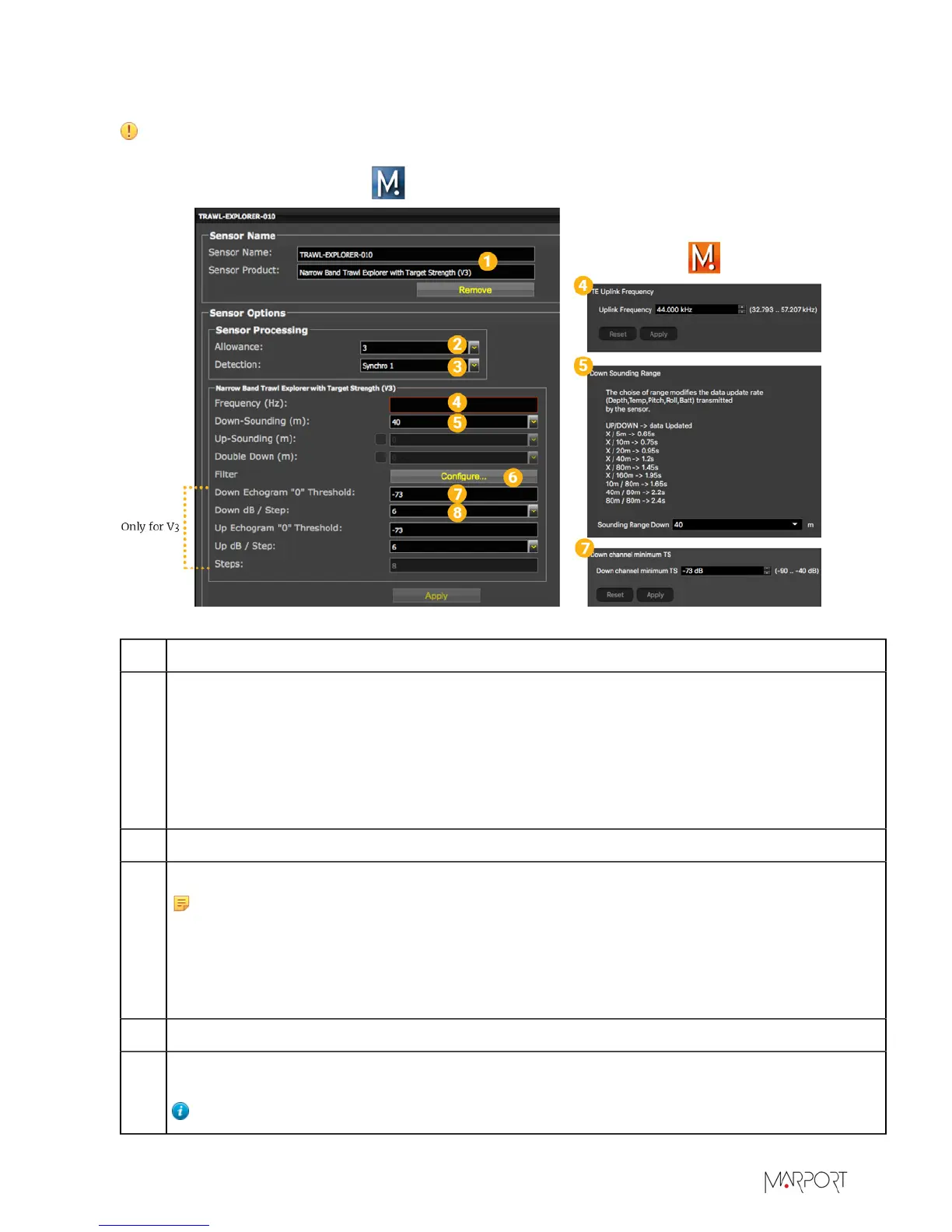
1 Sensor name displayed in Scala and its features.
2 This setting helps detecting the signal of the sensor among other sensor or echosounder
signals. Change default setting only if you have issues receiving data.
• 0-2: select only if no interferences on the vessel (not recommended).
• 3-4: default setting.
• 5-6: select if you have issues receiving data. It allows you to receive more data, but be
aware they might be wrong data.
3 This setting also helps detecting the sensor signal. Leave default setting at Synchro 1.
4
Enter the same frequency as the one entered for the uplink frequency in Mosa.
Note: The Trawl Explorer uses a 400 Hz bandwidth. When configuring other
sensors, there needs to be a 200 Hz margin before and a 400 Hz + 200 Hz margin
after the Trawl Explorer. So if the Trawl Explorer sensor is given the frequency
44000 Hz, the uplink frequency of the previous sensor has to be at 43800 Hz or
lower, and the uplink frequency of the sensor after has to be at 44600 Hz or higher.
5 Range of the sounding. Depends on soundings enabled.
6
Click Configure to change filters applied on incoming data. It is particularly useful to reduce
interferences on the echogram data.
Tip: Please refer to Scala user guide for more information about filters.
| 32


 To Next Page