Trawl Explorer | V2 | Sensor Configuration
Exporting Configuration Settings for Record Keeping
You can export the sensor configuration settings to a *.txt file.
Before you begin
• You have finished configuring the sensor.
• The sensor is connected to Mosa.
Procedure
1.
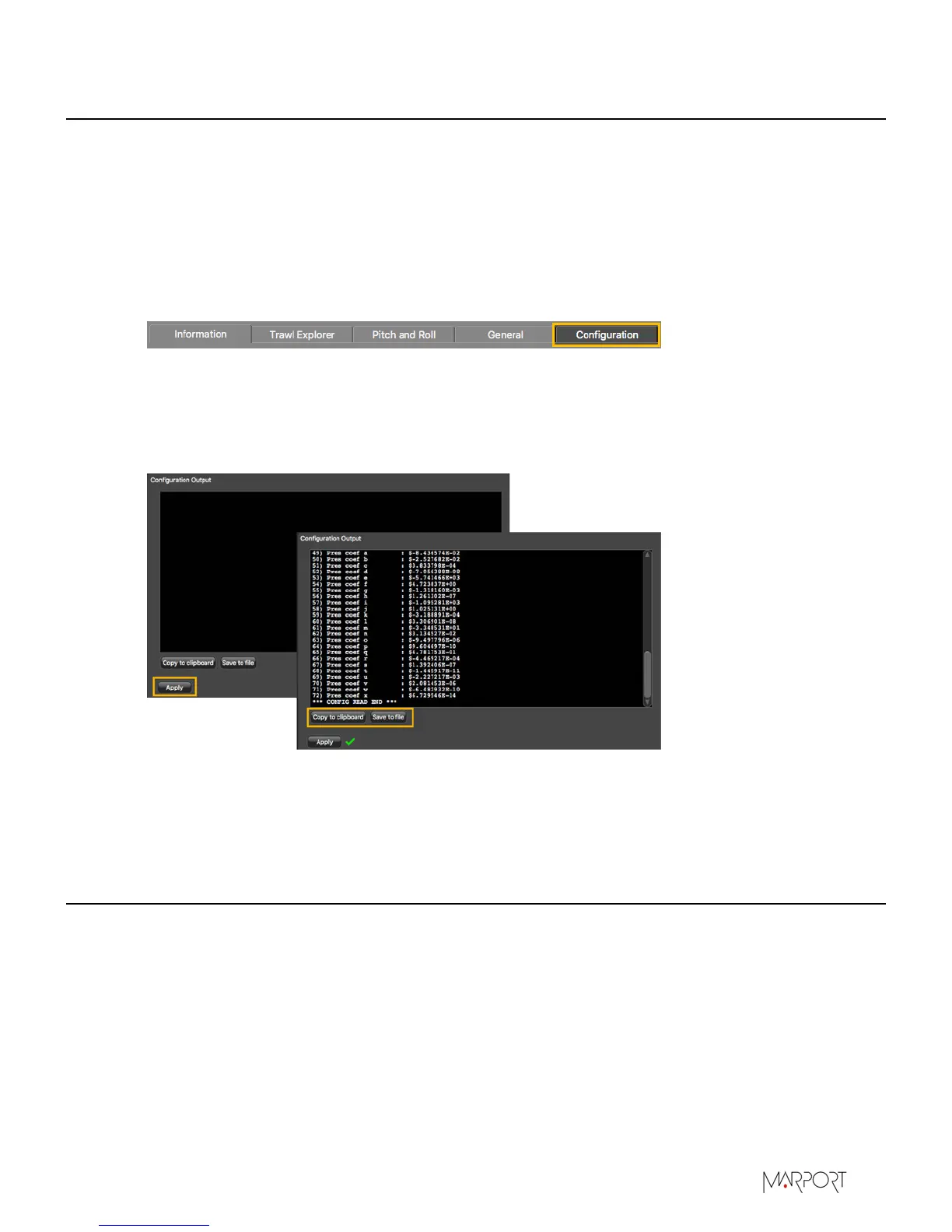
Click the tab Configuration.
2.
Click Configuration Output.
3.
Click Apply under the black area.
The settings are displayed.
4.
To save the settings:
•
Click Save to file to download the file on the computer.
•
Or, click Copy to clipboard, then press Cmd + V on a word processor like Pages to paste the
contents.
Exporting Sensor Configuration for Receiver
You can export the sensor settings you configured on Mosa on an XML file. You can afterward use
this file when adding the sensor to a receiver.
Before you begin
• You have finished configuring the sensor.
• The sensor is connected to Mosa.
| 26


 To Next Page