MasterclockGMRUserManualv2–2016.12
18
FactoryDefaults
FACTORY‐DEFAULTCONFIGURATION
TheGMRisfullytestedwithfactorydefaultspriortoshipping.Thisfactorydefaultconfigurationisdefinedas:
• UTCreferencetime(nolocaltimezoneoffsetanddaylightsavingautoadjustmentisdisabled)
• DHCPconfigurationmode–enabledfornetworkaddressandNTPServeraddresses
• NTPserverenabled,
NTPclientdisabled
• PTP(ifinstalled),End‐To‐Enddefaultprofile
• TimedisseminationviaReal‐TimeClock(RTC)duringreferenceoutagesenabledfor24hours
• DevicenamesettoGMR1000‐XX:XXorGMR5000‐XX:XX(whereXX:XXarethelasttwobits
oftheMACaddressofthe
unit)
• RelaySchedule–disabled.Thedefaultrelayactionistocloseuponlossofexternaltimereference(lossof
lock).
• PasswordforWinDiscovery–public
• PasswordforTelnet–public(Telnetisdisabledbydefault.)
• SSHCredentials–user:publicpassword:publicpass
RESETTOFACTORYDEFAULTS
Insomesituations,(suchasalostpasswordorremovalofconfidentialinformation,perhapspriortosendingthe
unitinforrepairservice),itmaybenecessarytoreturntheGMRtoitsfactorydefaultconfiguration.Thefactory
defaultsmayberestoredbyusingsoftware(WinDiscovery,SSHorTelnet)orby
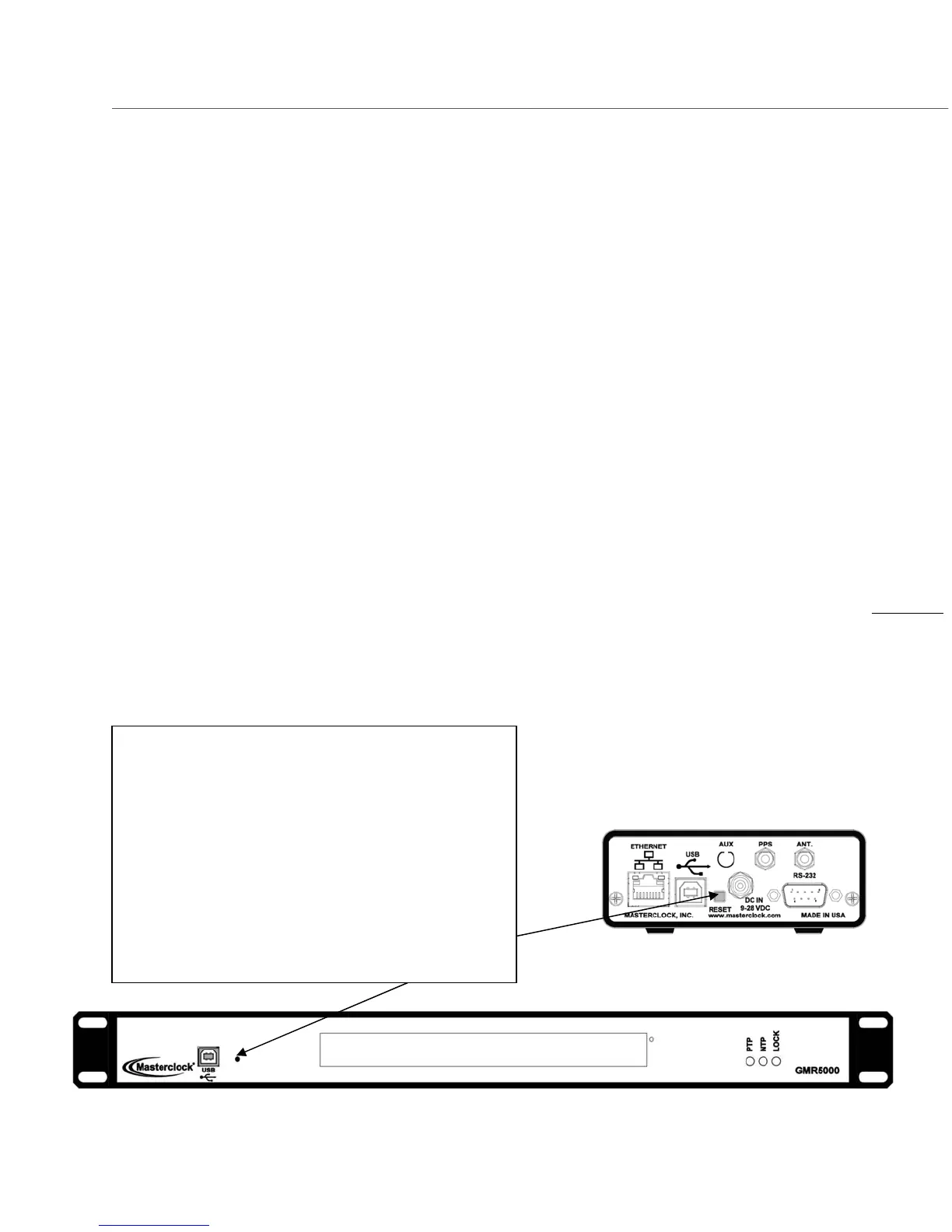
holdingdowntheresetbuttonon
thebackpanelofaGMR1000orthefrontofaGMR5000(seeillustrationatleft).Maintainpressureforatleast5
secondstoresettheunittofactorydefaults.
SettoFactoryDefaultButton
OntheGMR1000,arecessedbuttonlabeled“RESET”,
locatedonthebackoftheunitperformsthisfunction.
OntheGMR5000,theresetbuttonislocatedbehindthe
pinholetotherightoftheUSBportonthefrontoftheunit.
Toresetconfiguration
tofactorydefault:
1. Pressandholdthe“RESET”button.
2. Continuetopressthe“RESET”buttonuntilthe
unitreboots.



 To Next Page