MasterclockGMRUserManualv2–2016.12
23
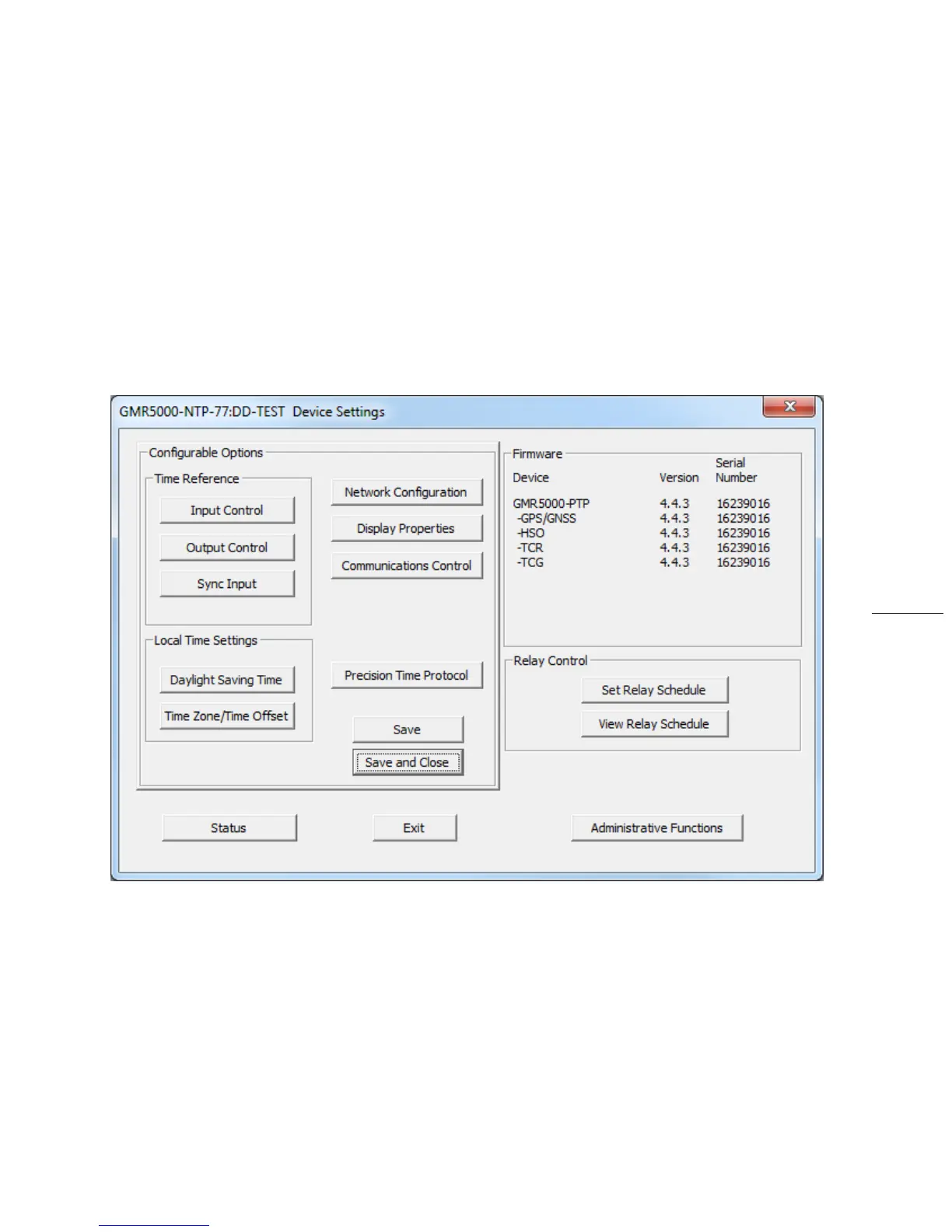
DEVICESETTINGS
ToopentheDeviceSettingspane,clickonthedevicename.
TheDeviceSettingswindowconfigurestheGMRtoreceiveanddisplayintheformatthatyouprefer,usingTime
ZoneoffsetsandDSTsettingstocompletelycustomizeitrelativetoUTCtime.
ThetoprightsectionoftheDeviceSettings
windowshowsalistofthefirmwareandoptionsassociatedwithyour
GMR.
TherestoftheDeviceSettingswindowincludesaccesstoallconfigurationoptionsforthenetwork.Theseinclude
timereferenceinputsandoutputs,displayproperties,relaycontrolandadministrativefunctions,suchas
password.Thereisalsoa
statusdisplaytomonitorremoteclocksanddevicesfromyourcomputerscreenusingthe
free,includedWinDiscoverysoftwareapplication.
Anychangesmadeinthiswindow,includingallthebuttonsthereon,willnotbeapplieduntilyouclicktheSave
button,ortheSaveandClosebutton,priortoclickingtheExit
button.



 To Next Page