MasterclockGMRUserManualv2–2016.12
34
DAYLIGHTSAVINGTIME
Daylightsavingstime(aka:“SummerTime”inEurope)adjustmentscanbeconfiguredseparatelyandinadditionto
aTimeZoneoffset.Daylighttimestandardsvarywidelythroughouttheworld.Traditionaldaylight/summertimeis
configuredasaone‐hourpositivebias.TheUS/CanadaDSTstandardis:one‐hourpositivebias,startingat
2:00am
onthesecondSundayinMarch,andendingat2:00amonthefirstSundayinNovember.IntheEuropeanUnion,
timechangesaredefinedrelativetotheUTCtimeofdayinsteadoflocaltimeofday(asinUS).
Toensureproperhands‐freeyear‐around
operation,theautomaticdaylighttimeadjustmentsmustbeconfigured
usingtheDaylightSavingsTimeOptionandnotwiththeTimeZoneoffsetoption.Factorydefault:DaylightSavings
timeisnotset.
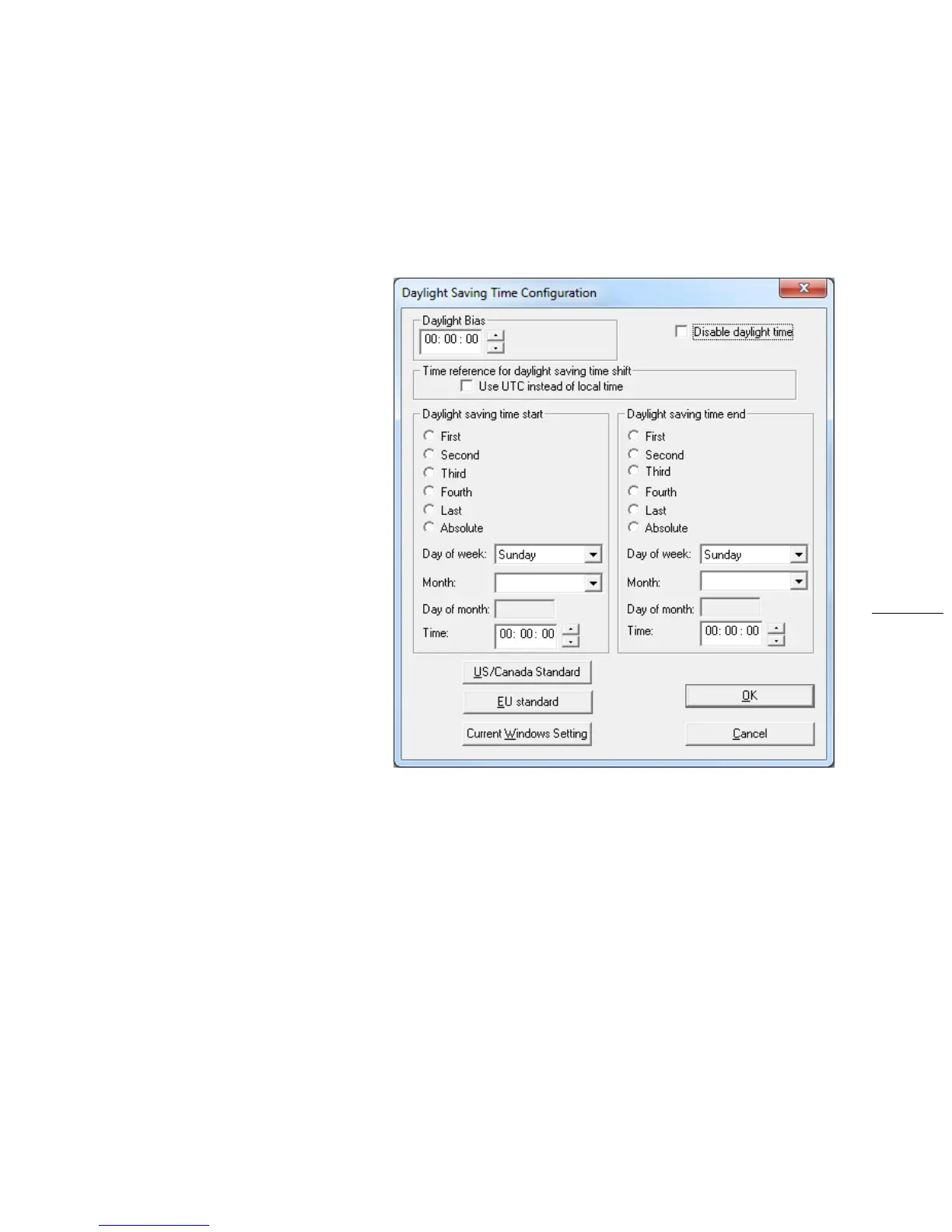
ClickDaylightSavingTimetoopenthis
window.Theclockhascompleteflexibility
todisplayanyTimeZoneand
DST
combination.
ForsettingtheDSTrules,useoneofthe
followingoptions.
1. ManuallyentertheDaylightSaving
Timerules;or
2. ClicktheUS/CanadaStandard
button;or
3. ClicktheEUStandard(European
Union)button;or
4. ClickCurrentWindowsSettingto
applythecurrentconfigurationfor
yourWindows
OS.
5. ClickOKtoclosetheWindow.
TheDSTruleswillbesavedwhenyouclick
eithertheSaveorSaveandClosebutton
ontheDeviceSettingswindow.
TIMEZONE/TIMEOFFSET
Atimezoneoffset(orbias)canbeprovidedtoadjustthetimefordisplayortimeoutputpurposes.Abiascanbe
setasapositive(+)ornegative(‐)valuewitharesolutionofonesecond.Factorydefault:Nooffset=UTCtime.
ClicktheTimeZone/TimeOffset
buttontoopenthe“TimeZoneConfiguration”window.Hereyou’llfindalistof
TimeZones,includingcityandareadescriptionstohelpwiththeselection.Selecttheoffsetthatfitsyourlocation
andclickOKtoclosethewindow.ClicktheSaveorSaveandClosebuttonon
theDeviceSettingswindow.
RELAYCONTROL
SetascheduleofrelayswitcheventswiththeSetRelaySchedulebutton.Onceaschedulehasbeenappliedtothe
GMR,thecurrentrelayscheduleinformationcanberetrievedtovalidatetheentrywasmadecorrectlyandthe
scheduleisactivebyusingtheViewRelaySchedulebutton.Clickthe
SaveorSaveandClosebuttonontheDevice
Settingswindow.



 To Next Page