Matica Lamination Module MC-L2 User Manual
31
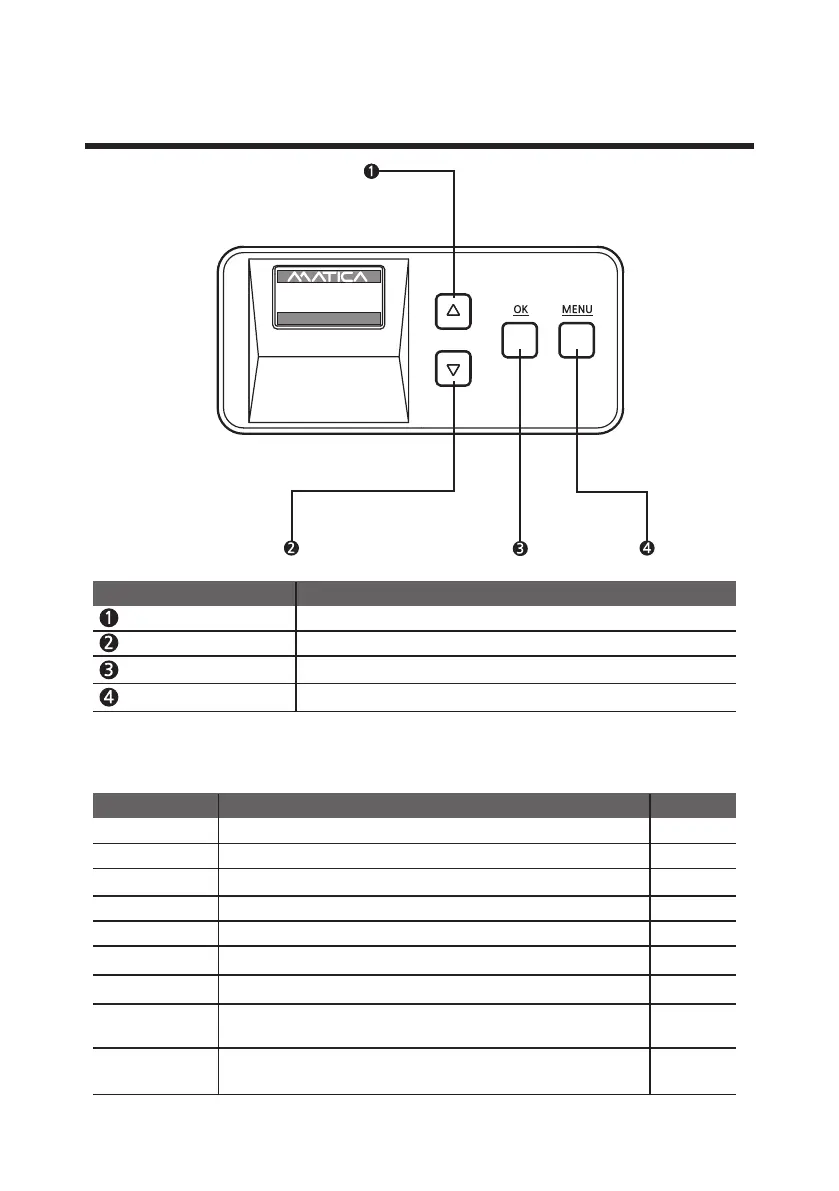
Button Control & Menu
-Buttons
Menu Navigation (Up)
Increase the value or navigate the menu.
Menu Navigation (Down)
Decrease the value or navigate the menu.
OK
Used to set the value or issue the card.
Menu
Used to enter or exit the menu or to cancel the lamination during issuance.
Name Description
Initialize When device is connected to power, checks status of each module.
Ready
Ready for lamination.
Rib Check Check status of card lamination lm, information.
Warm up Show "Warm up" sign before lamination heating roller gets set.
-Description on Laminator Status on LCD
Laminating
During the card lamination.
W10/Ready
Ready for laminati
on, but remain quantity of film is less tha 40 cards.n
Insert Card
W
hen card is being inserted from card input hopper to Laminator.
Status on LCD 3rd line
Description
Note
The lm life is reduced to 40 cards or less, or requires cleaning
inside of Laminator.
W11
Clean Lam
The laminator needs to be cleaned inside.
W30
Clean Lam
UP 500 / LO 500
W30 / READY
2019.07.29(V0XX)


 To Next Page