ⓒ2021 Matica Technologies Group. All rights reserved
54
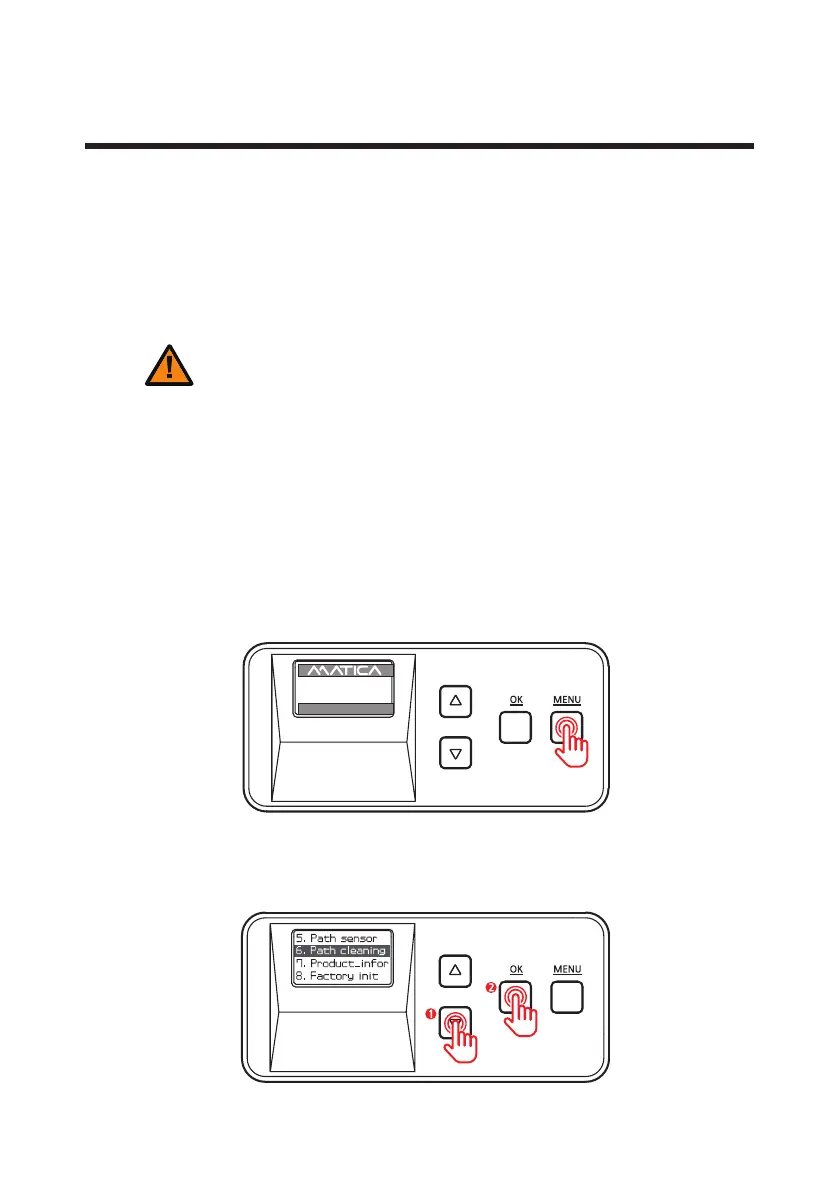
1. Press ‘MENU’ to enter the menu mode.
-Clean Roller Using Cleaning Card
It is recommended to clean the laminator using the cleaning card every month
or each time 500 cards are laminated in order to maintain quality and prevent
damage to the important parts.
2. Press the menu navigation button to select ‘6. Path cleaning’ and press ‘OK’ .
D
o not use any liquid / gel containing a high content of alcohol or solvent
Caution
c
lean the laminator as it may cause discoloration or ssure on its surface.
Clean the Laminator
-C
lean the Exterior
- Make sure to turn off the laminator and unplug the power
cable before cleaning it with a soft cloth slightly dampened
with water.
- Do not allow any liquid to drip inside the product.
- Make sure that the laminator is dry before turning it on.
UP 500 / LO 500
W30 / READY
2019.07.29(V0XX)


 To Next Page