Matica Lamination Module MC-L2 User Manual
39
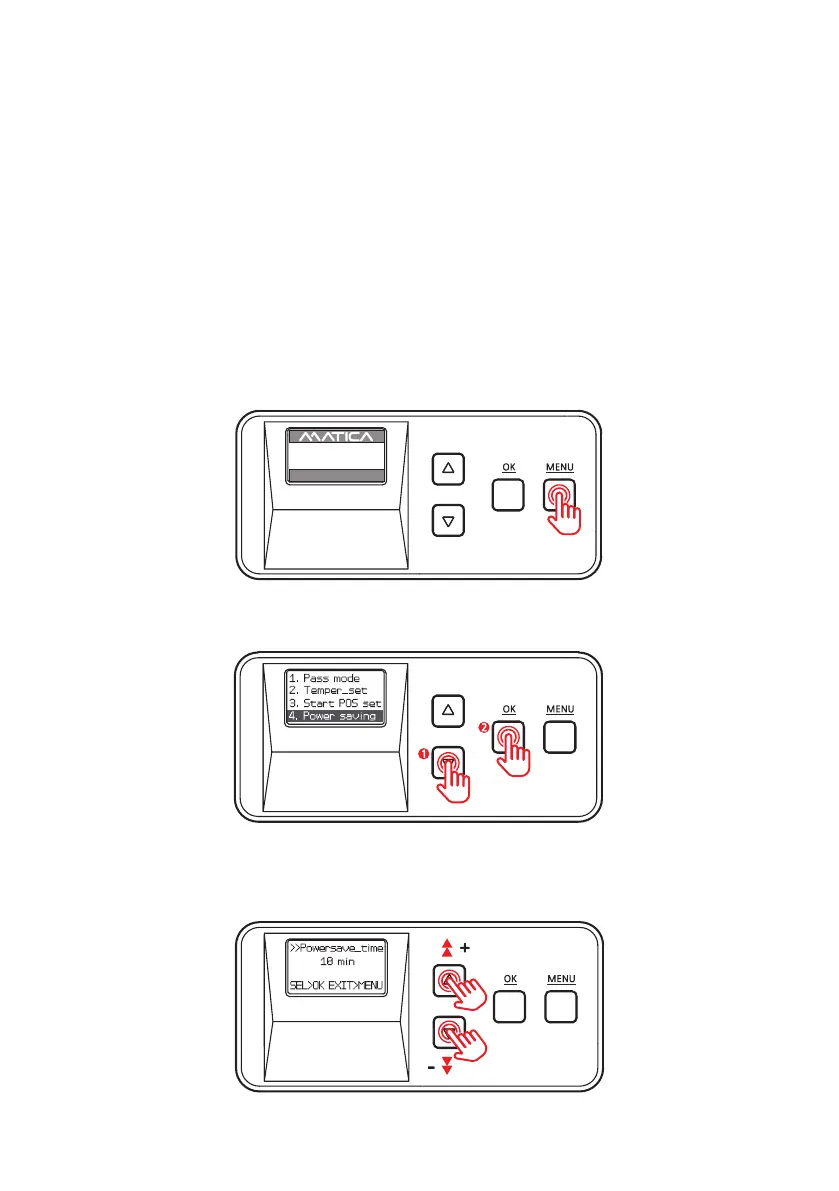
1. Press ‘MENU’ to enter the menu mode.
-Power Saving Mode
Function :
It limits unnecessary heating while the device's inactive for long time usage of
spare parts and reduce power consumption.
The system turns o if it is inactive for a set duration of time. It can be set
between 5 and 60 minutes +/- increments of 5 minutes.
2. Press the Menu Navigation Button to select ‘4. Power saving’ and press ‘OK’ .
3. Use the Menu Navigation Button to set the power saving mode.
(It can be set between 5 and 60 minutes +/- increments of 5 minutes.)
ex) If you set 10 minute for Power Saving Mode, the device starts power saving mode
10 minutes after last card lamination.
But after Power Saving Mode, NL200 may needs 'Warm Up' up to 40~60 sec before usage.
UP 500 / LO 500
W30 / READY
2019.07.29(V0XX)


 To Next Page