Matica Lamination Module MC-L2 User Manual
37
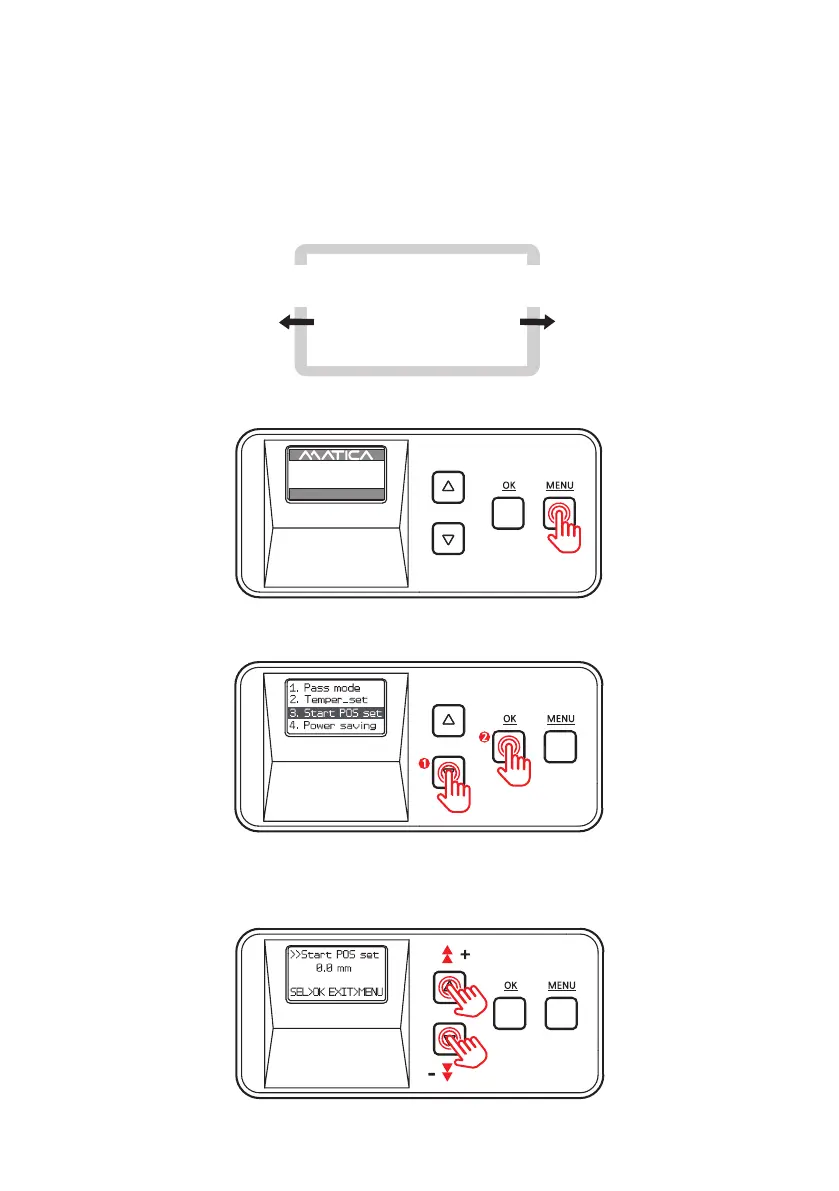
1. Press ‘MENU’ to enter the menu mode.
-Film Position (Start POS set)
Function :
Set the position of lm and card for lamination.
- It can be set between -1.0mm ~+1.5mm +/- increments of 0.1mm.
From the direction of inserting the card, it moves back by ‘– (L)‘ value and
forward by ‘+(R)’.
2. Press the Menu Navigation Button to select ‘3. Start POS set’ and press ‘OK’ .
3. Use the Menu Navigation Button to adjust the position to laminate.
(It can be set between -1.0mm ~+1.5mm +/- increments of 0.1mm.)
As -(L) is getting up, the lm will
be moved to the left.
As +(R) is getting up, the lm will
be moved to the right.
the direction of -(L) value the direction of +(R) value
UP 500 / LO 500
W30 / READY
2019.07.29(V0XX)


 To Next Page