Matica Lamination Module MC-L2 User Manual
35
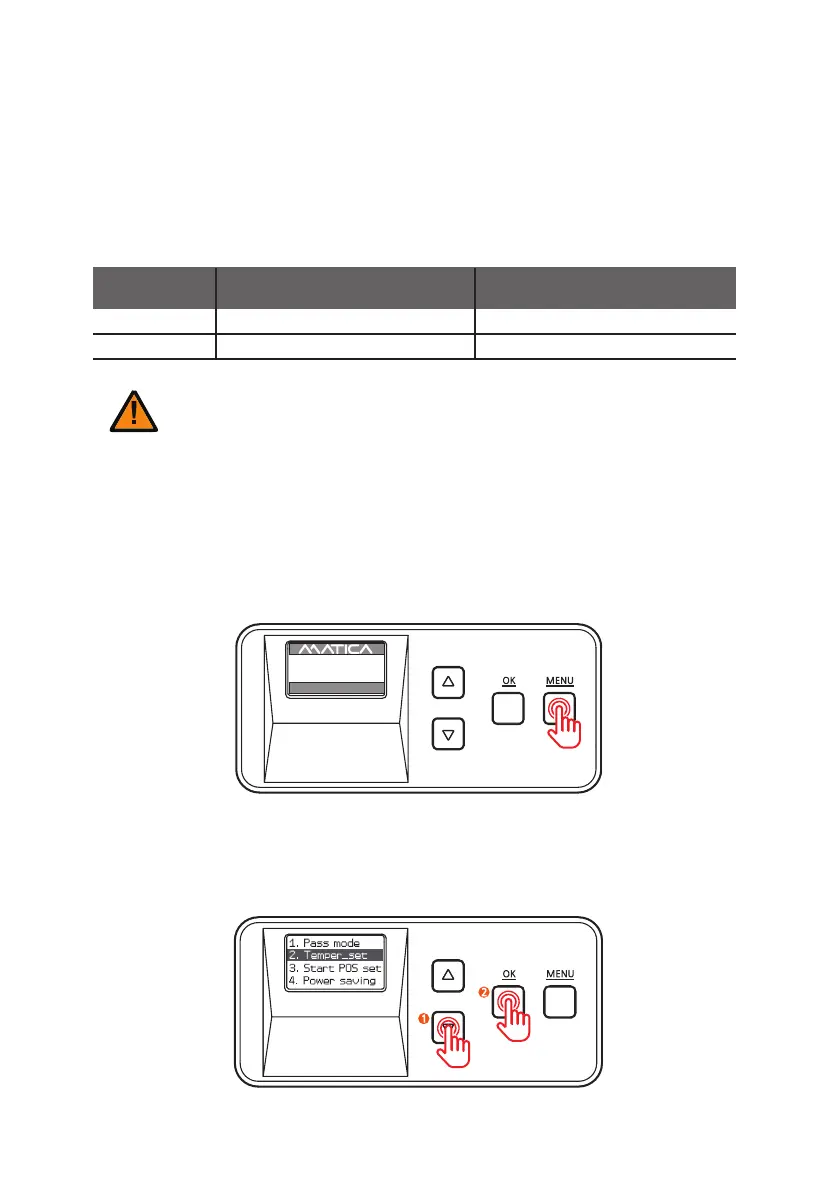
1. Press ‘MENU’ to enter the menu mode.
-Lamination Temperature (Temper_set)
Function:
S
et the lamination temperature.
It should be differently set according to the type of film, pass mode and card stock.
You can set the temperature between 120°C and 185°C (248°F and 365°F)
+/- increments of 5°C (9°F)
2. Press the menu navigation button to select ‘2. Temper_set’ and press ‘OK’ .
Clear (1.0mil)
160°C - 175°C (320°F - 347°F)
Hologram (1.0 mil)
Film type
Range of recommended temperature
for dual sided lamination
Range of recommended
temperature for single sided lamination
160°C - 175°C (320°F - 347°F)
170°C - 180°C (338°F - 356°F)
170°C - 180°C (338°F - 356°F)
- The laminated lm may be easily separated if the lamination temperature is lower than the recommended temperature.
Caution
- Card jam error or card bending issue can be occurred if the lamination temperature is higher than the recommended
temperature.
UP 500 / LO 500
W30 / READY
2019.07.29(V0XX)


 To Next Page