1-4
User Guide
MC310 USER GUIDE I 2-6
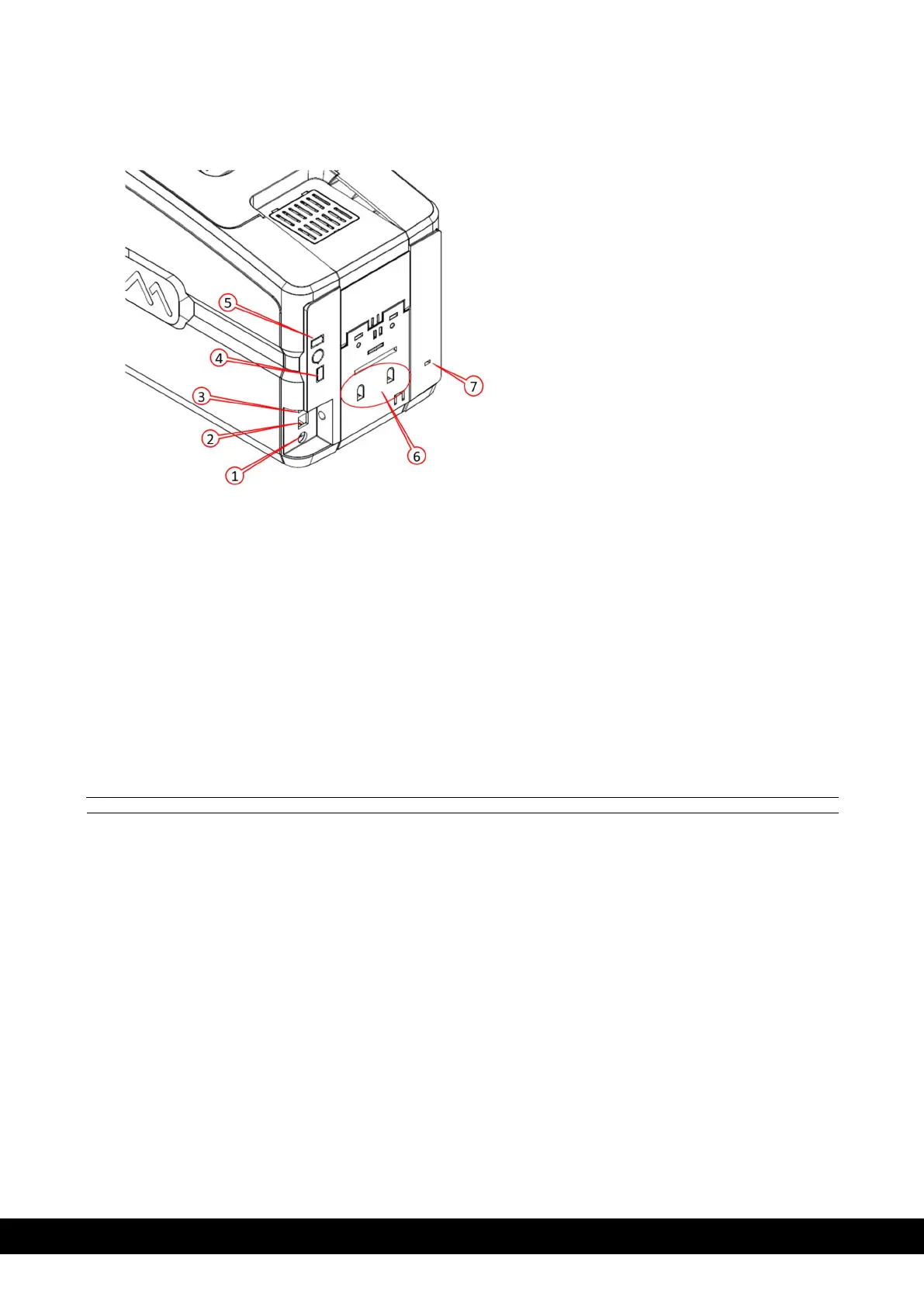
2.2.3 Rear View
The following components are located on the back panel:
1)
Power cord socket
2)
USB 2.0. Female B type. Host socket
3)
Ethernet connector with traffic LED
4)
USB 2.0 Port – No.1
5)
USB 2.0 Port – No.2
6)
Rejection bin fixing slot
7)
Kensington lock
2.2.4 Power Supply
The printer comes with an external auto-switching power supply.
Note: Only use the power supply provided with the printer.
2.2.5 Plastic Cards
Listed below are the plastic card specifications:
Type: PVC, PVC Composite, PET, ABS (varnished), PC, Re-printable cards
Dimensions: ISO CR80 - ISO 7810 (53.98 x 85.60)
Thickness: 0.25 to 1.25 mm (10 to 50 mil) manual gauge adjustment
Magnetic stripe: ISO 7811
Smart Card Contact: ISO 7816-1,2,3,4
Smart Card Contactless: ISO 14443A/B.



 To Next Page