4-4
User Guide
MC310 USER GUIDE I 5-18
5.1.1.5 Mag encoding setting & mag encoding tool tab
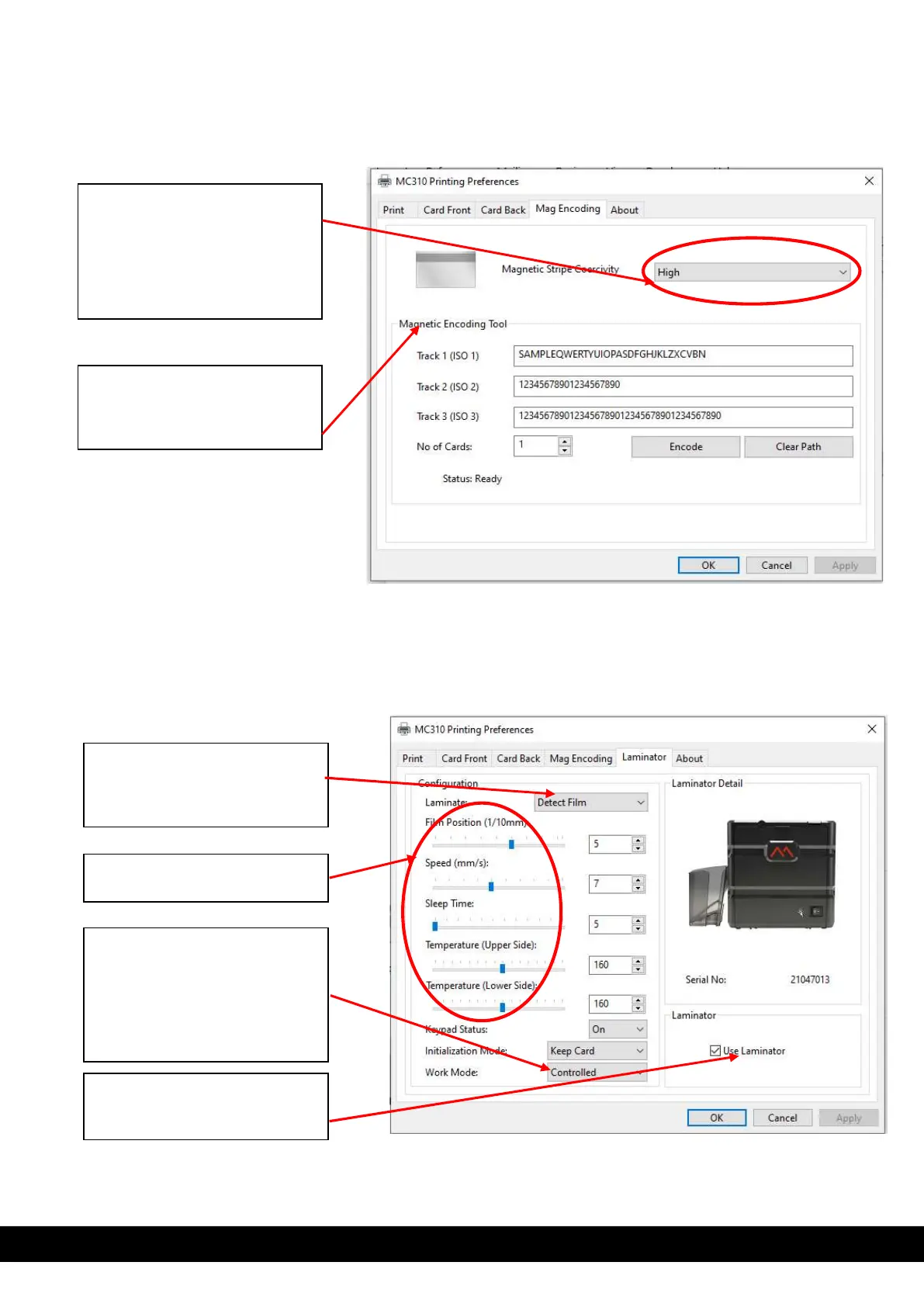
Mag encoding setting tab will be available for printer assembled with mag encoder.
5.1.1.6 Laminator:
XPS driver show laminator tab for Printer connected with inline MC-L2 laminator & User can select the
laminator options.
**Note: To use Laminator inline with MC310 printer, user need to select output card path as rear outbin.
Magnetic stripe coercivity
setting: Based on the type of
magnetic stripe card coercivity,
using this option the user must
select the coercivity from drop
down menu & click Ok.
Magnetic Encoding Tool:
Standalone tool provided to
encode mag encoding stripe
card.
Drop down menu for lamination
option like, detect film, upper
side, lower side, pass through &
both side.
Laminator parameter
Work mode: it has controlled &
standalone.
With controlled mode
lamination parameter are
controlled through XPS driver.
It should be set to
Need tick use laminator option
to use laminator inline with
MC310.



 To Next Page