5.1.1.3
Card back Setting tab
5.1.1.4
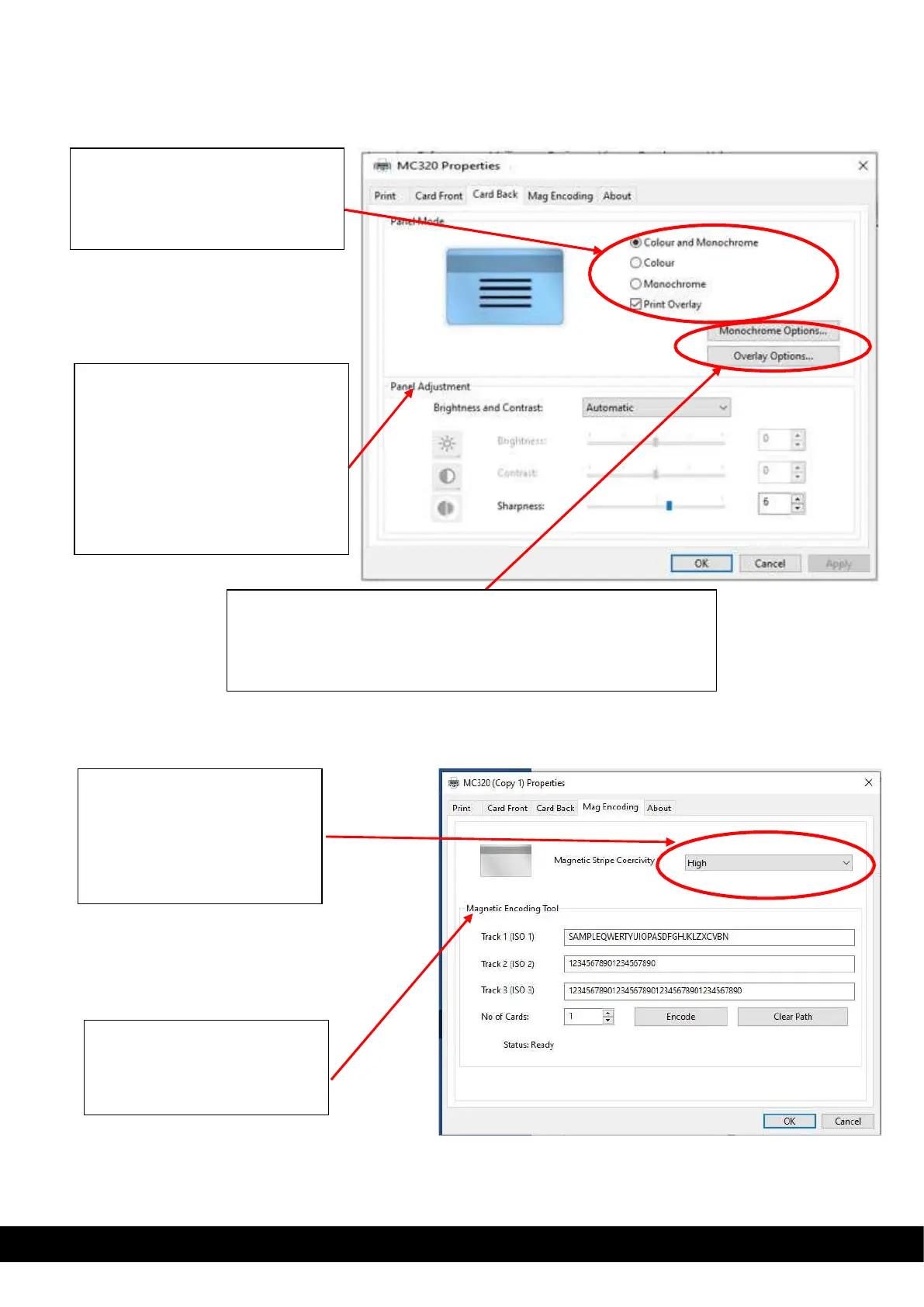
Mag encoding setting & mag encoding tool tab
Mag encoding setting tab will be available for printer assembled with mag encoder.
Monochrome option: This option allows the user to set the contrast,
Half tone for monochrome panel and Resin area Extraction.
Overlay option: This option allows the user to set contrast for
overlay panel and overlay area setting.
Panel Adjustment: using this option
the user can select Automatic &
manual setting of Brightness,
Contrast & Sharpness.
Automatic: Default setting available.
Manual: By selecting this option the
user can vary the brightness
contrast & sharpness, based on the
print image requirement.
Panel Mode setting: based on type
of ribbon added inside the printer for
printing, the user allowed set color,
monochrome & overlay option for
back side printing on card.
Magnetic Encoding Tool :
Standalone tool provided to
encode mag encoding stripe
card.
Magnetic stripe coercivity
setting: Based on the type of
magnetic stripe card coercivity,
using this option the user must
select the coercivity from drop
down menu & click Ok.



 To Next Page