113
QM00991-1
Troubleshooting
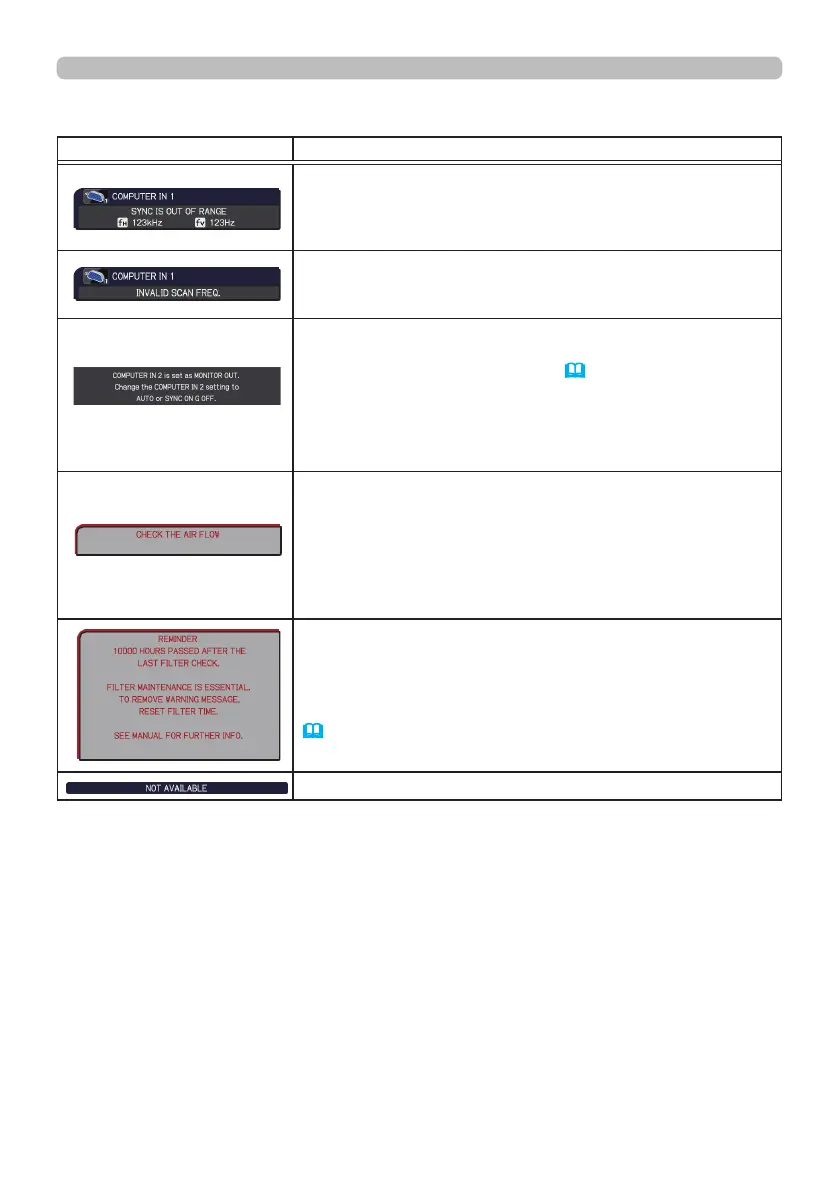
Message Description
The horizontal or vertical frequency of the input signal is
not within the specied range.
Please conrm the specs for your projector or the signal
source specs.
An improper signal is input.
Please conrm the specs for your projector or the signal
source specs.
The COMPUTER IN2/MONITOR OUT port is selected
as the picture input source even though MONITOR OUT
is selected for COMPUTER IN2(
60).
Select AUTO or SYNC ON G OFF in the dialog to project
the picture input to the COMPUTER IN2/MONITOR OUT
port. In this case, you cannot use the MONITOR OUT
function. Otherwise select other port for picture input.
The internal temperature is rising.
Please turn the power o, and allow the projector to cool
down at least 20 minutes. After having conrmed the
following items, please turn the power ON again.
• Is there blockage of the air passage aperture?
• Is the air lter dirty?
• Does the peripheral temperature exceed 40°C?
A note of precaution when cleaning the air lter.
Please immediately turn the power o, and clean or change
the air lter referring to the “Cleaning and replacing the
air lter” section of this manual. After you have cleaned or
changed the air lter, please be sure to reset the lter time
(
64, 109).
The button operation is not available.
Related messages (continued)



 To Next Page