34
QM00991-1
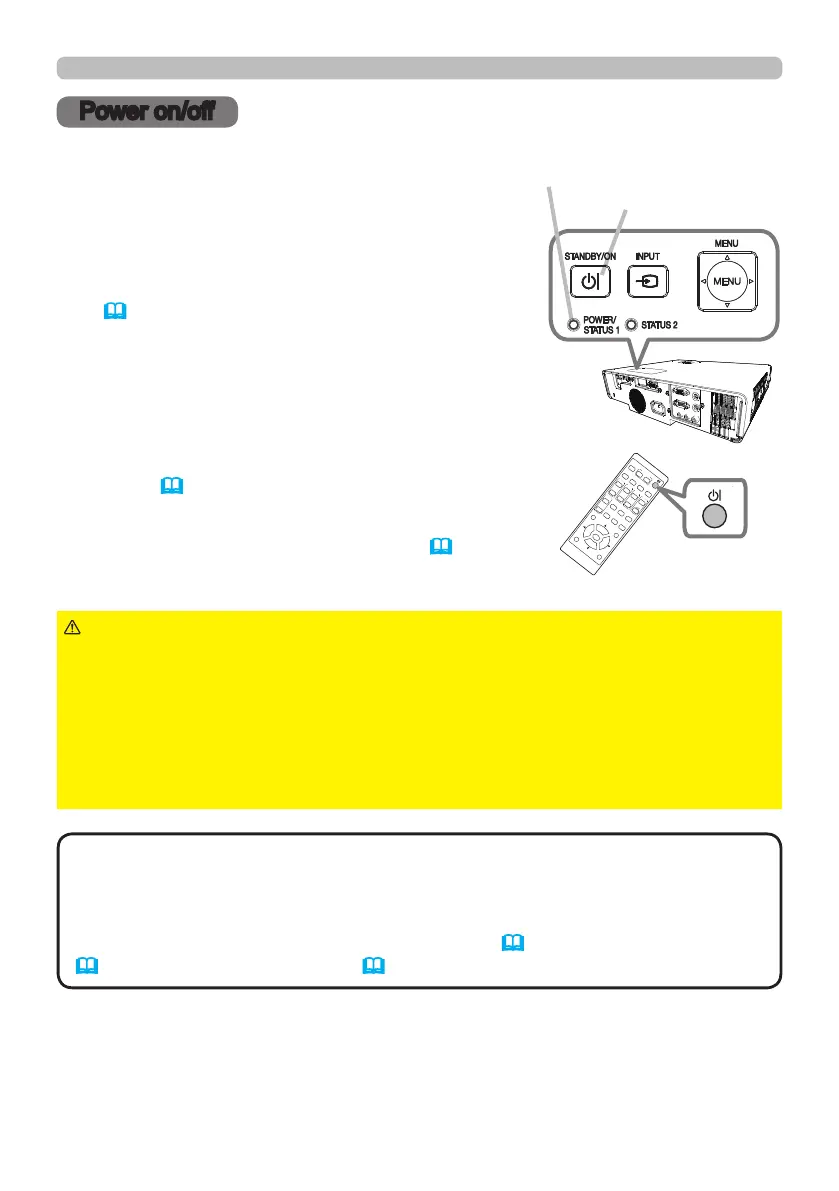
1.
Make sure that the power cord is rmly
and correctly connected to the projector
and the outlet.
Turning on the power
2.
Make sure that the POWER/STATUS1
indicator is lighted in steady orange
(114). Then remove the lens cover.
3.
Press the STANDBY/ON button on the projector
or the remote control.
The projection light source will light up, and the
POWER/STATUS1 indicator will begin blinking
green. When the power is completely on, the
indicator will stop blinking and light in steady
green (114).
Power on/o
To display the picture, select an input signal according
to the section Selecting an input signal (37).
Power on/off
STANDBY/ON
button
ASPECT
BLANK
ESC MENU
RESET
AUTO
PAGE
DOWN
ON
OFF
FREEZE
UP
ENTER
FOCUS
-
+
ZOOM
-
+
INPUT
INTERACTIVE
MYBUTTON
1 2
PbyP
MAGNIFY
VOLUME
-
+
GEOMETRY PICTURE MUTE
NETWORK
OSD MSG
ASPECT
BLANK
ESC MENU
RESET
AUTO
PAGE
DOWN
ON
OFF
FREEZE
UP
ENTER
FOCUS
-
+
ZOOM
-
+
INPUT
INTERACTIVE
MYBUTTON
1 2
PbyP
MAGNIFY
VOLUME
-
+
GEOMETRY PICTURE MUTE
NETWORK
OSD MSG
STANDBY/ON button
POWER/STATUS1 indicator
►A strong light is emitted when the projector’s power is on.
Do not look into the lens of the projector or look inside of the projector through
any of the projector’s openings since the projection ray may cause a trouble on
your eyes.
►Keep any object away from concentrated projection light beam. Blocking the
beam by something causes high temperature and could result in re or smoke.
►Do not touch around the exhaust vents during use or just after use, since it is
too hot.
WARNING
• Please power on the projector prior to the connected devices. Do not
turn on or o the projector while connected to a device in operation, unless that
is directed in the manual of the device.
• This projector has the function that can make the projector automatically turn
on/o. Please refer to the DIRECT POWER ON (76), AUTO POWER ON
(76) and AUTO POWER OFF (77) items of the OPTION menu.
NOTE



 To Next Page