108
QM00991-1
Maintenance
Maintenance
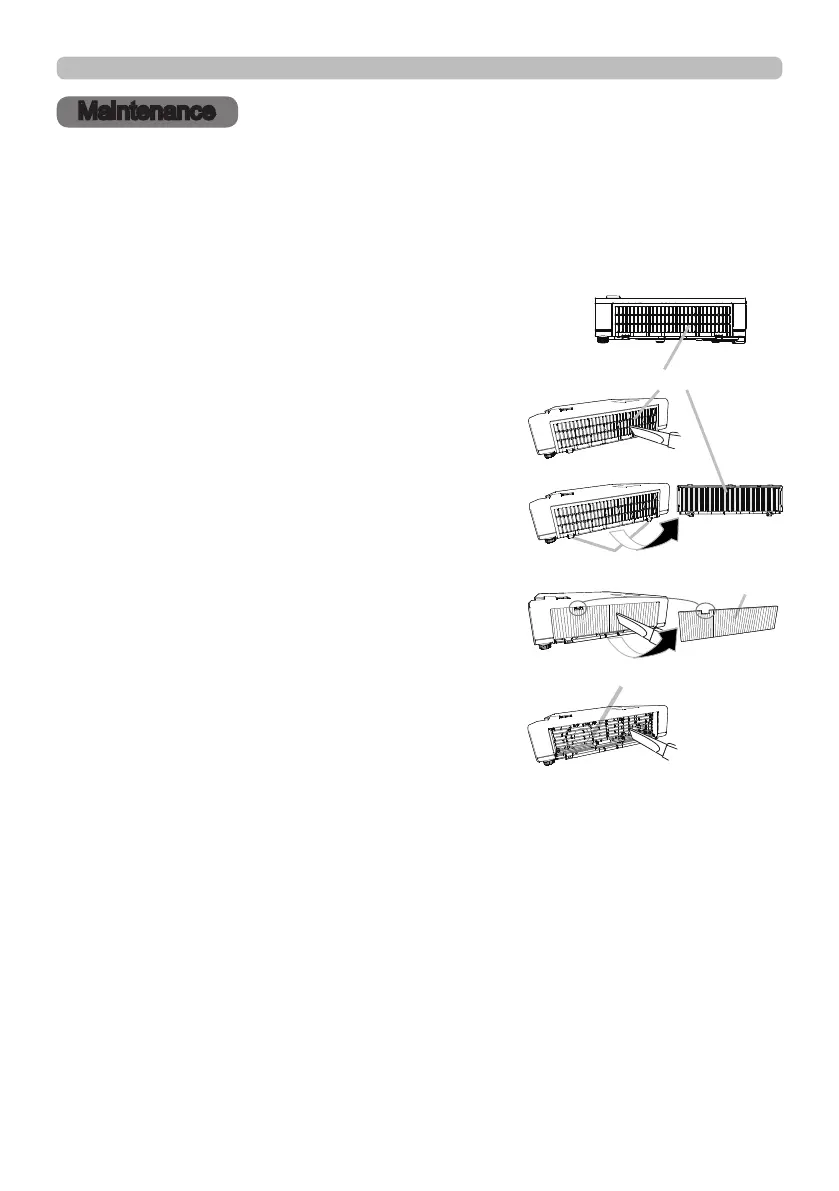
Cleaning and replacing the air lter
Check and clean the air lter periodically. When the indicators or a message
prompts you to clean the air lter, comply with it as soon as possible. The lter unit
is attached to inner side of the lter cover. If a lter of the lter unit is damaged or
heavily soiled, replace the whole unit with a new one.
1.
Turn the projector o, and unplug the power
cord. Allow the projector to suciently cool
down.
2.
Use a vacuum cleaner on and around the lter
cover.
3.
Pick and pull up the lter cover knobs to take it
o.
4.
Use a vacuum cleaner for the lter, and take
the lter o.
5.
Use a vacuum cleaner for the lter vent of the
projector.
6.
Use a vacuum cleaner for each part of the lter.
If any part of the lter is damaged or heavily
soiled, replace the whole unit with a new one.
To purchase the new lter unit, inform your
dealer
of the type number as follow.
UX44211
7.
Put the lter back in an upright state into the projector.
8.
Put the lter cover back into the place.
(continued on next page)
Filter cover
Filter cover knobs
2
3
4
5
Filter vent
Filter



 To Next Page